Compare Clash Royale gift cards against direct top-ups. Discover the real costs, checkout speed, Pass Royale access, and mistake recovery options.
Buying Gems or grabbing the latest Pass Royale once meant running to a retail rack, buying a plastic Apple or Google Play card, and scratching off the silver foil. Web-based direct recharges and digital codes have replaced that routine.
Both options fund your account, but they differ sharply on checkout speed, bonus currency, security, and refund paths if you mistype your information.
Clash Royale Direct Top Up vs Gift Card Mechanics
App Store and Google Play cards load credit directly to an operating system wallet. Once you redeem the 16-character voucher code, you launch the game and complete an in-app transaction through Apple or Google, which historically claim a 30% developer cut.
Direct web purchases bypass mobile operating system billing entirely. Because developers and recharge platforms avoid those platform cuts, they can pass the savings to players through bonus gems, bundle extras, or lower baseline prices.
Regional pricing creates another split. Supercell regularly recalculates in-game store prices against tax adjustments and foreign exchange shifts. Historical adjustments include tax jumps up to 26% (often landing at 5%, 13%, 18%, or 23%) alongside exchange-rate reductions of 15% to 20%.
Platform gift cards lock your funds to a single country and currency. Direct web portals display actual currency rates upfront, avoiding stranded balance fragments. To compare current rates without voucher redemption steps, check secure Clash Royale direct top-up options.

6000 Grumpy Medals
 6000 Grumpy MedalsUSD 16.12Buy Now
2600 Grumpy Medals
2600 Grumpy MedalsUSD 8.06Buy Now750 Grumpy Medals
750 Grumpy MedalsUSD 2.41Buy Now14000Gems
14000GemsUSD 80.63Buy Now6500Gems
6500GemsUSD 40.31Buy Now2500Gems
2500GemsUSD 16.12Buy Now1200Gems
1200GemsUSD 8.06Buy Now500Gems
500GemsUSD 4.02Buy Now80Gems
80GemsUSD 0.80Buy NowGold Pass
Gold PassUSD 5.64Buy NowEvent Pass
Event PassUSD 4.02Buy Now
Bonus Gems and Pass Royale Compatibility
Platform cards follow rigid math: a $10 card gives you $10 of credit. Buy an in-game pack, and you often end up with an unspendable $0.40 sitting in your wallet.
Web checkouts handle loyalty differently. The official Supercell Store runs 24-hour rotating offers, bonus gem thresholds, Supercell ID Rewards loyalty points, and season-over-season stamp cards.
| Purchase Channel | Payment Method & Scope | Core Advantages | Major Limitations |
|---|---|---|---|
| Platform Gift Card (Apple / Google Play) | In-app billing via redeemed wallet balance | Usable across any app; works with parental controls | Subject to 30% platform cut; leaves stranded loose change |
| Official Supercell Web Store | Direct checkout via Supercell ID | Grants loyalty points, pass stamp cards, and 24-hour specials | Requires linked Supercell ID; non-refundable upon delivery |
| Online Direct Top-Up | Digital voucher or Player Tag web order | Flexible pricing; listings start around $1.63 on digital aggregators | Platform requirements vary; non-refundable once credited |
Takeaway: Direct web channels avoid app store transaction fees and offer structured bonus programs, while standard gift cards lock your funds into closed ecosystem balances.
Google Play gift cards still work for Pass Royale. You redeem the balance to your store account, open Clash Royale, and purchase the pass in-app. Web top-ups streamline this by sending the Pass straight to your Player Tag or Supercell ID inventory, where you can hold it until your preferred season launches.
Clash Royale Gem Delivery Time and Friction
Checkout speed comes down to how many verification steps stand between your money and your in-game balance.
Redeeming a platform gift card takes five distinct steps: 1. Open the App Store or Google Play Store. 2. Manually enter or scan a long alphanumeric code. 3. Confirm platform wallet redemption. 4. Launch Clash Royale. 5. Authenticate via biometric scan or account password to confirm the in-app purchase.
Direct Player Tag top-up requires only the public tag found under your username on your profile screen. Paste the tag into the store, select your gem bundle, and check out. Gems show up automatically once payment clears.
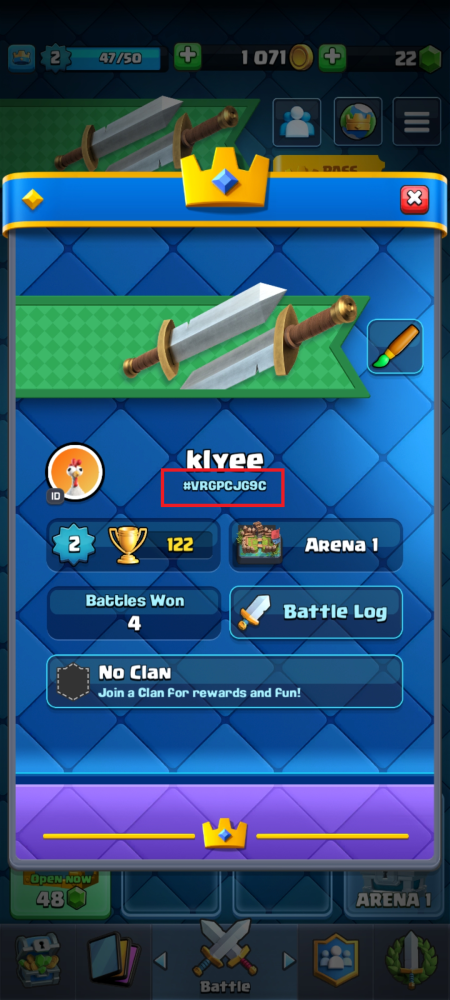
Watch out for storefronts posing as direct top-ups that ask for your Supercell ID email and a 6-digit login code. Those listings require full account access. Safe recharges require only your public Player Tag.
To bypass manual code entries on your phone, you can grab your Clash Royale gems instantly using direct tag entry.
What Happens When You Mistype? Refund and Error Policies
Input errors trigger radically different outcomes depending on the platform you choose.
Mistyping an App Store or Google Play voucher simply generates an "Invalid Code" message, keeping the funds locked to the unredeemed card. However, redeeming the card to the wrong email account makes transferring the balance nearly impossible.
Entering the wrong Player Tag on a direct top-up carries harsher consequences. If that tag belongs to an active player, the gems credit immediately. Supercell's digital terms state that all digital currency purchases are final, forfeiting statutory withdrawal rights upon electronic fulfillment. Once delivered, virtual currency cannot be refunded or transferred.
| Error Scenario | Platform Gift Card Outcome | Direct Top-Up / Web Shop Outcome | | :--- | :--- | :--- | :--- | | Typo during code/ID input | Code fails validation; funds stay safe on voucher | If tag is valid, gems deliver to wrong account immediately (no refund) | | Accidental delivery / Buyer regret | Non-refundable once spent on in-game digital goods | Strictly non-refundable upon immediate electronic delivery | | Regional currency mismatch | Card is region-locked; cannot be redeemed to foreign account | Web storefronts adjust rates to match regional tax (up to 26%) and FX | | Third-party marketplace dispute | Subject to platform store balance terms | Some digital marketplaces offer 14-day buyer insurance on vouchers |
Takeaway: Platform gift cards offer error buffers prior to redemption, whereas digital currency delivered to a valid Player Tag is permanent and strictly non-refundable.
Third-party marketplace escrow systems may offer 14-day buyer insurance, but this coverage applies solely to invalid voucher codes—never to player tag mistypes.
Spender Profiles: Which Buying Route Fits Your Playstyle?
Your purchasing pattern dictates the most cost-effective checkout method.
The Free-to-Play & Occasional Spender
Targeted gem purchases make the most sense for players who only buy an occasional emote or challenge entry. Fixed $15 or $25 gift cards force you to deposit excess cash. Direct top-ups let you buy exact amounts—like an 80-gem or 500-gem pack—without leaving leftover funds in your mobile wallet.
The Season Pass Subscriber
Recurring Pass Royale buyers benefit most from web-based inventory storage and Supercell Store stamp cards. These loyalty perks accumulate across seasons, protect against local app store tax adjustments, and let you bank passes until a season's rewards fit your deck upgrade priorities.
The Heavy Spender & Clan War Leader
High-volume gem buyers seeking card evolutions and Legendary King's Chests should rely on direct web top-ups. Skipping the 30% platform fee unlocks superior bulk rates and bundle extras that platform vouchers cannot match.
Account Security: Player Tag vs Account Credentials
Account security separates legitimate recharge services from account-sharing scams. A safe top-up requires only public account identifiers.
What a Safe Top-Up Requires
- Your Player Tag: A string starting with a hash (e.g., #XXXXXX) visible on your profile.
- Your In-Game Name: Used purely to verify the tag matches the right account before dispatching the order.
- No Password: Legitimate direct recharges never require direct access to your game client.
What You Must Never Provide
- Supercell ID Email Logins: Any platform asking for your email address to log into your account directly violates game terms.
- 6-Digit Verification Codes: If a seller asks you to forward a one-time password (OTP) sent to your inbox, they are logging into your account from an external device.
- Account Passwords: Never surrender your Google, Apple, or Supercell account passwords to third-party top-up sellers.
To avoid voucher friction safely, you can top up Clash Royale gems and passes using only your public player tag.
The Verdict on Clash Royale Recharges
Platform gift cards work, but they carry friction: leftover wallet balances, regional currency locks, and multi-step app store redemptions.
Direct Player Tag top-ups provide clean transactions, better volume value, and direct delivery without taking platform cuts.
Verify your Player Tag character by character before paying. Once confirmed, direct tag top-up offers the fastest, most economical route to fund Clash Royale.
FAQ
Can I top up Clash Royale using only my Player Tag on third-party sites?
Yes, legitimate recharge services only require your public Player Tag and in-game name to credit your account. Be cautious of services that ask for your Supercell ID email and 6-digit login verification codes, as this requires sharing account access.
What is the benefit of direct web top-ups over gift cards?
Direct web channels bypass the standard 30% platform fees taken by Apple and Google. This allows web storefronts to offer loyalty points, rotating specials, and structured rewards without leaving unspent change in your app store balance.
Can I buy Pass Royale with a Google Play gift card?
Yes, you can redeem a Google Play gift card into your Google account balance and use it to purchase Pass Royale directly inside the mobile app. Alternatively, web stores allow you to purchase passes directly to your Supercell ID inventory.
Are Clash Royale gift cards and gem purchases refundable?
Purchases of virtual currency and digital items are strictly final and non-refundable once delivered to your account under Supercell's digital terms. Platform gift cards cannot be refunded once redeemed into your wallet balance.
Do region locks affect Clash Royale gift cards?
Yes, digital platform gift cards are strictly locked to specific countries and currencies. Web storefronts calculate purchases directly based on local tax and foreign exchange rates, avoiding region-locked voucher errors.






Comments