You paid. Wallet didn't move. Before you open a ticket, check ID, server, and mailbox — most LifeAfter Credits stall for one of three boring reasons.
Why your LifeAfter top up is not received yet
LifeAfter is a post-apocalyptic mobile survival game from NetEase. Credits are the premium currency — gear, resources, cosmetics, Gold Bars — and that is what the wallet is for. A successful charge and a frozen balance feels like theft. It usually is not.
Third-party Credit top-ups route on two fields: player ID and server. Delivery stalls on a mismatch, a processor still marked pending, or Credits that already landed in mail while the HUD wallet stays flat. A pack sitting unclaimed can still produce three tickets.
How long a LifeAfter top up takes: almost immediately if the ID is right, and never if you typed a friend's ID, a retired character, or the wrong region. Force-close the client. Reopen it. Open Mail. If the recharge is still not showing after that pass, I treat it as a stalled order, not a laggy animation.
Do not buy the same pack again. A double purchase on a pending processor is how one receipt becomes two arguments.
If you need to confirm the exact pack on the receipt, match the amount against the LifeAfter Credits top-up page before you write a single support line.
The three checks I run before I bother support
Settings first. Launch the game. Top-right corner. That is where the User ID lives. Not the nickname. Not the survivor name over your head. The Account ID. If checkout used anything else, the storefront delivered into a void, or into someone else's camp.
Server second. Characters sit on named servers. A correct ID on the wrong server is still a miss. I copy both from the live client, not from a year-old screenshot in my gallery.
Mailbox third. Top-up Credits often arrive as mail, not as a live wallet tick. Restart, open Mail, claim it, then look at Credits. I treat every "lifeafter payment successful no credits" complaint as a mailbox problem until Mail is empty.
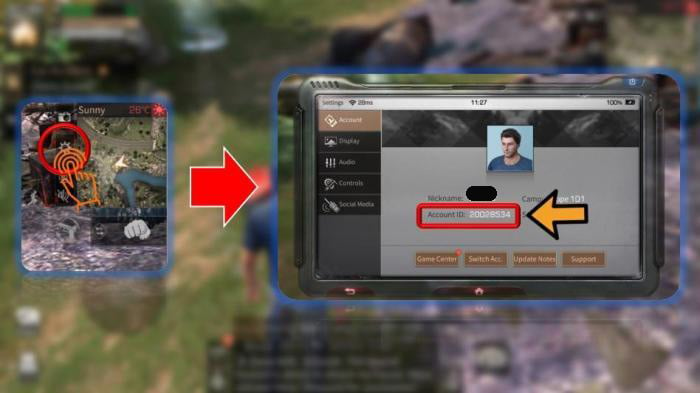
Those three checks kill most lifeafter credits not credited panic.
This is the stall map I use when the wallet has not moved.
| What stalled | What it looks like | First fix |
|---|---|---|
| Wrong User ID | Payment succeeded, every character still poor | Re-read the ID in top-right Settings; do not repurchase |
| Wrong server | ID matches, this character's wallet does not | Confirm the server on the character you actually play |
| Mail, not wallet | Balance unchanged, a mark on Mail | Restart the client, open mailbox, claim Credits |
| Pending processor | Order still pending after you paid | Sit tight; a second buy stacks risk |
| Already converted | Wallet low because you bought Gold Bars | Check Mall history and Trade City, not only Credits |
An unchanged HUD is not proof the pack failed. Mail and Gold Bars both hide a delivery that already worked.
If the ID in Settings does not match the ID on the order, stop. That is a mismatch, not a slow shard. Support can work with a mismatch they can see. They cannot guess which cabin you meant if you typed from memory.
Ticket details that get Credits pushed
"Hi my credits missing" earns a template. A ticket with the order number, the paid amount, the User ID copied from Settings, the server name, the character name, the time you paid, and a screenshot of the receipt gives support the only data that can push Credits or open a refund path.
Say what you already did. Restarted. Opened Mail. Compared IDs. That saves a round trip.
Do not paste your NetEase password. Do not send SMS codes. A useful ticket is order data plus the same two fields checkout already asked for.
I attach a screenshot of Settings with the ID visible, next to the checkout ID. If they match, someone can hunt the fulfillment log. If they do not, you just diagnosed the stall yourself.
Unfulfilled and mismatched orders are the disputes a third-party shop can act on. Change of mind after Credits land is a different fight, and I would not walk into it expecting a win. Credits never expire, so there is no clock forcing you to dump them the hour they arrive.
When you write the ticket, name the pack the way the LifeAfter pack you already paid for is listed, not a nickname you invented. Support searches catalogs. Not slang.
How long I actually wait
Lifeafter top up pending is a status, not a dare. Processors batch. Game servers hiccup. I give a short sit after payment — long enough to force-close the app and come back — then I check Mail again.
Some storefronts draw an informal line around ten minutes before they want you in the inbox. If the order page still says pending after the three checks, the next action is a ticket. Not a second cart.
I do not refresh the Mall fifty times or relog in a loop. One clean restart, one mailbox pass, then I write.
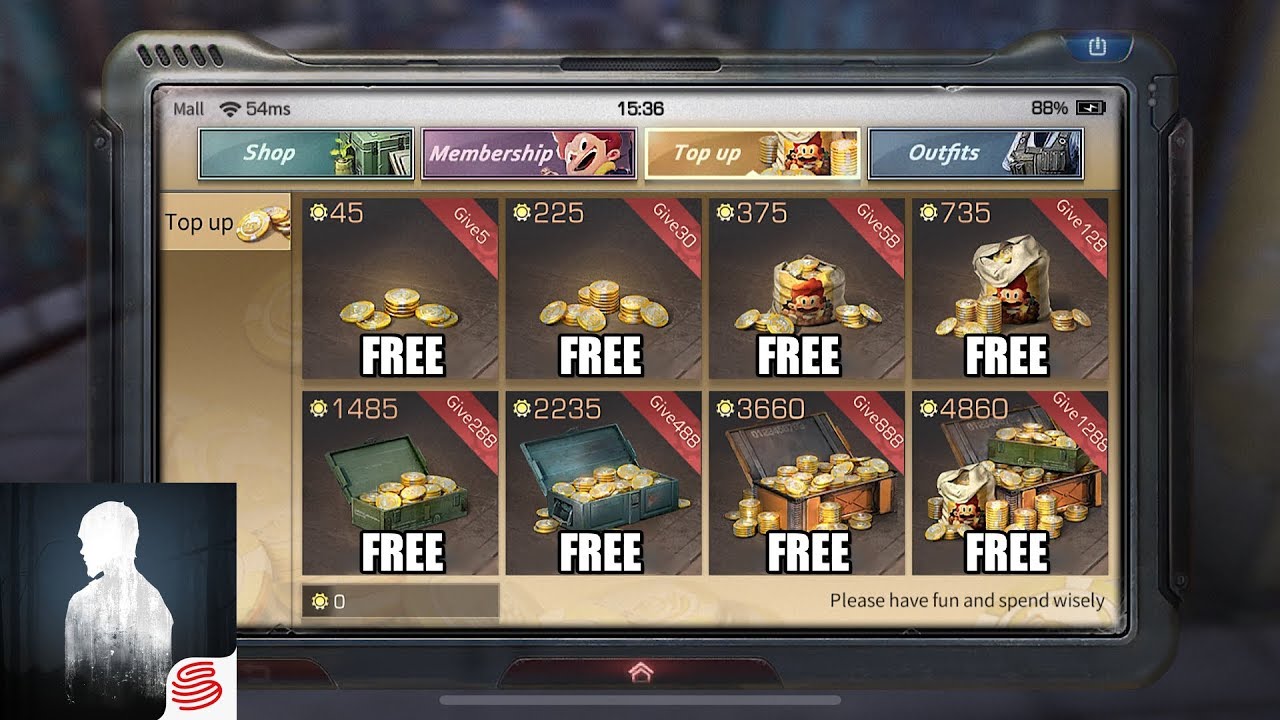
Sometimes the Credits already moved. Credits convert into Gold Bars in the Mall. Gold Bars buy player-traded gear in Trade City. Credits themselves do not buy those listings. Convert in a hurry and the wallet looks robbed while Trade City looks rich. Check both.
Credits also do not rot. No expiry. Saving them through a weak event is allowed. Panic-spending because you fear a clawback is how a stalled order turns into a gacha you did not plan to touch.
F2P, mid-spend, heavy: I would not treat these the same
Same stall. Different stakes. I would not give a first-time buyer the same next step I give someone who tops up every weekend.
F2P
You bought the smallest pack you could live with. Good. Do not "test" a second pack. Run the three checks. If Mail is empty and the ID matches, send one ticket and stay off the storefront until it replies. A F2P wallet cannot absorb a duplicate charge you placed out of anxiety.
Mid
You cover events. You care about rebate windows. Screenshot Settings before you pay, every time. If the recharge is not showing, the ticket should carry that screenshot plus the receipt. I would not sit on a mid-size pending order overnight without writing in, and I would not convert Credits to Gold Bars until the new balance is visible. Conversion on a half-updated wallet is a bookkeeping mess.
Heavy
You are the person buying through a pity ceiling. Frostwhisper Reverie dropped its guarantee from 120 spins to 100. Watermelon Smoothie still locked the outfit inside 60 attempts. Midsummer Rebate handed back up to 1,400 Credits if you bought the Ribbit Park Outfit and finished the quests. None of that math matters if the pack never posts. Heavy spenders create their own stalls by stacking three checkouts on one ID while the first is pending. I would rather have one clean delivery than three receipts and a support novel.
Those event numbers are also why people think a top-up failed when it did not. A rebate is not a missing recharge. A pity pull is not a storefront error. Keep the two ledgers apart.
| In-game fact | Figure | Why it gets mistaken for a failed top-up |
|---|---|---|
| Credits expiry | Never | Players rush a refund they do not need |
| Midsummer Rebate | Up to 1,400 Credits back | Rebate credit looks like a "partial" delivery |
| Watermelon Smoothie outfit | Guaranteed within 60 attempts | Spent Credits vanish into the draw |
| Frostwhisper Reverie pity | Cut from 120 spins to 100 | Patch notes get misread as a store delay |
| Trade City buying | Credits become Gold Bars in the Mall first | Wallet drops after a conversion, not a failed pay |
If the number that moved was an event rebate or a Gold Bar swap, you do not have a lifeafter top up not received problem. You have a memory problem. I still check Mall history before I write support in all caps.
A legitimate top-up never asks for your password
A real checkout asks for the User ID from Settings and the server you play on. That is the whole identity pair. The total shows before you pay.
A scam asks for the NetEase password. It asks for the email code. It asks you to install a "helper" file. It asks you to screen-share until someone else can tap Confirm. It offers to "verify the account" by logging in for you. Close that tab.
I keep the ID habit boring on purpose. Open LifeAfter. Settings, top right. Copy. Paste into checkout. If I ever retry after a mismatch, I go back through a LifeAfter top-up with the correct ID using that fresh copy, not the number I remember from last month.
Never send a support agent your login. Not in chat. Not in an attachment. Not "just this once."

FAQ
Why haven't my LifeAfter Credits appeared after payment?
Processing stalls on a server sync, a pending processor, or a User ID that does not match Settings. Restart the client. Open the in-game mailbox. Most lifeafter recharge not showing cases are mail sitting unclaimed or an ID typo, not a vanished payment.
Where do I find my LifeAfter Account ID?
Launch the game. Tap Settings in the top-right corner. That Account ID is the one checkout needs. A nickname will not route Credits. An old ID from a deleted screenshot is how packs go missing.
What if the top-up is still missing after I wait?
Mailbox first. Then compare the order ID against Settings. If both are clean and the wallet is still flat, write the storefront you paid with. Include order number, amount, server, User ID, and the time you paid. One ticket. Not five.
Do LifeAfter Credits expire if I leave them sitting?
No. Credits stay on the account until you spend them in the Mall. There is no hidden decay. Saving through a bad event is allowed. Spending in a panic because you think a refund is coming is how you lose both the dispute and the currency.
I paid and the status still says pending. Is that a failed order?
Pending means the processor has not finished, or the game has not acknowledged the push. It is not automatically a failure. Do not place a second order on the same ID. Check Mail once after a restart. Then send a ticket with the pending order number.
Can I buy Trade City gear straight with Credits?
No. Convert Credits to Gold Bars in the Mall, then shop Trade City. If your Credits dropped and your Gold Bars rose, the top-up landed. You already spent it.
My call if the wallet is still empty
Wait through one restart and one mailbox check. That is the whole normal window I respect. After that I stop waiting and I write a ticket with the receipt, the Settings ID, and the server name.
No second purchase. No password in the ticket. A Gold Bar conversion or a 1,400-Credit rebate is not a missing pack.
If the ID was wrong, say so in the first sentence of the ticket. Support can work with a mismatch they can see. They cannot work with "it just didn't come."
Check the three fields. Write one complete ticket. Leave the second cart alone until the first order is actually dead.






Comments