When your Likee diamonds are not received after a transaction, the issue usually stems from local app caching, gateway clearing times, or an incorrectly entered account ID. Authorized third-party platforms report a 98% delivery rate within minutes, but banking processors can take up to 10 business days to clear funds across certain external payment methods. If restarting your app does not reveal your balance, verifying your transaction receipt and account UID allows you to submit a support ticket for redelivery or manual account crediting.
Normal processing windows vs. gateway delays
Direct in-app transactions usually finalize immediately, but settlement windows vary by payment method.
- App store balances: In-app payment mechanisms like Google Play balances reflect changes immediately.
- Credit cards and direct bank transfers: While charges appear quickly on banking apps, Google Play support indicates external payment methods can require several days—and up to 10 business days in rare cases—before institutional settlement is finalized.
- Third-party recharge channels: Legitimate web top-up distributors generally credit diamonds within minutes once payment clears, with platforms like Enjoygm claiming a 98% delivery rate within minutes.
If money left your account, your payment processor may still be clearing the funds in the background before pinging the Likee server.

100 Diamonds
 100 DiamondsUSD 1.63Buy Now
200 Diamonds
200 DiamondsUSD 3.26Buy Now500 Diamonds
500 DiamondsUSD 8.15Buy Now1000 Diamonds
1000 DiamondsUSD 16.30Buy Now1500 Diamonds
1500 DiamondsUSD 24.44Buy Now2000 Diamonds
2000 DiamondsUSD 32.59Buy Now2500 Diamonds
2500 DiamondsUSD 40.74Buy Now3000 Diamonds
3000 DiamondsUSD 48.89Buy Now3500 Diamonds
3500 DiamondsUSD 57.04Buy Now4000 Diamonds
4000 DiamondsUSD 65.19Buy Now4500 Diamonds
4500 DiamondsUSD 73.33Buy Now5000 Diamonds
5000 DiamondsUSD 81.48Buy Now10000 Diamonds
10000 DiamondsUSD 162.96Buy Now20000 Diamonds
20000 DiamondsUSD 325.92Buy Now
Refreshing the app to clear local cache lag
Visual caching frequently creates the appearance of a failed delivery. Likee's central servers may have already credited your account, while the mobile client continues showing older cached data from local storage.
- Fully close the Likee application from your recent apps switcher.
- Reopen Likee to force a fresh profile query.
- Navigate to your wallet or stream interface to confirm whether the diamond count updates.
Re-syncing your device with the central servers resolves temporary display delays without needing external intervention, as outlined in Enjoygm's recharge guidance.
Verifying your Likee ID for input mistakes
A typo during checkout misroutes diamonds or leaves the purchase stranded in an unassigned queue. Cross-reference your order confirmation against your live account UID before opening a dispute.
Platforms present conflicting guidance on how to locate your profile and what the ID contains:
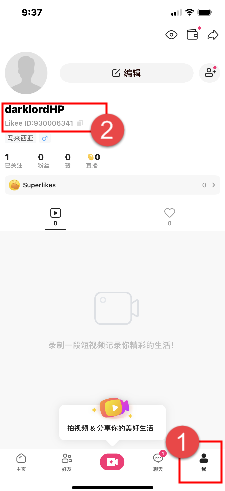
- Navigation path: Sources like BuffBuff and Enjoygm state the profile icon sits at the top left of the screen, whereas TOPUPlive states users should select "My Profile" in the lower right corner.
- ID format: Enjoygm describes the identifier strictly as a 10-digit number. In contrast, store instructions on Arctopup explicitly state to copy the complete ID from the profile view below your nickname, including letters if present.
Always copy your identifier directly from the "View or Edit Profile" menu instead of retyping your display name. If you entered an incorrect ID on an authorized platform, check your receipt promptly. Certain services can redirect credits or issue refunds if the entered ID does not exist and the diamonds remain unclaimed.
| Issue Type | Typical Symptom | Resolution Step |
|---|---|---|
| Cache Desync | Payment confirmed; balance unchanged | Force-close and restart Likee |
| Bank Settlement | Payment pending on card or statement | Allow processing time (up to 10 business days for certain banks via Google Play Help) |
| Typo in Account ID | Delivery confirmed by vendor; account empty | Compare receipt ID with profile UID; contact store support |
| Unauthorized Vendor | Login requested; credentials or delivery blocked | Avoid account-sharing sellers; escalate to payment provider |
Security risks with unauthorized recharge platforms
Third-party sellers carry vastly different fulfillment and safety standards. Legitimate web distributors require only your public Likee User ID, keeping account credentials private.
Unauthorized sellers often operate in gray markets, asking for account passwords or using payment exploits that trigger security flags. Enjoygm reports that illicit purchases can leave buyers waiting days for missing currency. (Vendor documentation is itself contradictory: Enjoygm warns against sharing passwords, yet elsewhere suggests waiting while staff logs into your account.) Never share account passwords to buy Likee Diamonds.
Gathering proof to contact support
Customer reports on Sikayetvar indicate that uncredited transactions can stall indefinitely without direct follow-up. Assemble your transaction records before submitting a ticket to Likee or the merchant portal.
- Order reference / Transaction ID: The alphanumeric identifier assigned by the store, Google Play, or your card provider.
- Timestamp: The exact date and time the charge occurred.
- Account UID: The exact Likee ID copied from your profile screen.
- Payment receipt: A digital invoice showing a completed charge status rather than a pending authorization hold.
If you purchased through an external distributor, provide the order reference directly to their support team first. If the purchase took place directly through Likee via Google Play, submit the transaction ID via in-app feedback or your app store order history.






Comments