BEST LIVE Top Up: What Is BEST LIVE and How Do Virtual Credits Work?
BEST LIVE is a global interactive livestreaming platform where creators, performers, and community hosts connect with audiences in real time. Viewers tune in to watch gaming sessions, musical performances, talk shows, and casual lifestyle broadcasts while interacting through live chat and interactive events.
Virtual credits represent the primary digital currency within BEST LIVE. When you recharge credits to your account balance, you gain the ability to purchase virtual gifts, trigger dynamic on-screen animations, and show direct appreciation to your favorite broadcasters. Beyond simple tipping, holding a balance of credits allows you to take part in community competitions, climb viewer leaderboards, and access special room privileges that standard viewers cannot use.
Because live broadcasts happen continuously, keeping your balance topped up ensures you never miss a critical moment during streamer battles, PK challenges, or limited-time community events. ArcTopup provides direct credit replenishment to your account using only your User ID (UID), allowing you to return to the live action without delay.
Step-by-Step Guide: How to Top Up BEST LIVE with Account UID
Adding credits to your BEST LIVE account through ArcTopup is straightforward and requires no login credentials. Follow these simple steps to complete your purchase:
- Locate Your UID: Open the BEST LIVE app on your mobile device and retrieve your numeric User ID from your profile menu.
- Enter Your UID: Type your numeric account ID into the UID input field on this ArcTopup page.
- Select Your Credit Package: Review the available credit denominations displayed in the live catalog and select the amount you want.
- Proceed to Checkout: Verify your account details on the checkout screen, review the live pricing, and choose your preferred payment method.
- Complete the Transaction: Follow the on-screen instructions to finalize your payment securely.
- Check Your In-App Balance: Open BEST LIVE, refresh your profile wallet, and your new credits will be ready to spend immediately.
| Top-Up Step | Action Required | Verification Point |
|---|---|---|
| 1. Account Identification | Enter BEST LIVE UID | Check profile numbers carefully |
| 2. Package Selection | Pick credit denomination | Review listed coin totals |
| 3. Payment Processing | Complete checkout | Receive order confirmation |
| 4. Credit Fulfillment | In-app balance update | Refresh wallet in app |
How to Locate Your BEST LIVE Account UID in the App
To ensure your recharge reaches the correct account, you must provide your exact numeric UID. You can find this identifier inside the app in seconds:
- Launch the BEST LIVE application on your smartphone or tablet.
- Tap the Profile or Me icon located in the bottom-right corner of the main screen.
- Look directly beneath your profile avatar and display name.
- You will see a unique numerical string labeled ID or UID.
- Tap the copy icon next to the number, or write it down carefully before entering it at checkout.
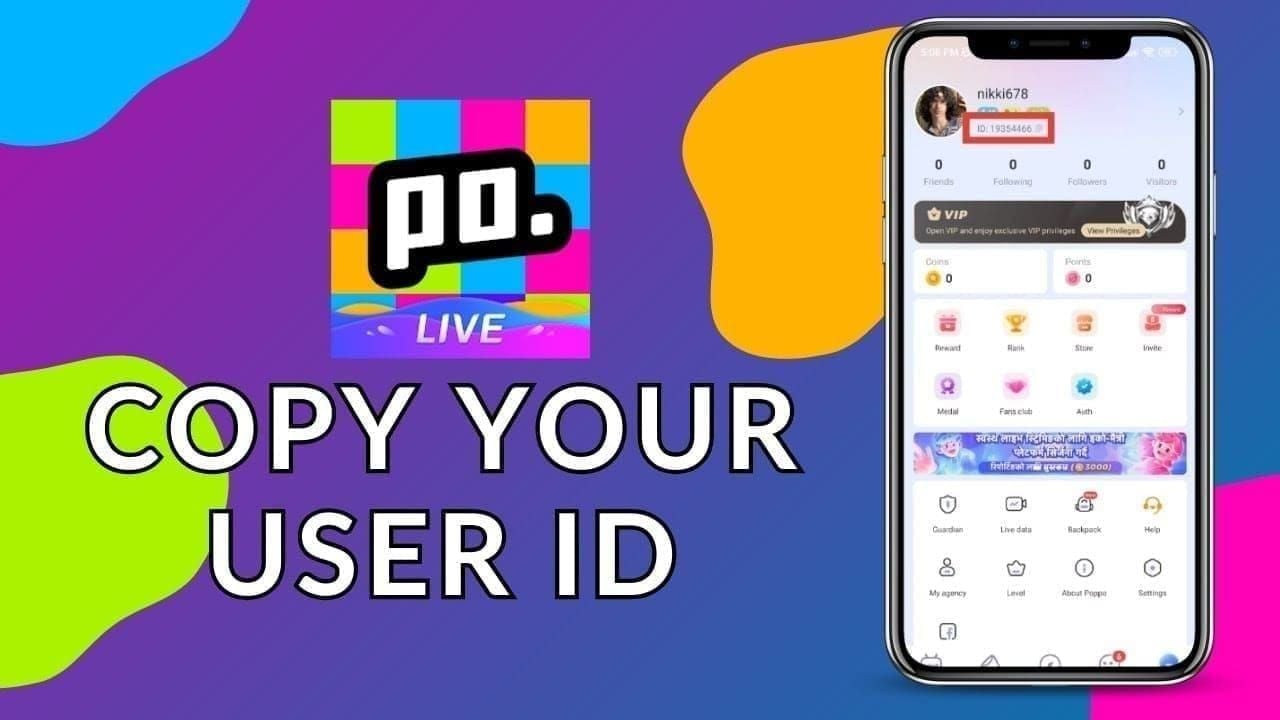
Double-check that all digits match your profile before submitting your order to prevent delivery delays.
Streamer Perks and Virtual Gifts Unlocked with BEST LIVE Recharge
Recharging your BEST LIVE account gives you access to a wide range of interactive features designed to enhance your viewing experience:
- Animated Virtual Gifts: Send everything from simple roses and coffee cups to elaborate full-screen supercars, dragons, and rocket animations that appear over the stream for everyone to see.
- Streamer Ranking Support: During competitive PK matches and seasonal tournaments, gifts sent using credits translate directly into rank points for the broadcaster, helping them climb official platform leaderboards.
- Chat Highlighting and Badges: Active gifters earn special chat badges, distinct username colors, and priority placement in the viewer list, making your comments stand out to the host.
- Exclusive Room Entrance Effects: Arrive in style with custom entrance banners and sound effects that notify the host and other viewers the moment you enter a live room.
- Fan Club Memberships: Use your credits to subscribe to creator fan clubs, gaining access to private chat groups, custom emotes, and subscriber-only live sessions.
Security First: Why UID-Only Top-Up Protects Your Account
Account safety is a major priority when buying digital items online. ArcTopup uses a strict UID-only fulfillment model for BEST LIVE top-ups, which offers substantial security advantages:
- No Passwords Required: You never need to reveal your BEST LIVE password, recovery email, or linked phone number. Your login credentials stay completely private.
- No Third-Party Social Logins: You do not have to link external accounts or authorize third-party access to your personal social media profiles.
- Zero Risk of Account Hijacking: Because no login access is granted, your account cannot be accessed, modified, or transferred by external systems during the transaction.
- Transparent Processing: Direct UID fulfillment sends credits straight to your public account ID through standard platform balance channels.
By keeping your personal authentication data on your own device, UID top-ups provide the safest way to manage in-app purchases.
Troubleshooting BEST LIVE Top-Up Delivery and Common UID Mistakes
If you experience any delay or issue with your order, use this troubleshooting checklist to resolve it quickly:
- Verify UID Accuracy: Mistyping even a single digit can send credits to a different user or cause the transaction to pause. Always use the built-in copy button in the app rather than typing the number manually.
- Restart the Mobile App: In many cases, credits arrive instantly on the server side, but the mobile app displays a cached balance. Force close BEST LIVE and reopen it to trigger a wallet balance update.
- Check Your Internet Connection: A weak or unstable network connection can prevent the app from fetching your updated profile data. Switch between Wi-Fi and mobile data to refresh your connection.
- Inspect ArcTopup Order Status: Review your order confirmation screen to confirm that payment went through successfully.
- Contact Customer Support: If your credits do not appear after refreshing, reach out to ArcTopup customer support with your order number and BEST LIVE UID for prompt assistance.
Frequently Asked Questions
What is the best top up site for BEST LIVE?
ArcTopup is an excellent choice for BEST LIVE top-ups, offering direct UID transactions, transparent live pricing, and automated delivery that gets credits into your account without requiring your password.
Is it safe to recharge BEST LIVE using only my UID?
Yes, it is entirely safe. Topping up with only your UID means you never share passwords, verification codes, or linked social accounts, keeping your personal account completely secure.
Where can I find my BEST LIVE UID?
Open the BEST LIVE app, tap the Profile icon in the bottom-right corner, and find the numeric ID displayed directly beneath your profile picture and nickname.
Do I need to provide my BEST LIVE password to top up?
No. ArcTopup never asks for your password or sensitive account credentials. You only need to provide your public numeric UID.
How long does it take for BEST LIVE credits to reflect in my account?
Credits are processed automatically upon successful payment. In most cases, your new balance reflects in your in-app wallet within moments of completing checkout.
What should I do if my BEST LIVE top up does not appear immediately?
First, force close and reopen the BEST LIVE app to clear your local cache. If the balance remains unchanged, verify the UID submitted on your order receipt and contact ArcTopup support with your transaction details.
Current packages and prices
Current base prices exclude Tax. Tax, payment fees and coupon adjustments are shown at checkout.
| Package | Price |
|---|---|
| BEST LIVE - BEST LIVE*5000000 | USD 8.33 |
| BEST LIVE - BEST LIVE*10000000 | USD 16.65 |
| BEST LIVE - BEST LIVE*50000000 | USD 83.25 |
| BEST LIVE - BEST LIVE*100000000 | USD 166.50 |
| BEST LIVE - BEST LIVE*1000000 | USD 1.67 |






























































