
Dawa Top Up: What Are Dawa Credits and Platform Perks in 2026
Dawa serves as an interactive live streaming and social entertainment platform where users connect with broadcasters, join voice chat rooms, and participate in community events. Within the platform, Dawa credits act as the primary virtual currency. Users spend these credits to send virtual gifts, activate special entry effects, send broadcast-wide banners, and support their favorite content creators during live PK battles.
Unlike physical products or unrelated services sharing a similar name, digital Dawa credits are strictly utilized within the official Dawa mobile application to fund your in-app wallet. Holding an active balance of credits allows you to access premium interactive features, customize your chat appearance, and increase your member rank within live rooms. Recharging your balance outside the standard app store billing system through ArcTopup provides direct account crediting using only your unique Player ID, eliminating account sharing risks while offering flexible local and global checkout options.
How to Top Up Dawa Using Player ID on ArcTopup
Adding credits to your Dawa profile through ArcTopup requires only a few straightforward steps. Follow this guide to ensure your top up reaches your account immediately:
- Select Credit Amount: Choose the desired Dawa credit bundle from the available denominations. Current pricing in your regional currency is displayed on the live checkout interface.
- Enter Your Player ID: Input your unique Dawa Player ID in the required field. Double-check all digits to avoid sending credits to an incorrect user.
- Choose Payment Method: Pick your preferred payment method from the available local e-wallets, credit or debit cards, and online banking options.
- Confirm and Pay: Review your order summary and finalize the transaction.
- Check Account Balance: Once your payment is approved, open your Dawa app to view your updated credit balance.
| Top-Up Step | Required Action | Verification Check |
|---|---|---|
| 1. Select Package | Choose credit bundle | Check real-time checkout price |
| 2. Enter ID | Type Dawa Player ID | Confirm numeric digits in profile |
| 3. Select Payment | Choose preferred checkout option | Review total amount |
| 4. Receive Delivery | Open Dawa mobile app | Check wallet balance refresh |
How to Locate Your Dawa Player ID in the Mobile App
Your Dawa Player ID is the permanent numeric identifier linked to your account profile. Finding your ID takes only seconds inside the mobile app:
- Open the Dawa app on your mobile device and log in to your account.
- Tap the Profile or Me icon located in the bottom-right corner of the main screen.
- Your Player ID is visible directly underneath your profile avatar and display name.
- Tap the Copy icon next to the number to copy the exact identifier to your clipboard.
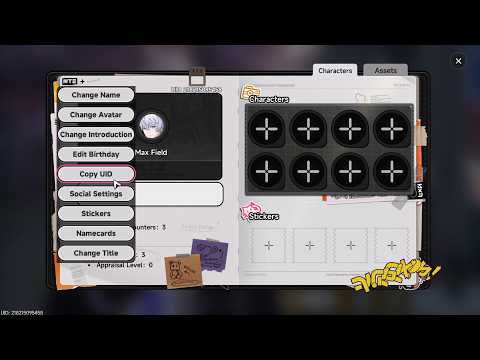
Pasting the copied ID directly into the ArcTopup input field prevents typing mistakes and ensures smooth order processing.
Safe & Password-Free Dawa Recharge Protection
Account safety is a core priority when buying virtual goods online. ArcTopup uses a direct ID-based delivery system, which means you never need to reveal your account password, email login, or verification codes to complete a Dawa recharge.
- No Login Credentials Needed: You only supply your public Player ID. Your login credentials remain strictly private on your own device.
- Protected Transactions: All checkout pages use encrypted security protocols to keep your payment details safe.
- Direct In-App Delivery: Purchased credits are transferred directly to the corresponding Dawa profile on the game server without manual intermediary handling.
Never share your password or temporary verification codes with third parties. Using an ID-only recharge method keeps your personal account secure from unauthorized access.
Supported Global & Local Payment Options for Dawa
ArcTopup supports a comprehensive range of payment systems to serve users across different regions. Depending on your location, you can complete your Dawa top up using:
- Credit and Debit Cards: Visa, Mastercard, and other major card networks.
- E-Wallets: Popular digital wallets tailored to regional currencies.
- Bank Transfers & Instant Pay: Direct online banking integrations for quick settlement.
All currency conversions and final costs appear directly at checkout before you authorize payment, ensuring full transparency without unexpected processing charges.
Troubleshooting Common Dawa Balance Delivery Issues
While most top-up orders complete within moments of successful payment, occasional network delays can happen. If your Dawa credits do not appear right away, use the following troubleshooting checklist:
- Restart the Dawa App: Fully close the Dawa application from your device task manager and reopen it. This forces the client to fetch fresh balance data from the server.
- Verify the Player ID Submitted: Check your order confirmation receipt to confirm that the Player ID entered matches your in-app ID.
- Check Payment Confirmation: Ensure your bank or payment provider marked the transaction as completed rather than pending.
- Contact ArcTopup Support: If your balance has not updated after a few minutes, provide your ArcTopup order number and Dawa Player ID to customer support for prompt resolution.
Frequently Asked Questions About Dawa Recharge
How do I find my Dawa Player ID for top up?
Open the Dawa app, go to your Profile tab in the bottom-right corner, and locate the numeric ID displayed under your username and avatar. Use the copy button next to the ID to paste it directly into ArcTopup.
Do I need to share my Dawa account password to recharge?
No. ArcTopup only requires your public Dawa Player ID to deliver credits. You should never share your account password, linked social logins, or SMS verification codes with anyone.
How long does it take for Dawa credits to reflect in my account?
Credits are dispatched directly to your account immediately after payment verification. In most cases, the balance updates as soon as you reopen or refresh your Dawa in-app wallet.
Can I buy Dawa credits for another user using their Player ID?
Yes. Because the top-up process only relies on the Player ID, you can send credits to friends or favorite streamers by entering their specific Player ID during checkout.
What payment methods can I use to top up Dawa on ArcTopup?
ArcTopup supports international debit and credit cards, popular digital e-wallets, and regional banking options. The available methods for your location are displayed on the checkout page.
What should I do if my Dawa top up does not appear after payment?
First, restart the Dawa application to refresh your account data. If your balance remains unchanged, verify your transaction status with your payment provider and reach out to ArcTopup customer service with your order ID for quick assistance.
Current packages and prices
Current base prices exclude Tax. Tax, payment fees and coupon adjustments are shown at checkout.
| Package | Price |
|---|---|
| Dawa - Dawa*70000 | USD 0.91 |
| Dawa - Dawa*100000 | USD 1.30 |
| Dawa - Dawa*200000 | USD 2.61 |
| Dawa - Dawa*500000 | USD 6.52 |
| Dawa - Dawa*700000 | USD 9.13 |
| Dawa - Dawa*1000000 | USD 13.04 |
| Dawa - Dawa*2000000 | USD 26.08 |
| Dawa - Dawa*5000000 | USD 65.21 |
| Dawa - Dawa*10000000 | USD 130.41 |






























































