Mazyoun Zena Top Up: In-App Coins for Voice Rooms and Gifting
Mazyoun Zena is a popular interactive social and live voice chat platform where users connect in audio party rooms, organize themed discussions, and interact with live broadcasters. While the name is sometimes confused with retail or clothing terms, Mazyoun Zena operates entirely as a digital voice community. Within the app, in-app coins serve as the central currency that powers room activities, user recognition, and interactive gifting.
Recharging your Mazyoun Zena coin balance gives you direct access to premium interaction tools. Coins let you send animated gifts to room hosts, activate visual entrance banners when entering active chat rooms, and participate in competitive room rankings. Whether you host your own audio parties or support your favorite creators in public chat spaces, having a ready coin balance keeps your profile active and recognized across the community.
ArcTopup provides a direct top up method that credits coins straight to your account using only your Mazyoun Zena User ID (UID).
Step-by-Step Guide: How to Top Up Mazyoun Zena Coins
Adding coins to your Mazyoun Zena account takes only a few quick steps on ArcTopup. Follow this walkthrough to complete your recharge:
- Select Your Coin Package: Browse the coin packages displayed on the live ArcTopup catalog and choose the quantity you wish to purchase.
- Enter Your User ID (UID): Type or paste your exact Mazyoun Zena numeric UID into the required input field.
- Verify Your UID: Double-check your entered numbers to make sure they match your in-app profile ID.
- Complete Payment: Select your preferred payment method on the checkout screen and confirm the order.
- Check In-App Balance: Open Mazyoun Zena, navigate to your wallet or profile page, and verify your updated coin total.
How to Locate Your Mazyoun Zena UID
Your Mazyoun Zena User ID is a unique numeric identifier linked directly to your profile. You do not need to share your phone number, email, or password to recharge your coins—only this public UID is required.
Follow these steps to find your UID inside the app:
- Open the Mazyoun Zena app on your phone.
- Tap the Profile or Me icon located in the bottom right corner of the main screen.
- Locate your numeric UID displayed directly underneath your profile name and avatar.
- Tap the copy icon next to the number, or write down the digits carefully.
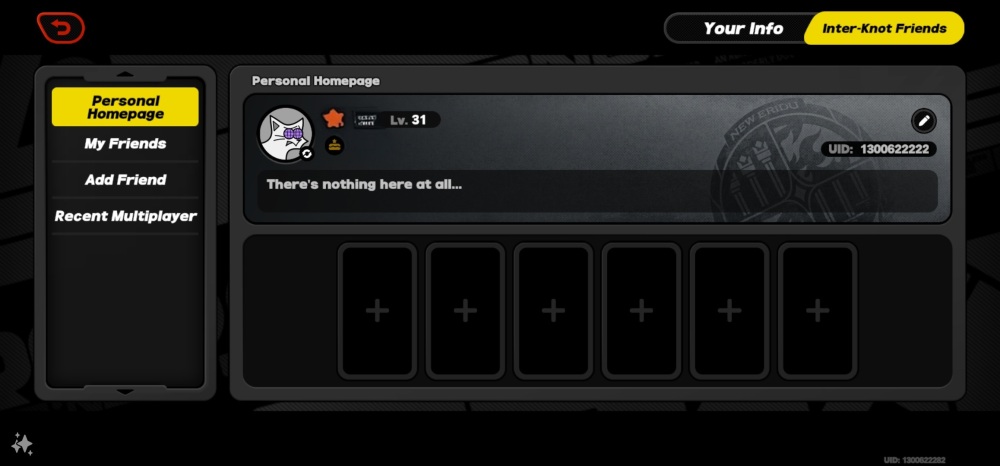
Make sure to copy the full sequence of numbers accurately so your order reaches the correct account without delay.
Mazyoun Zena Coin Usage and Room Features
In-app coins allow you to take full advantage of Mazyoun Zena's social audio features. Different activities require different coin amounts depending on how you participate in the community.
| Feature / Activity | Purpose | Coin Requirement Level |
|---|---|---|
| Micro Gifting | Send basic emojis and small animated tokens to room speakers | Low |
| Deluxe Room Gifts | Trigger full-screen animations and broadcast announcements | Medium to High |
| Entrance Effects | Display custom visual banners when joining popular voice rooms | Medium |
| Room Level Boosting | Contribute to group goals and room ranking competitions | Flexible / High |
| Interactive Mini-Games | Participate in community party games inside voice rooms | Variable |
Selecting the right package depends on your planned activity. If you want to show casual appreciation during everyday voice chats, smaller coin denominations work well. If you plan to support hosts during major room battles, seasonal events, or community leaderboards in 2026, larger coin bundles ensure you do not run out of balance during live interactions.
All bundle sizes and current rates are displayed directly on the live checkout interface.
Account Safety: Why Direct UID Top Ups Protect You
Protecting your personal account data is critical when purchasing digital currency. ArcTopup uses a direct UID delivery system, which means your account credentials remain completely private throughout the transaction.
Keep the following security practices in mind:
- Never Share Passwords: A legitimate recharge service only requires your public UID. Never share your password, login tokens, or SMS verification codes with anyone.
- Avoid Fake Coin Generators: Web tools or modified APK files claiming to offer free or unlimited Mazyoun Zena coins are fraudulent. Using unauthorized third-party software can lead to permanent account bans and compromised device security.
- No Account Handover: Never hand your account login over to third parties promising cheaper recharges. Direct UID recharges do not require logging in to your personal profile.
By sticking to standard UID-based purchases on ArcTopup, your account remains secure and in your control at all times.
Why Choose ArcTopup for Your Mazyoun Zena Recharge
ArcTopup is built to provide an efficient, straightforward purchasing experience for social app users worldwide:
- Direct UID Delivery: Enter your ID, complete your order, and receive your coins directly in your Mazyoun Zena account.
- Clear Pricing: All item costs and available packages are presented upfront on the live checkout page without hidden platform surcharges.
- Simple Checkout Process: The ordering layout is clean and user-friendly, allowing you to complete your top up in just a few clicks.
- Dedicated Order Assistance: If you have questions about your order or need help verifying a transaction, customer support is available to assist you.
Frequently Asked Questions About Mazyoun Zena Top Up
How do I find my Mazyoun Zena UID for top up?
Open the Mazyoun Zena application, tap the Profile or "Me" tab at the bottom right of the screen, and locate the numeric UID shown directly below your profile name. Tap the copy icon next to the number to copy it to your clipboard.
Do I need to provide my Mazyoun Zena account password to recharge coins?
No. ArcTopup only requires your public Mazyoun Zena UID to credit the coins. You should never share your login password, social login details, or SMS verification codes.
How quickly will the coins be credited to my Mazyoun Zena account?
Orders are processed immediately upon successful payment confirmation. Once the transaction completes, open or refresh your Mazyoun Zena app to see your updated coin balance in your profile wallet.
What can I use Mazyoun Zena coins for inside the app?
Mazyoun Zena coins can be used to send virtual animated gifts to voice room hosts, purchase dynamic entrance effects, participate in audio party games, and support room ranking milestones during live community events.
Can I top up Mazyoun Zena coins for another user using their UID?
Yes. Because the top up process only requires a valid UID, you can purchase coins for friends or favorite room hosts by entering their Mazyoun Zena UID during checkout instead of your own. Confirm their UID with them before ordering.
What should I do if I entered the wrong UID during checkout?
Top up transactions are automated and processed directly to the submitted UID. If you notice an error before completing payment, cancel and re-enter the correct UID. If payment has already gone through for an incorrect, valid UID, the coins will be delivered to that account and cannot be reversed. If you need help reviewing an order status, contact ArcTopup customer support with your order details.
Current packages and prices
Current base prices exclude Tax. Tax, payment fees and coupon adjustments are shown at checkout.
| Package | Price |
|---|---|
| Mazyoun Zena - Mazyoun Zena*15000 | USD 1.82 |
| Mazyoun Zena - Mazyoun Zena*20000 | USD 2.43 |
| Mazyoun Zena - Mazyoun Zena*25000 | USD 3.03 |
| Mazyoun Zena - Mazyoun Zena*50000 | USD 6.07 |
| Mazyoun Zena - Mazyoun Zena*100000 | USD 12.14 |
| Mazyoun Zena - Mazyoun Zena*500000 | USD 60.68 |
| Mazyoun Zena - Mazyoun Zena*1000000 | USD 121.36 |
| Mazyoun Zena - Mazyoun Zena*10000 | USD 1.21 |






























































