
Mixu Top Up: Get Coins for Live Video Chats and Direct Matching
Mixu is a popular global video chat platform that connects people across borders for real-time 1-on-1 video conversations, text messaging, and live interactions. To start private video calls, filter matches by region or gender, and send virtual gifts to your favorite broadcasters, you need Mixu coins. ArcTopup provides a direct and reliable way to complete your Mixu top up using only your Player ID, ensuring your personal credentials remain private.
Whether you want to keep conversations running without interruption or surprise a creator with special animated gifts, recharging your coin balance through ArcTopup is straightforward, fast, and secure.
What Are Mixu Coins and How Are They Used in Video Chats?
Mixu coins represent the core in-app currency within the Mixu mobile app. While basic profile setup and browsing are accessible freely, coins power the real-time communication features that make the app engaging.
1-on-1 Video Calling
When you connect with other users for private video calls, calls consume coins on a per-minute basis. Having an active coin balance allows you to start calls immediately, accept direct requests, and extend talk time without abrupt disconnections.
Custom Matching and Advanced Filters
Mixu allows users to apply specific preference filters, such as regional location and language preferences. Unlocking these targeted matching options requires coins, helping you find conversation partners who match your interests.
Virtual Gifts and Profile Appreciation
During live video chats, you can send animated virtual gifts ranging from simple tokens to high-tier visual displays. Sending gifts shows appreciation to creators, helps you get noticed, and builds stronger connections with your favorite hosts.
Direct Messaging and Reconnecting
If you meet someone you enjoy talking to, coins let you send direct text messages, share media, and reconnect even after a random video session ends.
How to Locate Your Mixu Player ID in the App
To process your coin recharge on ArcTopup, you only need to provide your numeric Player ID. You do not need to log in with your password or share any sensitive account details. Follow these quick steps to find your ID:
- Launch the Mixu app on your Android or iOS device.
- Tap the Profile (or Me) tab located in the bottom right corner of the navigation bar.
- Locate the numeric Player ID displayed directly beneath your profile picture and username.
- Tap the copy icon next to your ID to copy the number directly to your clipboard.
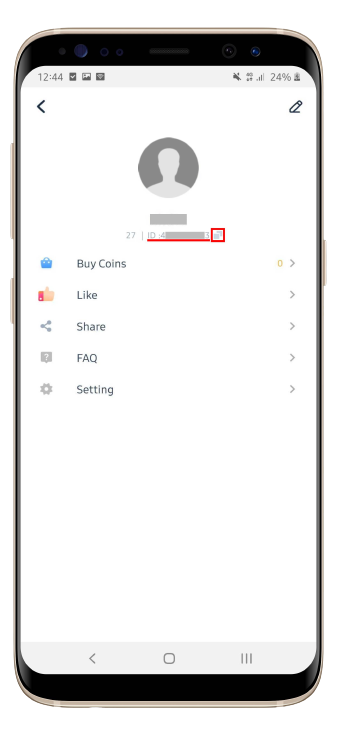
Double-check that the copied number matches your profile ID before placing your order on ArcTopup.
Step-by-Step Guide to Top Up Mixu Coins Online
Recharging your Mixu account through ArcTopup is simple and takes only a few moments:
- Select Your Coin Package: Review the available Mixu coin denominations displayed in the live catalog above and choose the bundle that fits your chatting needs.
- Enter Your Player ID: Paste your numeric Mixu Player ID into the designated input field. Make sure there are no spaces or extra characters.
- Review Order and Complete Payment: Choose your preferred payment method and proceed to checkout. The live pricing interface displays the exact total before you confirm.
- Receive Your Coins: Once your payment is verified, ArcTopup delivers the coins directly to your Mixu account via the official direct-recharge system. Open your Mixu app to confirm your updated balance.
Mixu Coin Utility and Feature Overview
Understanding how coins are spent helps you choose the right package size for your video chat sessions.
| Feature / Activity | Coin Purpose | Practical Advantage |
|---|---|---|
| 1-on-1 Video Chat | Connect directly with online users | Maintain ongoing calls without mid-chat interruptions |
| Virtual Gifting | Send digital tokens and animations | Stand out during video streams and support broadcasters |
| Targeted Matching | Apply regional and preference filters | Find conversation partners matching your language and location preferences |
| Direct Messaging | Message contacts outside live calls | Reconnect with past matches and keep chat history active |
Safe Top-Up Best Practices: Recharging Without Password Sharing
Account safety is essential when purchasing digital currencies online. Third-party sellers that request your social login, Google credentials, Apple ID, or phone verification codes put your account at risk of unauthorized access or permanent bans.
Why Player ID Recharges Are Safer
- Zero Password Requirements: ArcTopup only requires your public Player ID to credit your account. You never share passwords, SMS codes, or login tokens.
- No Risk of Account Takeover: Because your private login details are never entered, your private messages, contacts, and account security settings remain completely safe.
- Direct and Official System: Direct ID top-ups deposit coins straight to the central server linked to your account, ensuring full compliance with platform rules.
Why Choose ArcTopup for Your Mixu Recharge?
ArcTopup offers a dedicated platform designed for fast, hassle-free social app recharges:
- Direct ID Delivery: Instant delivery mechanics ensure your coins reflect on your Mixu profile as soon as payment is confirmed.
- Transparent Live Checkout: All pricing details are clearly displayed before purchase, with no hidden fees or unexpected checkout additions.
- Global Accessibility: Whether you are using Mixu locally or while traveling internationally, ArcTopup supports global users without region-locking issues.
- Dedicated Order Support: If you ever have a question about an order, ArcTopup provides responsive customer support to check your transaction status.
Troubleshooting Common Mixu Top Up and Account Issues
If you experience any delay or issue after completing your purchase, use the following troubleshooting steps:
1. Balance Not Updating Immediately
If your coins do not appear right away, close the Mixu app completely from your background applications, ensure your internet connection is stable, and reopen the app. Check your profile wallet screen to trigger a fresh balance sync.
2. Incorrect Player ID Entered
If you submitted an incorrect Player ID during checkout, check your order confirmation. If the incorrect ID belongs to an active account, coins are credited to that account immediately and cannot be transferred back. Always copy and paste your Player ID directly from the Mixu app to prevent typos.
3. Payment Completed but Order Pending
On rare occasions, payment verification can take a couple of minutes depending on the payment channel. Check your email for an ArcTopup order confirmation. If the balance does not arrive within a short period, contact ArcTopup customer support with your Order ID and Player ID for assistance.
Frequently Asked Questions
What is Mixu and what are Mixu coins used for?
Mixu is a real-time 1-on-1 video chat and social app designed to connect people globally. Mixu coins are the in-app currency used to initiate private video calls, apply custom location and matching filters, send animated gifts to creators, and send direct messages.
How do I find my Mixu Player ID for coin top up?
Open the Mixu app, tap the Profile or Me icon in the bottom right corner, and view the numeric ID displayed under your username. Tap the copy icon next to it to copy your Player ID for checkout.
Do I need to provide my Mixu password to recharge coins?
No. ArcTopup only requires your public numeric Player ID to deposit coins into your account. You should never share your password, login codes, or linked social media credentials.
Where can I purchase Mixu coins online safely?
You can purchase Mixu coins safely on ArcTopup by selecting your desired package, entering your Player ID, and checking out through secure payment options.
What should I do if my Mixu coins do not appear after purchase?
First, restart your Mixu app to refresh your wallet balance. If the coins still do not show, check your ArcTopup order status to confirm completion, and contact ArcTopup support with your Order ID and Player ID.
Can I top up Mixu coins for a friend using their Player ID?
Yes. As long as you have your friend's correct Mixu Player ID, you can enter their ID at checkout on ArcTopup, and the coins will be delivered directly to their profile.
Current packages and prices
Current base prices exclude Tax. Tax, payment fees and coupon adjustments are shown at checkout.
| Package | Price |
|---|---|
| mixu 650 coins | USD 3.26 |
| mixu 1250 coins | USD 6.29 |
| mixu 1800 coins | USD 8.64 |
| mixu 3500 coins | USD 15.65 |
| mixu 7000 coins | USD 30.71 |
| mixu 15000 coins | USD 66.51 |






























































