
The Division Resurgence Premium Credits Top Up on ArcTopup
Equipping your SHD agent in New York City requires access to high-tier vanity gear, weapon skins, and seasonal passes. The Division Resurgence Premium Credits serve as the primary currency for purchasing exclusive cosmetic collections, premium operational pass tracks, and specialized supply bundles.
ArcTopup provides a direct recharge service for The Division Resurgence. By entering only your unique in-game User ID, you can top up your account balance without sharing your Ubisoft login credentials or account passwords. Current pricing and credit package tiers are listed directly in the checkout selector above, allowing you to choose the exact amount of Premium Credits your agent needs for upcoming street operations.
How to Top Up The Division Resurgence Premium Credits
Completing a recharge takes only a few quick steps. Follow this guide to credit your account directly:
- Select Your Credit Amount: Review the available denominations on the ArcTopup product menu and choose the Premium Credits pack you wish to purchase.
- Enter Your User ID: Type or paste your in-game User ID into the designated input field. Make sure the number matches your profile exactly.
- Confirm Order Details: Check the selected credit quantity and verify your player identifier before proceeding.
- Complete Checkout: Select your preferred payment option from the available checkout methods and finalize the payment.
- Verify In-Game Delivery: Open The Division Resurgence on your device. Your balance updates directly in your in-game store counter.
Where to Find Your The Division Resurgence User ID
Finding your User ID is simple and requires only a few taps inside the game client.
- Launch The Division Resurgence on your mobile device or handheld system.
- Tap your Player Profile / Agent Avatar icon in the top-left corner of the main screen.
- In the profile overview menu, locate the numeric sequence labeled User ID or UID displayed beneath your character name.
- Tap the Copy icon next to the number string to copy your User ID directly to your clipboard.
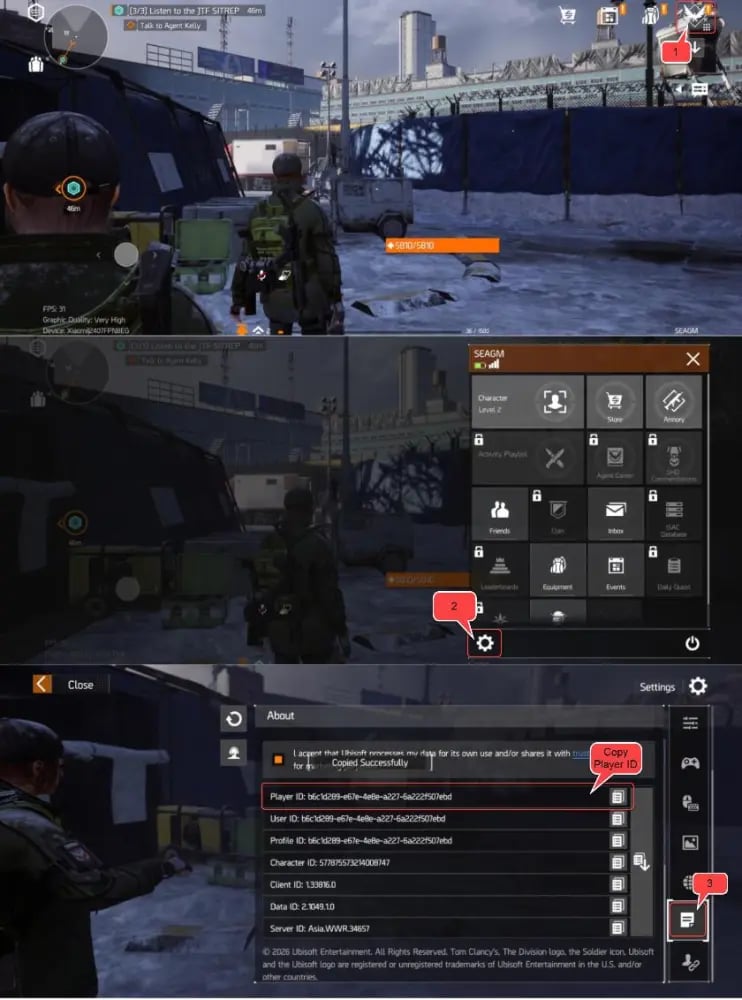
Always double-check your User ID before submitting an order on ArcTopup to guarantee that your Premium Credits reach the correct character.
What Are Premium Credits Used For in The Division Resurgence
Premium Credits give agents direct access to vanity customization and convenience items without altering core combat balancing. Here is how you can use your balance:
- Agent Outfits and Apparel: Unlock tactical jackets, military pants, combat boots, specialized gloves, and custom masks to personalize your agent's appearance.
- Weapon Camouflage and Finishes: Apply unique paint schemes, tactical camos, and weapon charms across assault rifles, marksman rifles, and sidearms.
- Seasonal Battle Pass Activation: Unlock the premium tier of active seasonal battle passes in 2026 to collect exclusive cosmetic caches and resource crates as you level up your operational rank.
- Vanity Caches and Crates: Open specialized apparel caches featuring limited-run clothing sets and rare weapon visual modifications.
| Item Category | Main In-Game Purpose | Primary Purchase Method |
|---|---|---|
| Agent Vanity Apparel | Cosmetic jackets, masks, and tactical uniforms | Premium Credits |
| Weapon & Gear Skins | Visual paint jobs and weapon charms | Premium Credits |
| Seasonal Battle Pass | Access to premium reward progression tiers | Premium Credits |
| Standard Gear & Weapons | Combat stats, armor, and weapon calibration | In-game missions & gameplay drops |
Safe Recharge Guarantee: No Password or Account Credentials Required
Account safety is a core concern for online tactical shooters. ArcTopup uses a direct User ID credit system that requires zero private login information.
- No Password Requests: You never need to supply your Ubisoft Connect password, personal email, or social media login details.
- Direct System Delivery: Orders are routed straight to your character ID through standard digital distribution channels.
- Privacy Protection: Your personal login data stays completely under your control, removing the risk of unauthorized access or security breaches.
Troubleshooting Delivery Issues and Verifying Credited Balances in 2026
Digital recharges on ArcTopup are processed promptly once payment clears. If your new balance does not appear immediately upon completing your order, follow these troubleshooting steps:
- Restart the Game Client: Completely close The Division Resurgence from your recent apps switcher and reopen it to force a fresh server synchronization.
- Check the In-Game Store Tab: Navigate to the in-game store page. Sometimes the top-right currency balance refreshes only after opening the store interface.
- Verify Your User ID Submission: Check your ArcTopup order confirmation receipt to confirm you entered the correct User ID without missing digits.
- Check In-Game Mail: Certain bonus credits or bundle items may arrive as an attachment inside your agent's operational mailbox.
- Contact Support: If your balance does not update after restarting, reach out to ArcTopup customer support with your order number for fast verification.
How to Send The Division Resurgence Premium Credits to a Friend Using User ID
Surprising a squadmate with Premium Credits is straightforward on ArcTopup:
- Ask your squad member to copy their in-game User ID from their profile screen.
- Select the credit pack you wish to gift on the ArcTopup store page.
- Paste your friend's User ID into the player information box.
- Complete the checkout process.
The purchased credits will be delivered directly to your friend's account balance, ready for them to spend on outfits, skins, or seasonal passes.
Frequently Asked Questions
How do I find my User ID in The Division Resurgence?
Open the game, tap your player profile avatar in the upper-left corner of the home screen, and find the numeric User ID listed beneath your username. Tap the copy icon to copy it accurately.
Do I need to provide my Ubisoft login or password for top up?
No. ArcTopup requires only your in-game User ID. You never need to share passwords, email credentials, or verification codes.
How are Premium Credits delivered to my The Division Resurgence account?
Credits are transferred directly to your player account using your User ID. Once the order completes, the currency balance updates inside your in-game wallet.
What can I purchase with Premium Credits in The Division Resurgence?
You can purchase apparel bundles, character outfits, weapon skins, tactical camos, emote packs, and the premium track of seasonal battle passes.
Can I top up The Division Resurgence Premium Credits for another player?
Yes. Enter your friend's User ID into the input field during checkout, choose the credit package, and complete payment. The credits will go directly to their account.
Is The Division Resurgence pay to win with Premium Credits?
No. Premium Credits are designed primarily for cosmetic items, seasonal battle passes, and visual customizations. Core weapon stats and equipment power come from gameplay progression, missions, and loot drops.
Current packages and prices
Current base prices exclude Tax. Tax, payment fees and coupon adjustments are shown at checkout.
| Package | Price |
|---|---|
| 125 (120 + 5) Premium Credits | USD 1.58 |
| 315 (300 + 15) Premium Credits | USD 3.96 |
| 645 (600 + 45) Premium Credits | USD 7.91 |
| 1650 (1500 + 150) Premium Credits | USD 19.76 |
| 3450 (3000 + 450) Premium Credits | USD 39.27 |
| 7200 (6000 + 1200) Premium Credits | USD 78.81 |






























































