EVE Echoes AUR Top Up: Instant Direct Pilot Funding
Surviving and thriving in the harsh star systems of New Eden requires resources, preparation, and the right fleet assets. EVE Echoes AUR (Aurum) is the premier currency required to purchase premium bundles, acquire high-tier Nanocores, unlock exclusive ship liveries, and obtain PLEX for your Omega subscription. When you need to replenish your balance without missing a critical corporate fleet operation, an EVE Echoes AUR top up on ArcTopup provides a direct, secure path to fund your pilot account.
ArcTopup processes your order directly using only your in-game User ID and selected server. You never have to share login passwords or account credentials, keeping your pilot profile safe from security risks.
What is EVE Echoes AUR and What Can You Buy With It?
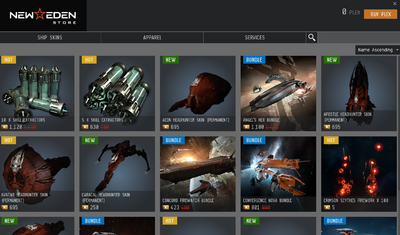
AUR is the bound premium currency in EVE Echoes. Unlike standard credits earned through mining, ratting, or market speculation, AUR is credited through direct purchases and unlocks specialized items inside the New Eden Store.
Key In-Game Uses for AUR:
- Monthly Skill Point Supplies: Accelerate your pilot skill training queue with monthly booster passes purchased with AUR.
- Nanocore Upgrades and Material Packs: Equip your combat, mining, or hauling hulls with specialized Nanocores that grant direct stat bonuses, warp speed enhancements, and damage multipliers.
- Direct PLEX Conversion: Convert your AUR into PLEX to activate Basic or Standard Omega Clone status, unlocking advanced tech-level hulls and full market access.
- Exclusive Ship Skins: Stand out during fleet battles with limited-edition faction liveries and custom visual finishes.
- Special Combo Bundles: Purchase limited-time value packs containing insurance tokens, datacores, and skill reset items.
Understanding EVE Echoes Currencies: AUR vs PLEX vs ISK
New Eden runs on a three-tier economy. Knowing how each currency functions helps you manage your pilot finances efficiently:
| Currency | Primary Acquisition | Main In-Game Purpose | Market Tradeable? |
|---|---|---|---|
| AUR (Aurum) | Direct top-up via UID | Store bundles, Nanocore materials, PLEX conversion | No (Bound to account) |
| PLEX | Bought with AUR or purchased on ISK market | Omega Clone subscription, store services | Yes (Freely tradeable) |
| ISK | Mining, ratting, missions, market trading | Ships, fittings, modules, market transactions | Yes (Standard currency) |
How the Conversion Mechanics Work
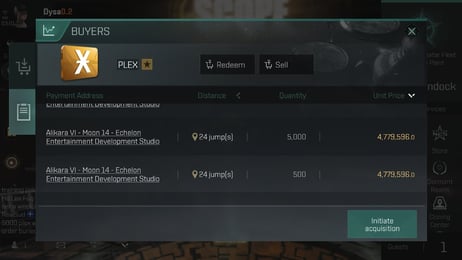
AUR acts as the entry point into the premium economy. While AUR cannot be sold directly on the regional market for ISK, you can convert AUR into PLEX within the in-game store. Once converted, PLEX can either be spent on Omega game time or listed on the open market for other Capsuleers to purchase with ISK. This system gives you full flexibility to fund your skill queues, replace destroyed ships, or build corporate infrastructure.
Step-by-Step Guide: How to Top Up EVE Echoes AUR on ArcTopup
Recharging your AUR balance takes just a few steps:
- Select Your Package: Review the available AUR denominations on the ArcTopup product page. Current pricing and bonus pack structures are visible directly on the live checkout interface.
- Enter Your User ID: Type your numeric pilot User ID into the designated field.
- Select Server: Choose Aurora from the server dropdown list.
- Proceed to Checkout: Select your preferred payment option from the available regional and international payment channels.
- Receive Your AUR: Complete the payment. Your AUR credits are sent directly to your pilot wallet in-game.
How to Find Your EVE Echoes User ID and Server
To ensure your AUR arrives without delay, locate your exact numeric User ID using the following steps inside the game client:
- Launch EVE Echoes on your mobile device or emulator.
- Tap your Pilot Avatar located in the upper-left corner of the main screen.
- Open your Pilot Profile sheet.
- Look below your character name and corporation tag to find your numeric User ID.
- Confirm that your active server is Aurora.
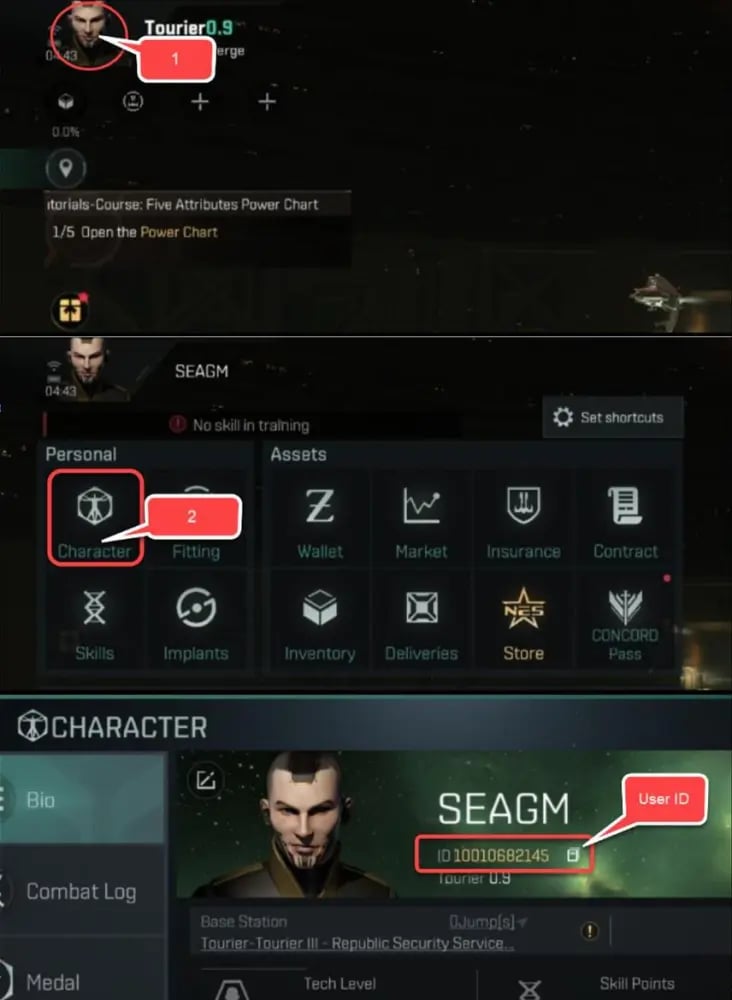
Double-check the numeric sequence before submitting your order on ArcTopup to prevent delivery to an incorrect account.
Safe Space Trading: Password-Free Direct Top-Up Guarantee
Account security is essential for any Capsuleer holding valuable ships, high-tech modules, and corporate assets. ArcTopup uses a direct API UID recharge system designed to eliminate account vulnerabilities:
- Zero Password Sharing: You will never be asked for your Google Play, Apple ID, Facebook, Twitter, or NetEase login credentials.
- No Account Handover: The recharge process interacts only with public character identifiers (User ID and Server).
- Encrypted Checkout: Every transaction is processed through encrypted payment gateways to protect personal billing data.
- Clean Delivery: AUR arrives as legitimate in-game credit, maintaining full compliance with standard pilot wallet balances.
Is EVE Echoes Pay to Play in 2026?
In 2026, EVE Echoes continues to operate on a hybrid Alpha / Omega Clone model. New pilots can download and play for free under the Alpha clone classification, gaining access to basic Tech Level ships, standard mining barges, and entry-level combat cruisers.
However, advanced Tech Level ships (such as Tech IX and Tech X Battleships, Dreadnoughts, and Force Auxiliaries), high-yield planetary production, and accelerated skill training require an Omega Clone state. An EVE Echoes AUR top up gives pilots the ability to acquire PLEX for Omega maintenance or secure skill point bundles directly, significantly speeding up the training time required to fly advanced hulls.
What to Do If Your AUR Recharge Does Not Appear Immediately
If your AUR does not display in your wallet immediately after completing your purchase, follow these troubleshooting steps:
- Force a Client Sync: Dock at any station, open your wallet, or jump to an adjacent star system to force the game client to refresh its balance sheet.
- Restart the Game: Completely close the EVE Echoes application from your device task manager and relaunch it.
- Check ArcTopup Order Status: Visit the order history section on ArcTopup to confirm your payment status shows as completed.
- Verify Your UID: Check your receipt to ensure the User ID entered matched your character sheet.
- Contact ArcTopup Support: If your balance has not updated after a few minutes, reach out to the ArcTopup customer support team with your order number and pilot User ID for rapid resolution.
Frequently Asked Questions
What is EVE Echoes AUR used for?
AUR (Aurum) is used to buy New Eden Store bundles, Nanocores, skill point supplies, exclusive ship liveries, and PLEX for Omega Clone game time.
How do I find my EVE Echoes User ID?
Tap your pilot avatar in the top-left corner of the screen. Your numeric User ID is displayed under your character name on the profile page.
Which server do I choose when topping up EVE Echoes AUR?
Select Aurora, which is the global operational server for EVE Echoes pilots worldwide.
Do I need to give my EVE Echoes account password to recharge AUR?
No. ArcTopup requires only your pilot User ID and server selection. You do not need to share passwords or login credentials.
Can AUR be converted into PLEX or ISK in EVE Echoes?
AUR can be converted into PLEX directly through the New Eden Store. PLEX can then be sold on the regional market to other players for ISK.
Is EVE Echoes pay to play in 2026?
EVE Echoes is free to download and play with an Alpha Clone. Activating Omega status through AUR or PLEX unlocks high-tech ships, full market privileges, and faster skill training queues.
How long does it take for the AUR top-up to reflect in my game account?
Direct top-ups on ArcTopup are processed immediately after payment verification. Your AUR balance typically reflects in your wallet within moments of transaction completion.
Current packages and prices
Current base prices exclude Tax. Tax, payment fees and coupon adjustments are shown at checkout.
| Package | Price |
|---|---|
| 25 AUR | USD 0.91 |
| 125 AUR | USD 4.24 |
| 265 AUR | USD 8.49 |
| 525 AUR | USD 16.97 |
| 1315 AUR | USD 42.41 |
| Tech Leap Program | USD 65.30 |
| 2750 AUR | USD 84.81 |