Compare in-game store purchases and direct UID recharge in this EVE Echoes AUR top-up comparison to find the safest, highest-value method for your pilot.
Pilots across New Eden burn substantial real-money capital fitting faction cruisers, pushing Nanocore upgrades, and funding sovereign wars. In EVE Echoes, Aurum (AUR) remains the undisputed core of that economy.
Every pilot eventually faces a choice: tap the in-game buy button through Google Play or the iOS App Store, or purchase AUR via web-based Player ID top-ups. The difference comes down to raw purchasing power, delivery speed, and account security.
Default mobile store markups waste real money. This guide compares in-game mobile checkouts with web UID recharge options so you can secure the highest possible AUR yield per dollar spent.
The Currency Architecture: What AUR Buys in New Eden
AUR is the hard premium currency of EVE Echoes. While ISK is earned through mining, ratting, or market speculation, AUR enters the universe exclusively through direct real-money purchases.
Once credited to your account, AUR serves several core economic functions:
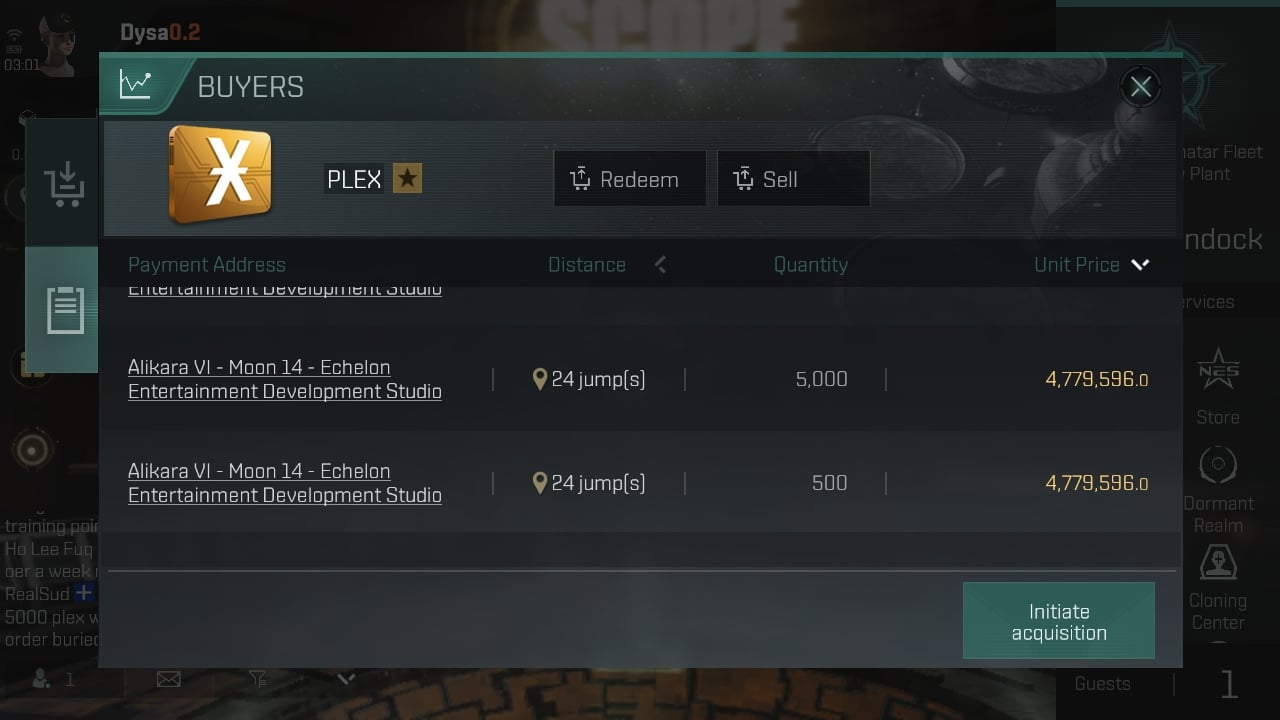
- PLEX Conversion: Convert AUR directly into PLEX to trade on the market for ISK, activate Omega clone status, or place regional trade orders.
- Tech Leap Acceleration: Access bundled skill plans and acceleration tokens through the Tech Leap Program to fast-track pilot Tech levels.
- Skill Extraction and Injection: Purchase skill extractors with AUR to pull skill points into tradeable skill injectors for quick re-speccing.
- CONCORD Pass Progression: Unlock premium passes and high-tier specialization skills requiring 36,000 to 60,000 Pass Points in the store.
- High-End Ship Skins and Nanocores: Acquire combat Nanocores and hull coatings sold exclusively for premium currency.
Fleet logistics demand massive capital. In the 2026 Megacorporation League, tournament entry fees run at 10 billion ISK for the Standard Tonnage bracket and 30 billion ISK for the Small Capital Ship bracket. When alliances prepare for competitive seasons, efficient currency conversion is mandatory.
EVE Echoes operates on a completely independent mobile shard. Currencies, PLEX, and items bought for PC EVE Online (Tranquility or Serenity servers) do not transfer to EVE Echoes. Every purchase must target the mobile title directly.


Mobile App Stores vs. Direct Web UID: The Core Mechanics
In-game purchases on iOS and Android route through Apple or Google, which charge developers platform fees of up to 30%. To offset these cuts, publishers keep in-app pricing fixed and rarely offer bonus currency tiers within mobile client interfaces.
Direct web UID recharges bypass mobile storefront processing. Instead of logging into an app store account, you submit only your public numeric Player ID (Character UID) on a web portal. The portal uses publisher backend APIs to credit AUR directly to your character wallet in space.
Without mobile store commissions, web distribution channels pass savings back to players through lower base prices or higher bonus currency yields.
Account synchronization remains seamless across ecosystems. Because EVE Echoes uses unified NetEase backend architecture, any AUR credited to your Player ID appears immediately whether you log in on iOS, Android, or a PC emulator.
Price and Value Breakdown Across Recharge Channels
Evaluating recharge options requires balancing delivery speed, credential safety, and pricing efficiency.
The table below outlines how in-game app store purchases compare to third-party direct UID storefronts and official publisher portals.
| Recharge Channel | Pricing Structure | Credentials Required | Typical Fulfillment Time | Value Rating |
|---|---|---|---|---|
| In-Game App Stores (iOS / Google Play) | Standard fixed mobile tiers ($0.99 to $99.99) | Biometric / App Store Account Login | Instantaneous (In-app) | Moderate |
| Direct Web UID Top-Up | Discounted base pricing & promotional bundles | Public numeric Player ID only | Under 60 seconds (Automated) | Excellent |
| NetEase Publisher Web Top-Up | Tiered packages with bonus AUR + loyalty points | User ID & Server Selection | 1 - 3 minutes | High |
Direct UID recharges consistently offer superior AUR-per-dollar ratios by circumventing mobile app store commission structures while maintaining rapid automated delivery.
In-app purchases charge full retail rates on every transaction. By contrast, discounted EVE Echoes AUR packs available through external web portals provide identical in-game purchasing power at a lower out-of-pocket cost.
Bonus Ratios and Denomination Tiers
EVE Echoes distributes AUR across structured denomination tiers from small top-ups to large bulk packs. Standard microtransaction brackets run at $0.99, $2.99, $4.99, $9.99, $29.99, $49.99, and $99.99, alongside fixed options like the 2,750 AUR bundle.
In-game stores maintain flat AUR allocations per tier. Web top-up platforms attach scaling bonus percentages as purchase volume increases.
The table below outlines pack behaviors across standard pricing tiers.
| Denomination Tier | Standard Base AUR Yield | Web Bonus Yield Potential | Primary Tactical Use Case |
|---|---|---|---|
| $0.99 Tier | ~60 AUR | Low / Zero Bonus | Quick emergency top-up for market fees |
| $4.99 Tier | ~330 AUR | +2% to +5% Bonus Units | Basic Monthly Omega Clone activation |
| $29.99 Tier | ~2,000 AUR | +5% to +8% Bonus Units | CONCORD Pass unlocks & Nanocore materials |
| 2,750 AUR Pack | 2,750 AUR Fixed | Discounted Cash Price | Targeted skill extraction & Tech Leap plans |
| $99.99 Tier | ~6,800 AUR | +10% to +15% Bonus Units | Capital fleet funding & massive PLEX conversion |
Higher denomination packs purchased through direct UID routes deliver exponential value scaling compared to buying multiple smaller tiers in-game.
Regional tax rules also impact checkout totals. Mobile app stores lock sales tax and VAT to your registered Apple ID or Google Play country profile. Web platforms calculate taxes directly during payment processing based on your billing address, frequently resulting in sharper pricing.
Account Security: Legitimate UID Systems vs Credential Scams
Account security is critical when managing capital fleets and years of accumulated skill points.
The fundamental rule is absolute: a legitimate direct web recharge will never ask for your password.
Direct UID recharges use NetEase public query APIs and require only your numeric Player ID. This ID functions like a bank routing number—anyone can deposit AUR into it, but nobody can log in, extract your skill points, or reprocess your ships using that number alone.
Credential scams operate differently. They demand your NetEase login, email credentials, or social auth tokens under the guise of loading cheap packs. Handing over login details violates terms of service, risks permanent account bans, and exposes your hangar to total liquidation.
The comparison table below outlines the differences between safe direct top-ups and credential-stealing schemes.
| Verification Factor | Legitimate Web UID Service | Dangerous Credential Scam |
|---|---|---|
| Information Requested | Numeric Character Player ID only | Email login, account password, 2FA codes |
| Account Access | Zero access to your character or assets | Complete takeover of your game account |
| Fulfillment Process | Automated API transfer to game server | Manual login by an unknown third party |
| Security Risk | 100% safe (Public identifier) | Total loss of account, ships, and items |
| Ban Risk | None (Standard direct recharge) | High (Violates credential-sharing policies) |
Legitimate third-party platforms never require login access; they deliver AUR purely through your public character identifier.
If any website or seller asks for your 2FA authentication prompt or NetEase password, cancel the transaction immediately.
Pilot Spending Profiles: Choosing the Right Purchase Route
Every pilot plays EVE Echoes with distinct operational goals and budgets.
+-------------------------------------------------------------------------+
|                       PILOT SPENDING PROFILES                           |
+-------------------------------------------------------------------------+
|  [F2P / Low-Spender]                                                    |
|  Goal: Basic Omega Maintenance & Skill Training                         |
|  Budget: $5 - $15 / month                                               |
|  Best Strategy: In-game or low-tier UID top-up for exact Omega PLEX.    |
|  Recommendation: In-game store is acceptable for speed, but single-pack |
|                  UID top-ups save pennies that add up over time.        |
+-------------------------------------------------------------------------+
|  [Mid-Tier Combatant]                                                   |
|  Goal: CONCORD Pass, Nanocores, Tech Leap SP Plans                      |
|  Budget: $30 - $100 / month                                             |
|  Best Strategy: 2750 AUR packs & mid-tier web recharges.                |
|  Recommendation: Direct UID web recharge is the clear winner. Bonus     |
|                  ratios significantly outpace standard mobile prices.   |
+-------------------------------------------------------------------------+
|  [Fleet Commander / Alliance Industrialist]                             |
|  Goal: Capital Ship Replacement, Corporation War Chests, 30B ISK Events |
|  Budget: $200+ / month                                                  |
|  Best Strategy: Bulk $99.99 Web UID purchases.                          |
|  Recommendation: Never buy in-game. Bulk UID web top-ups yield maximum  |
|                  bonus AUR, saving hundreds of dollars per year.        |
+-------------------------------------------------------------------------+
Pilots stocking up for tournament fits can buy EVE Echoes AUR via UID to secure maximum currency yields without losing capital to mobile app store fees.
Step-by-Step Guide: How to Execute a Direct UID Recharge
Executing a direct UID recharge takes less than two minutes. Accuracy is critical because transactions delivered to mistyped IDs cannot be reversed.
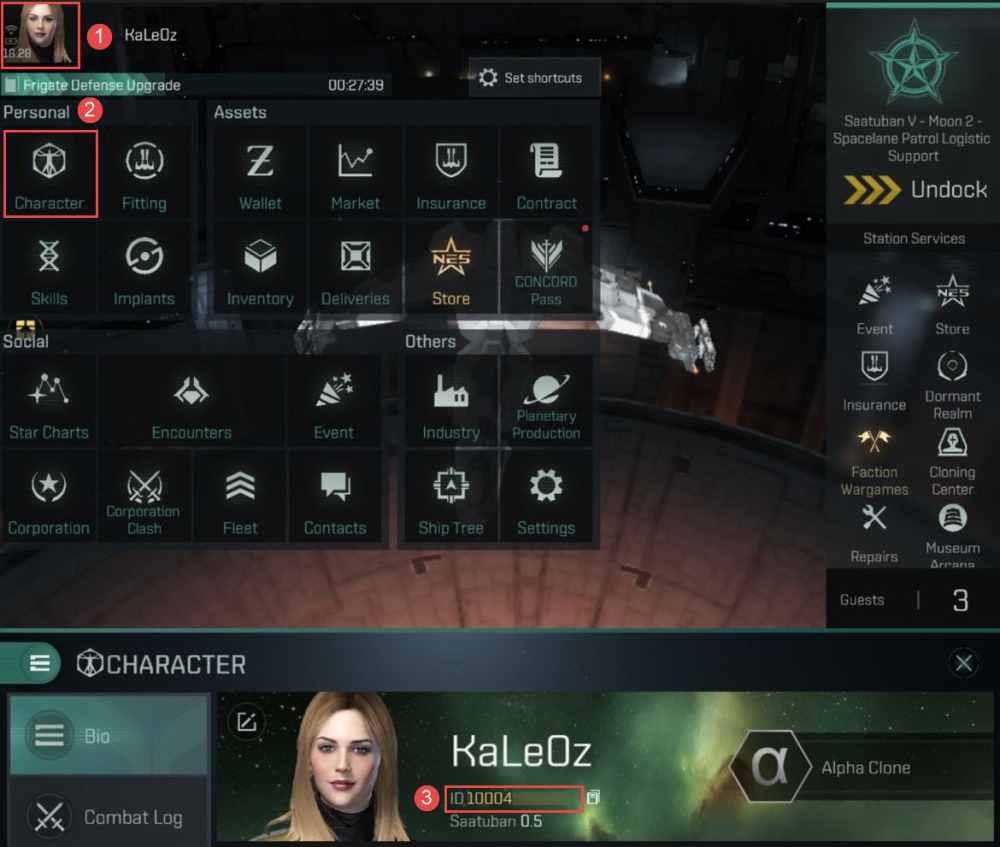
Step 1: Locate Your Numeric Player ID
- Launch EVE Echoes on your mobile device or emulator.
- Tap your character portrait in the top-left corner of the screen while docked in a station or floating in space.
- Open the Character Info sheet.
- Locate your Player ID (the numeric sequence listed beneath your pilot name).
- Copy the ID directly from the client.
Step 2: Select Your AUR Package Online
- Visit your selected direct top-up platform.
- Navigate to the EVE Echoes product catalog.
- Choose your desired AUR denomination tier (such as the 2,750 AUR pack or standard tier bundles).
Step 3: Enter Your Player ID and Confirm Details
- Paste your numeric Player ID into the designated field.
- Verify every digit. Ensure you have not entered a corporation ID or character name.
- Proceed to checkout to complete payment.
Step 4: Verify Delivery in New Eden
- Once payment clears, the fulfillment system delivers the AUR automatically in under 60 seconds.
- Return to the game client.
- Open your character wallet or store panel to verify your updated AUR balance.
- If your balance does not refresh immediately, open your wallet tab or re-dock at a station to force a UI query.
When ready to recharge, you can order EVE Echoes AUR securely using only your public pilot identifier for rapid automated delivery.
Common Top-Up Pitfalls and How to Avoid Them
Avoid these three common operational errors when buying AUR outside the in-game client.
1. The Mistyped Player ID Trap
Automated direct delivery systems do not perform name-matching verification; they push AUR directly to the numeric ID entered at checkout. If you miskey a digit and that ID belongs to another registered pilot, the AUR deposits into that account. Because digital currency distributions are final, external storefronts cannot recall misdirected AUR. Always copy and paste directly from the game client.
2. Confusing EVE Online PC with EVE Echoes Mobile
EVE Online (PC) and EVE Echoes (Mobile) operate on separate server infrastructure. Purchasing PC PLEX does nothing for your mobile capsuleer. Always ensure the product listing explicitly states EVE Echoes.
3. Server Desynchronization Delays
While automated delivery systems credit your balance in under 60 seconds, client caches can occasionally lag behind. If your balance does not update instantly, do not purchase a second pack. Dock at a station, jump a stargate, or restart the mobile client to force a fresh balance query to the NetEase servers.
Frequently Asked Questions
What is the primary difference between in-game AUR top-up and web UID recharge?
In-game purchases process through mobile app stores tied to device billing, whereas web UID top-ups credit your account directly using only your numeric Player ID at discounted base rates. Web recharges bypass app store transaction fees, yielding more currency per dollar.
Do I need to give my account password or login credentials for a web UID top-up?
No, legitimate web direct recharge services only require your numeric in-game Player ID. Never provide your NetEase login, email credentials, or 2FA verification codes to third parties.
How do I find my EVE Echoes Player ID for web top-ups?
Open the main menu in-game while docked or in space and tap your character profile avatar. Your numeric Player ID is displayed directly on the character information sheet.
Can I transfer AUR or PLEX purchased for EVE Online PC over to EVE Echoes?
No, EVE Echoes operates on an independent mobile shard with separate currencies and economies. Purchases made for EVE Online PC cannot be transferred or used in EVE Echoes.
What happens if I submit an incorrect Player ID during a web recharge?
The AUR will be permanently delivered to the account associated with the number you entered. Web storefronts cannot refund or reverse completed automated deliveries once processed.
How quickly does AUR reflect in-game after completing a web UID top-up?
Web UID top-up systems typically deliver AUR to your in-game wallet in under 60 seconds. You can verify delivery immediately by opening your in-game wallet.
Will AUR purchased via web UID top-up work on both iOS and Android?
Yes, EVE Echoes character data is synchronized across platforms through NetEase's game backend. Once AUR is credited to your Player ID, it is accessible regardless of the mobile OS you use to log in.
Final Verdict: The Optimal Recharge Strategy for 2026
Paying default in-game app store rates costs pilots money on every pack.
Direct UID web recharges eliminate Apple and Google platform markups, offer higher bonus percentages on mid-to-high denomination tiers, and protect account security by requiring nothing more than a public numeric Player ID.
Double-check your Player ID before submitting payment, and use direct web top-ups to maximize your purchasing power across New Eden.






Comments