To convert AUR to PLEX in EVE Echoes, open the in-game New Eden Store, access the PLEX category, and exchange your AUR balance directly for PLEX (ArcTopup). Because AUR is account-bound, it cannot be listed directly on regional market boards; exchanging it inside the store interface is the mandatory mechanism for liquidating premium currency into tradable assets or Omega subscription time.
Why AUR Cannot Be Sold on the Regional Market
Pilots often search station hangars or market sell tabs after acquiring AUR, but find nothing. AUR functions strictly as an account-bound wallet balance, not a physical cargo item.
Because AUR cannot be listed on market orders, turning real-money purchases (VG247) into ISK requires converting it to PLEX first. Once exchanged in the store catalog, PLEX acts as a standard tradable commodity: you can hold it, consume it for Basic or Standard Omega clone status, or list it on the regional market for ISK.
Unlike PC EVE Online, which phased out Aurum and merged it into PLEX, mobile EVE Echoes maintains AUR as an active, distinct currency alongside PLEX.
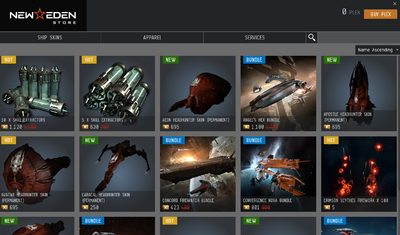


Step-by-Step Store Exchange Process
Converting your balance takes less than a minute once docked or floating safely in space.
- Open the main pilot menu by tapping your pilot portrait in the upper-left corner.
- Tap the New Eden Store icon.
- Browse the store tabs and select the PLEX category.
- Select the exchange bundle that corresponds to your available AUR balance.
- Confirm the transaction to finalize the exchange.
Your PLEX balance will update immediately. If your goal is generating ISK, open your inventory, transfer the PLEX to a station hangar, and create a sell order on the regional market at current local prices.
Resolving an Unsynced AUR Balance
A recent purchase of EVE Echoes AUR can occasionally lag in updating your wallet balance when client-server balance sheets desync after a transaction.
Do not resubmit transactions repeatedly. You can force the EVE Echoes client to request an updated ledger using any of these actions:
- Dock at any nearby station or outpost.
- Open your character wallet overview to trigger a balance call.
- Jump through a stargate into an adjacent system.
- Force close the application and complete a clean restart.
Once the client refreshes, the updated AUR quantity will appear, ready for the New Eden Store PLEX exchange.






Comments