
How to Complete an Opa Live Top Up with Your UID
Getting credits for Opa Live keeps you connected with your favorite streamers, lets you send animated virtual gifts, and unlocks premium room perks across live broadcasts. ArcTopup provides a direct recharge system designed around account security and immediate order processing. You only need your numerical user ID (UID) to credit your balance.
Follow these steps to complete your order:
- Select Your Credit Amount: Review the available credit packages shown in the live selector on this page. Choose the package that matches your gifting or interaction needs.
- Enter Your UID: Type your numerical Opa Live user ID into the designated player ID field. Double-check the digits to prevent delivery errors.
- Proceed to Checkout: Select your preferred payment method from the available local and international options.
- Confirm Payment: Complete the transaction through the encrypted checkout screen.
- Check Your In-App Balance: Open the Opa Live app, go to your profile, and verify that your newly added credits have arrived.
Because our system delivers directly via the internal numerical user ID, your account remains active throughout the process with zero downtime.
Where to Find Your Opa Live UID in the App
Locating your UID takes only a few taps within the Opa Live mobile application. Your UID is a permanent numerical string assigned to your profile upon registration, separate from your customizable display name.
Here is how to locate it:
- Open the Opa Live app on your mobile device and log in to your account.
- Tap the Profile (or "Me") icon located at the bottom-right corner of the main screen.
- Look directly beneath your profile avatar and display name at the top of the screen.
- You will see a field labeled ID or UID followed by a unique series of numbers.
- Tap the copy icon next to the number, or write down the exact digits.
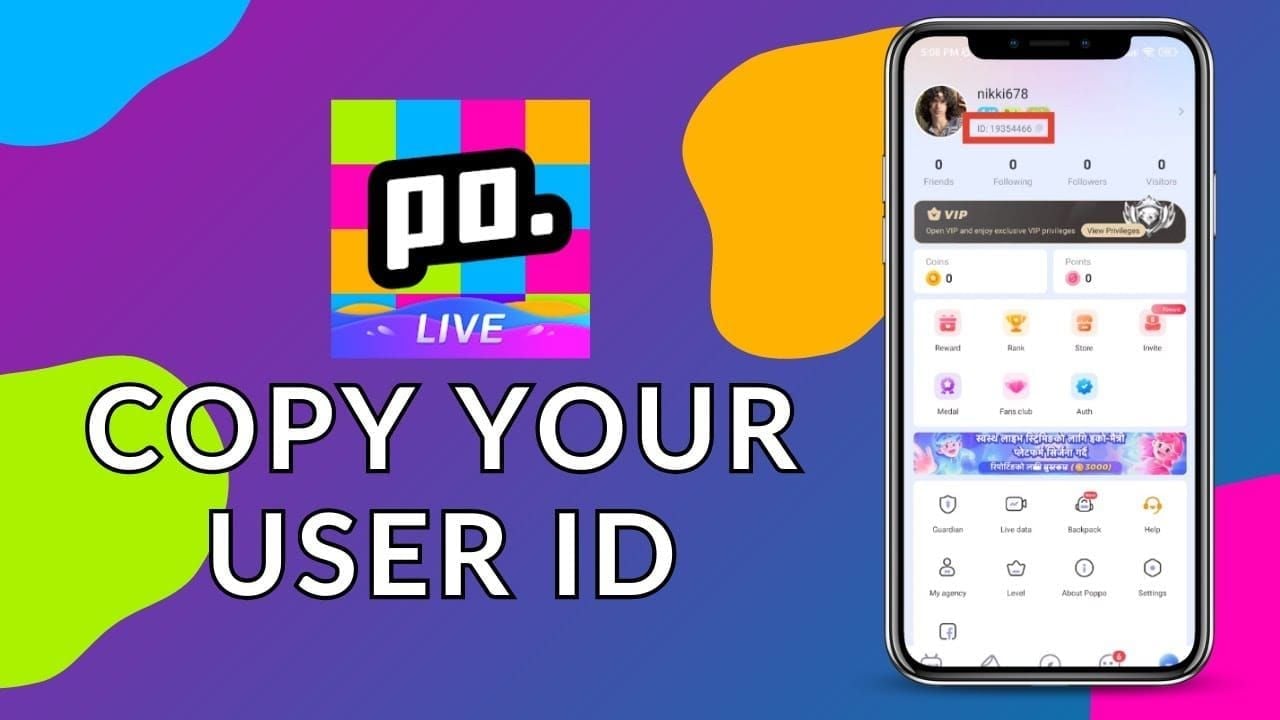
Ensure that you copy only the numbers. Do not include spaces, symbols, or the word "ID" when entering the value into ArcTopup.
Opa Live Credit Packages and Live Checkout Guide
Opa Live uses virtual credits to support creators, unlock exclusive badges, enter private interactive rooms, and purchase dynamic gifting animations. ArcTopup updates its catalog in real time to reflect current package options and rates for 2026.
| Package Tier | Primary In-App Use Case | Delivery Requirement |
|---|---|---|
| Starter Packs | Small chat gifts, basic stickers, profile badges | Numerical UID only |
| Standard Packs | Interactive room entries, animated stream gifts | Numerical UID only |
| Premium Packs | High-tier gifting effects, VIP broadcast status | Numerical UID only |
| Bulk Bundles | Continuous creator support, long-term credit reserves | Numerical UID only |
Current pricing, active bundle sizes, and currency conversions are dynamically displayed on the live checkout interface above. Choose your tier based on your planned in-app activity and complete your order in seconds.
Supported Payment Methods for Opa Live Top-Up in 2026
ArcTopup supports a comprehensive range of payment channels to ensure smooth transactions regardless of your location. When purchasing an Opa Live recharge in 2026, you can select from multiple reliable checkout options:
- Credit and Debit Cards: Visa, Mastercard, and other major international bank card networks.
- Digital Wallets: Popular regional e-wallets configured for direct mobile payments.
- Online Bank Transfers: Secure direct bank transfer options depending on your country.
- Local Payment Gateways: Region-specific billing systems tailored for quick mobile checkouts.
All transactions are routed through encrypted payment processing gateways. Real-time conversion rates and available localized options appear on the checkout page before you finalize payment.
Account Security: Why You Never Need to Share Passwords
Account safety is the foundation of the ArcTopup experience. A legitimate top up system should never ask for sensitive credentials.
- Zero Password Requirement: ArcTopup only requires your numerical Opa Live UID. We will never ask for your account password, email login, or two-factor verification codes.
- No Third-Party Logins: You do not need to link social media accounts or grant third-party application permissions to receive credits.
- Protection Against Account Takeover: Keeping your login details private eliminates the risk of unauthorized access or account theft.
- Encrypted Billing: All billing information is processed using industry-standard SSL encryption protocols, protecting your financial data at every step.
Never share your account credentials with anyone claiming to offer direct balance top-ups. A verified UID is all that is required for direct balance replenishment.
Troubleshooting Delayed Delivery and Incorrect UID Entry
While the vast majority of orders complete within moments, occasional network anomalies or user input mistakes can occur. Here is how to handle common scenarios:
1. Balance Not Updating Immediately
If your credits do not appear right away:- Force-close the Opa Live app on your phone and relaunch it to refresh your server connection.- Go to your wallet or balance tab to trigger a fresh data fetch.- Check your payment confirmation email from ArcTopup to confirm your payment was completed successfully.- In rare cases of high server congestion, allow a few extra minutes for the server to sync.
2. Entering an Incorrect UID
- If the UID does not exist: The system will typically reject the order, and our customer support team can assist you in updating the UID to the correct one.
- If the UID belongs to another active user: Credits delivered to an active, valid account entered by mistake cannot be reversed once processed. Always verify your UID digits carefully before clicking confirm.
3. Payment Processing Lag
If funds were deducted from your payment method but your ArcTopup status remains pending, the payment gateway may be completing automated anti-fraud checks. Keep your transaction reference number ready and contact ArcTopup customer support if the status does not update promptly.
Frequently Asked Questions About Opa Live Top Up
How does the Opa Live top up process work on ArcTopup?
The process is direct and automated. You pick your desired credit package on ArcTopup, type your Opa Live numerical UID into the player field, choose your payment method, and complete checkout. Our system routes the credits straight to your in-app profile balance.
Where do I find my numerical Opa Live UID?
Open the Opa Live application, tap the Profile icon in the bottom-right corner, and locate the ID numbers listed directly beneath your avatar and username. Tap the copy icon to get your exact UID.
Do I need to provide my Opa Live account password to top up?
No. ArcTopup never asks for your password, PIN, or verification codes. You only need to provide your public numerical UID to receive credits.
What should I do if I entered the wrong UID during checkout?
If you realize you entered an incorrect UID, contact ArcTopup customer support immediately with your order ID and the correct UID. If the order has not yet been processed by the system, our support team can correct the destination details.
How quickly will the credits reflect in my Opa Live balance?
Credits are delivered directly through the system shortly after payment confirmation. Once the transaction completes, refresh your Opa Live app balance to view the updated total.
Is it safe to buy Opa Live top up from ArcTopup?
Yes. ArcTopup uses secure, encrypted payment systems and strictly adheres to UID-only top-ups, ensuring your personal login credentials remain completely protected.
Current packages and prices
Current base prices exclude Tax. Tax, payment fees and coupon adjustments are shown at checkout.
| Package | Price |
|---|---|
| Opa Live - Opa Live*20000 | USD 1.50 |
| Opa Live - Opa Live*25000 | USD 1.87 |
| Opa Live - Opa Live*50000 | USD 3.75 |
| Opa Live - Opa Live*100000 | USD 7.50 |
| Opa Live - Opa Live*500000 | USD 37.49 |
| Opa Live - Opa Live*1000000 | USD 74.98 |
| Opa Live - Opa Live*5000000 | USD 374.90 |
| Opa Live - Opa Live*15000 | USD 1.13 |






























































