
How to Top Up Salam Credits Online with Your UID
To complete a Salam top up on ArcTopup, you only need your unique user identification number (UID). This direct top-up system connects straight to your profile, delivering credits without requiring any login credentials or account handoffs.
Follow these simple steps to place your order:
- Select Credit Package: Choose the desired Salam credit denomination from the catalog above.
- Enter Your UID: Type your numeric Salam UID into the designated player field. Double-check the digits to ensure they match your in-app profile.
- Review Order Summary: Verify the selected amount and the final total shown on the live checkout screen.
- Choose Payment Method: Pick your preferred payment option from the available regional and international channels.
- Complete Checkout: Finalize the transaction. Once the payment clears, the system processes your recharge directly to the specified UID.
+-------------------------------------------------------------------------+| Salam Top Up Workflow || || [Select Package] -> [Enter UID] -> [Confirm Live Price] -> [Credit Sent]|+-------------------------------------------------------------------------+Step-by-Step Guide: How to Find Your Salam UID
Your Salam UID is the exclusive identifier tied to your user account. Providing the correct UID ensures your purchased credits reach your balance instantly.
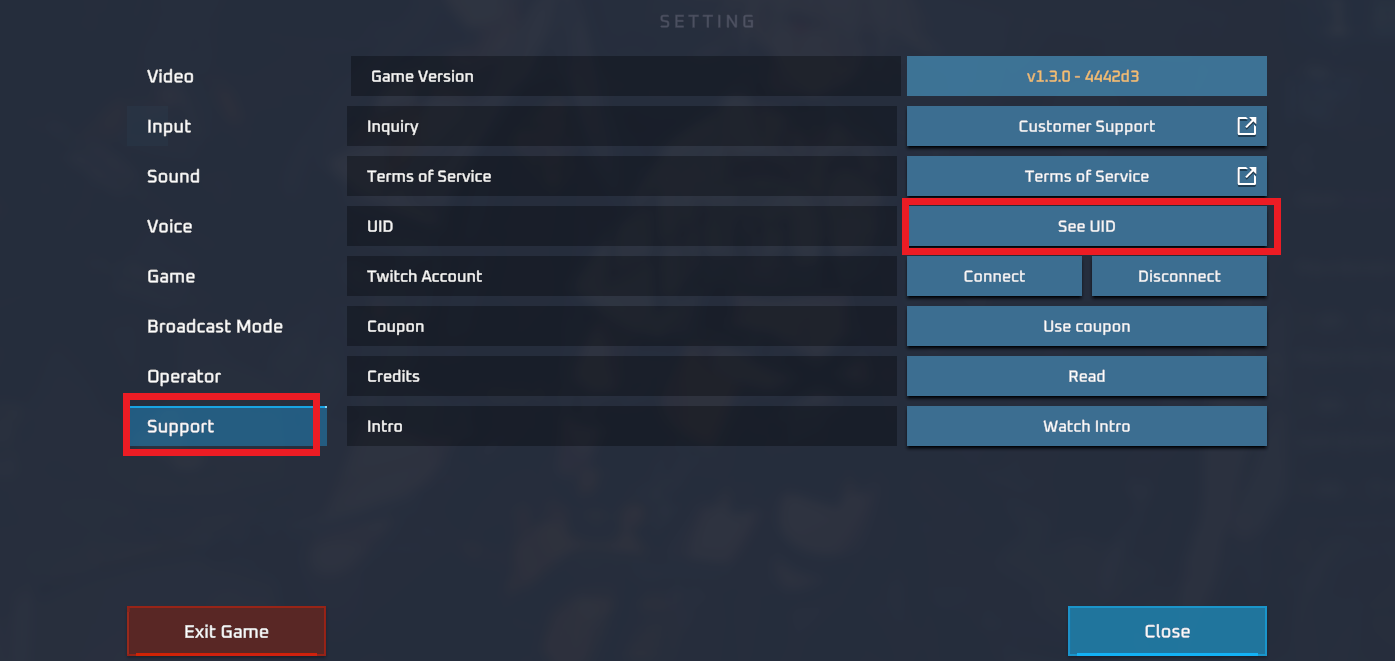
Follow this visual walkthrough to locate your UID inside the application:
- Launch the Salam App: Open the app on your mobile device and log in to your account.
- Go to Profile: Tap on the Me or Profile icon located in the bottom menu bar.
- Locate the User ID: Look under your avatar and display name at the top of the profile screen. Your UID appears as a series of numbers.
- Copy the UID: Tap the copy icon next to the number, or write down the exact sequence of digits.
| UID Field Verification | Correct Format Example | What to Avoid |
|---|---|---|
| Numeric UID | 123456789 | Do not enter your display nickname |
| Spacing | No spaces (87654321) | Do not paste spaces or symbols (#, @) |
| Account Type | Primary active account | Do not use guest accounts without binding |
App Credit Top-Up vs. Telecom Airtime Recharges
It is essential to understand the distinction between a direct digital app recharge and traditional telecom mobile airtime reloads.
- Salam Digital App Credits: This service credits your in-app balance directly using your numerical account UID. These credits are used within the Salam platform for digital features, gifting, and premium services.
- Telecom SIM Airtime: Telecommunications recharges require a local mobile phone number rather than an app UID and are applied exclusively to SIM cards for cellular calls and data.
ArcTopup processes direct digital Salam app refills. Always ensure you input your in-app UID and not a phone number when completing your order.
Supported Payment Options for Salam Recharge
ArcTopup provides a transparent checkout experience. Current rates, available currencies, and processing fees are calculated dynamically on the live checkout page based on your selected region and payment method.
Available payment categories include:
- Credit and Debit Cards: Visa, Mastercard, and other major card networks.
- Digital Wallets: Convenient local and regional e-wallets.
- Online Bank Transfers: Secure direct bank routing in supported territories.
- Localized Payment Gateways: Tailored regional channels allowing you to pay in your local currency without hidden conversion charges.
Select your package and region to view the real-time pricing and payment breakdown before confirming your purchase.
Delivery Time and Checking Your Salam Account Balance
Direct UID recharges are handled through an automated delivery pipeline. In standard operating conditions, credits are transferred to your account immediately after your payment is authorized.
How to Verify Your Updated Balance
- Close the Salam application completely on your device.
- Reopen the app to initiate a clean server sync.
- Navigate to your Wallet or Profile section.
- Confirm that the new credit balance reflects your recent purchase.
If the balance has not updated within a few minutes of transaction completion, check your ArcTopup order status page to confirm that the payment cleared successfully.
Safety and Security: Why ArcTopup Needs Only Your UID
Account safety is a core priority when buying digital goods. ArcTopup uses a direct-to-UID infrastructure that eliminates the need for sensitive account information.
- No Passwords Required: You will never be asked to share your Salam account password, email access, or social login credentials.
- Zero Risk of Account Sharing: Because our system routes credits directly through your public numeric UID, your private messages, personal settings, and account data remain entirely protected.
- Secure Payment Processing: Transactions run through encrypted checkout protocols, ensuring your financial information is guarded by industry-standard encryption standards.
Never share your login passwords or verification codes with anyone offering top-up services. A genuine direct top-up only requires your public UID.
Troubleshooting Common Salam Recharge and UID Errors
If you experience an issue while placing an order or waiting for credits, use the following troubleshooting guide:
1. Incorrect UID Entered
Because top-up orders are processed automatically to the numeric identifier you submit, recharges sent to an incorrect but active UID cannot be reversed. Always copy and paste your UID directly from your Salam profile rather than typing it manually.
2. Payment Pending or Processing
Certain payment providers require extra verification before funds are released. If your transaction status shows as pending, the credits will be delivered automatically as soon as your bank confirms the payment.
3. Server Synchronization Delays
During scheduled app maintenance or peak usage hours, credit balance updates inside the app can take a few minutes. Logging out and logging back in will force your app client to fetch the latest balance from the main server.
4. Contacting Support
If your transaction has completed on ArcTopup but your balance does not update after refreshing, reach out to our 24/7 customer support team with your Order ID and Salam UID for prompt assistance.
Frequently Asked Questions About Salam Top Up
How do I top up Salam credits using my UID?
Select your credit package on ArcTopup, input your Salam numeric UID into the player field, review the live price, and proceed through checkout. The credits are credited directly to your account upon payment confirmation.
Where can I find my Salam UID?
Open the Salam app, tap on the Profile or Me tab at the bottom of the screen, and locate the numeric ID displayed beneath your avatar and username. Tap the copy icon to copy the digits directly.
Do I need to provide my Salam password to complete a top up?
No. ArcTopup strictly requires only your public numeric UID. We will never ask for your password, verification codes, or login credentials.
How long does it take for Salam top up credits to reflect in my account?
Credits are usually delivered immediately after payment verification. Simply restart your app to refresh your profile balance.
What should I do if I entered the wrong UID during recharge?
Direct UID deliveries process automatically. If an invalid UID was entered that does not exist, the order will fail and can be corrected. If an active UID belonging to another user was entered, the transfer cannot be recalled. Always verify your UID before confirming payment.
What payment methods can I use to buy Salam credits on ArcTopup?
ArcTopup supports credit and debit cards, regional digital wallets, and local banking solutions. You can view all real-time payment options and local currency conversions on the live checkout screen.
Current packages and prices
Current base prices exclude Tax. Tax, payment fees and coupon adjustments are shown at checkout.
| Package | Price |
|---|---|
| Salam - Salam*1000000 | USD 8.63 |
| Salam - Salam*5000000 | USD 43.16 |
| Salam - Salam*10000000 | USD 86.31 |
| Salam - Salam*500000 | USD 4.32 |































































