
PUBG G-COIN Top Up: What Is G-COIN and How Is It Used?
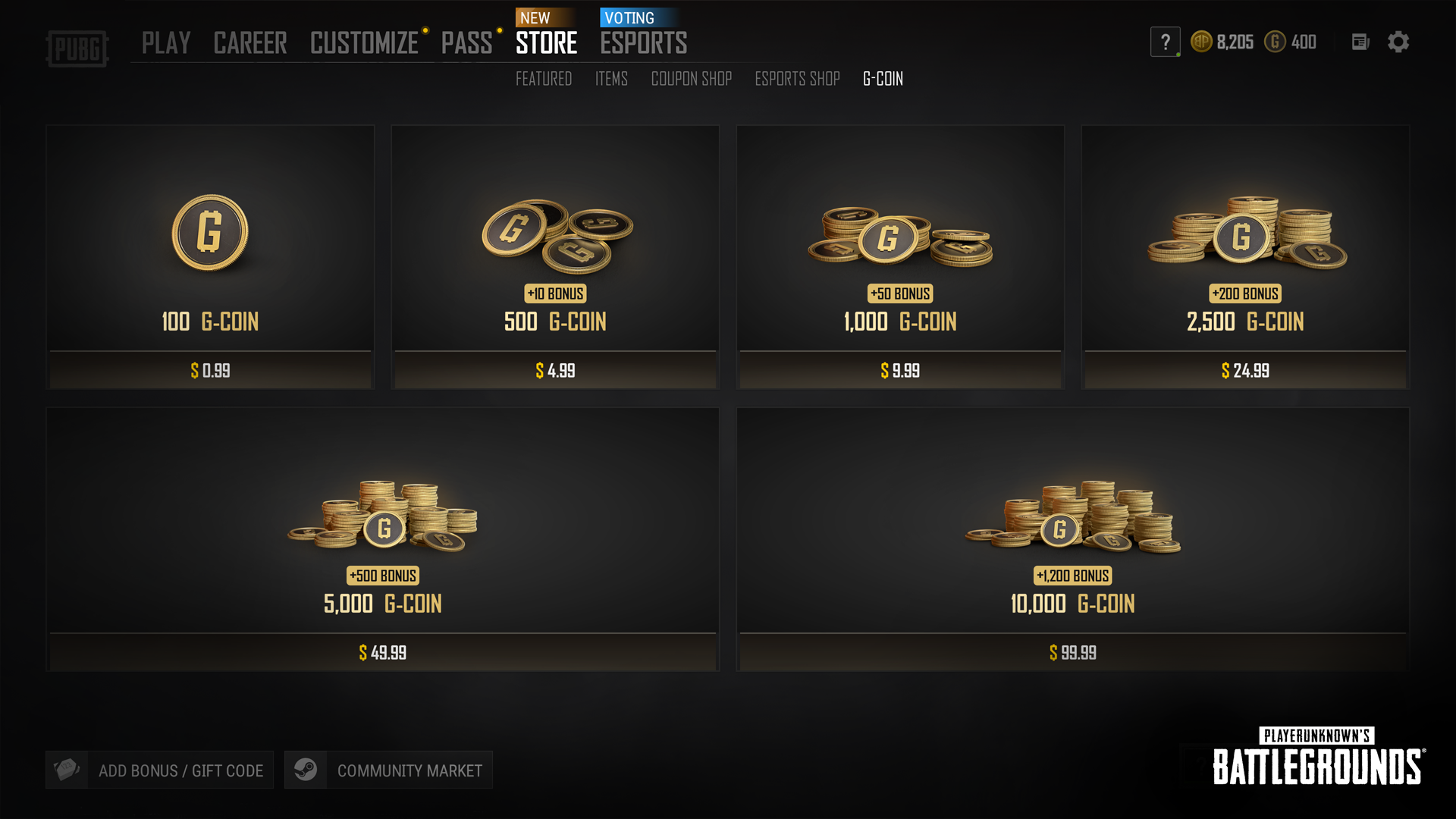
PUBG G-COIN is the official premium virtual currency used exclusively in PUBG: BATTLEGROUNDS on PC. By obtaining G-COIN, players can access premium in-game content, customize their characters, and unlock progression tracks across every season.
Primary Uses for PUBG G-COIN in 2026
- Survivor Pass: Unlock premium battle pass tiers to earn seasonal outfits, weapon skins, gear blueprints, and level-up rewards.
- Contraband Crates & Progressive Weapon Skins: Open weapon crates to obtain upgradeable firearm skins such as the Beryl M762, M416, and Kar98k, along with polymers and schematics required for tier upgrades.
- The Workshop & Hunter's Chests: Purchase keys, chests, and materials to craft archival skins, vintage outfits, and rare equipment.
- In-Game Store Bundles: Buy exclusive character outfits, helmet and backpack skins, victory dance emotes, weapon charms, and spray tags.
- Account Utility Items: Acquire Nickname Change items, preset slot coupons, and BP boosts.
Step-by-Step Guide: How to Top Up PUBG G-COIN with Email
ArcTopup provides a direct recharge process that requires only your registered account email. You do not need to share passwords, authenticate third-party login sessions, or compromise your account security.
- Select Your Package: Choose the quantity of PUBG G-COIN you wish to purchase from the product catalog.
- Enter Your Account Email: Type the email address linked to your PUBG / Krafton ID into the required
Emailfield. - Confirm Details: Double-check your email spelling to ensure accurate, delay-free delivery.
- Complete Payment: Review the total on the checkout screen. Real-time pricing and available regional payment methods are displayed directly at checkout.
- Receive Your G-COIN: Once payment completes, the coins are credited to your account balance. Launch PUBG: BATTLEGROUNDS on PC to view your updated balance.
How to Verify Your Account Email and UID for Top-Up
To ensure your G-COIN arrives in the correct account, always verify the email address tied to your active game profile before finalizing your order.
Finding Your Account Email:
- Open your web browser and log in to the official Krafton ID portal (
accounts.krafton.com). - View the primary email address listed under your Account Info tab.
- Verify that your Steam account is actively linked under Connected Accounts.
- Copy that exact email address into the ArcTopup order form.
Using the verified account email prevents delivery delays and protects your purchase against routing errors.
PUBG PC vs PUBG Mobile: Understanding Currency Differences
Before ordering, make sure you are purchasing the correct currency for your platform. PUBG titles across different devices use distinct, non-transferable currencies.
- PUBG: BATTLEGROUNDS (PC / Steam / Epic Games): Uses G-COIN. This product page provides G-COIN intended for the PC version.
- PUBG Mobile (iOS / Android): Uses Unknown Cash (UC). UC cannot be converted to G-COIN or used in the PC version.
- NEW STATE Mobile: Uses NC (New State Credit), which is incompatible with both PC PUBG and PUBG Mobile.
- Console Editions (Xbox / PlayStation): Rely on platform-specific storefront wallets. G-COIN purchased for PC cannot be transferred to console profiles.
Confirm that you are playing PUBG: BATTLEGROUNDS on PC before submitting your recharge.
PUBG G-COIN Expiration Rules and Bonus Coin Management
When managing your in-game balance, keep in mind that regular purchased G-Coins and promotional bonus G-Coins carry different validity periods and consumption rules.
| G-Coin Type | Source | Validity Period | Spending Priority |
|---|---|---|---|
| Purchased G-Coin | Direct top-up / Store purchase | Up to 5 Years | Consumed second |
| Bonus G-Coin | Promotional bundles & package perks | 30 to 90 Days | Consumed first |
| Event / Reward G-Coin | In-game missions, drops, codes | 7 to 30 Days | Consumed first |
How the In-Game Store Deducts G-Coin:
The game engine automatically spends coins with the shortest remaining validity first. When you buy an item, any expiring event or bonus G-Coins are consumed before your permanent purchased balance is touched. You can check the expiration date of bonus coins directly in the in-game inventory under your wallet status.
Safe Top-Up Practices: Protecting Your Steam and Krafton Accounts
Account safety is essential when purchasing digital gaming goods. Many third-party sellers compromise buyer accounts through insecure practices. Here is how ArcTopup ensures account integrity:
- No Password Required: ArcTopup only asks for your registered account email. You will never be asked for your Steam password, Krafton password, or Steam Guard mobile authenticator codes.
- Protection Against API Scams: By avoiding direct Steam login prompts on third-party sites, you eliminate the risk of Steam Web API key hijacking and phishing redirects.
- No Account Sharing: Your account remains strictly in your hands. No third party ever accesses your profile to make manual in-game purchases.
- Clean Delivery Channels: Top-ups are processed through direct digital fulfillment systems, ensuring your account remains in good standing with publisher terms of service.
Troubleshooting Delivery and Checkout Issues
If your G-COIN balance does not update immediately after completing payment, follow these troubleshooting steps:
- Restart the Game Client: Completely close PUBG: BATTLEGROUNDS and your Steam/Epic launcher, then relaunch the game to force a server synchronization.
- Check the In-Game Store Tab: Navigate to the "Store" or "Customize" menu inside PUBG to prompt the client to refresh your current wallet values.
- Verify Transaction Status: Check your ArcTopup order status to confirm that payment processing is complete.
- Check Email Matching: Confirm that the email entered during checkout matches the Krafton ID connected to your active Steam profile.
- Contact Support: If the balance remains uncredited after restarting, reach out to ArcTopup customer support with your Order ID and transaction receipt for quick assistance.
Why Choose ArcTopup for PUBG G-COIN Recharge?
- Direct and Secure: Simple email-only order flow keeps your login credentials completely private.
- Clear Pricing: All costs and currency rates are displayed clearly at checkout without hidden processing surcharges.
- Global Support: Compatible with global PUBG PC accounts, enabling players across regions to top up without regional friction.
- Fast Fulfillment: Automated order processing ensures your G-COIN arrives promptly so you can get right back into the match.
Frequently Asked Questions
What is PUBG G-COIN used for in-game?
PUBG G-COIN is used to buy Survivor Passes, Contraband Crates, progressive weapon upgrade materials, Workshop Hunter's Chests, character clothing sets, weapon skins, name change coupons, and cosmetic emotes in PUBG: BATTLEGROUNDS on PC.
How do I top up PUBG G-COIN using my email address?
Select your preferred G-COIN package on ArcTopup, type your registered Krafton ID email address into the account field, and complete your payment at checkout. The coins are delivered straight to your account balance.
Do PUBG G-Coins expire after purchase?
Purchased G-Coins remain valid for up to 5 years under standard publisher terms. Bonus or promotional G-Coins included in event packages carry shorter expiration windows, typically ranging between 30 and 90 days. The game automatically spends the shortest-lived coins first.
Do I need to share my Steam password to top up G-Coin?
No. ArcTopup never asks for your Steam password, Krafton password, or two-factor authentication codes. Delivery requires only your registered account email.
Can I use PC PUBG G-COIN in PUBG Mobile?
No. PUBG PC uses G-COIN, whereas PUBG Mobile uses UC (Unknown Cash). Currencies cannot be transferred or shared across different platform versions.
What should I do if my PUBG G-COIN does not appear after checkout?
Restart your PUBG game client and check the in-game Store menu to refresh your wallet. If the coins do not display, check your order confirmation details and provide your Order ID to ArcTopup support for verification.
Current packages and prices
Current base prices exclude Tax. Tax, payment fees and coupon adjustments are shown at checkout.
| Package | Price |
|---|---|
| 100 G-Coin | USD 0.75 |
| 500+10 G-Coin | USD 3.76 |
| 1000+50 G-Coin | USD 7.52 |
| 2500+200 G-Coin | USD 18.79 |
| 5000+500 G-Coin | USD 37.58 |
| 10000+1200 G-Coin | USD 75.15 |