Sawa Play Top Up: In-Game Coins and Diamonds Explained
Sawa Play is a leading social gaming and voice entertainment platform in the Middle East, bringing together competitive tabletop classics and interactive live audio rooms. Whether you play traditional card games, roll dice in board game arenas, or hang out in group voice channels, in-game currency is essential for an active profile.
Sawa Play uses two main virtual currencies: Coins and Diamonds (often referred to interchangeably depending on regional app updates). Understanding how each currency functions helps you pick the right top-up pack on ArcTopup.
| Currency | Primary Function | Where to Spend |
|---|---|---|
| Coins | Table entry stakes, room games, standard gifts | Jackaroo, Baloot, Ludo, Hand, Voice Chat Rooms |
| Diamonds | Premium store items, exclusive effects, VIP status | Profile badges, entrance animations, rare virtual gifts |
Coins allow you to enter higher-stakes game rooms where skilled players compete for large pot rewards. In voice rooms, coins let you send animated gifts to room hosts and friends, boosting your social ranking on weekly leaderboards. Diamonds serve as the premium tier for unlocking luxury cosmetics, customized avatar frames, and special entrance effects when joining popular voice channels.
How to Top Up Sawa Play on ArcTopup Using User ID
Recharging your Sawa Play account on ArcTopup is straightforward and requires only your numeric User ID. You do not need to share login credentials, passwords, or linked social media accounts.
Follow these steps to complete your order:
- Select Your Package: Review the available Sawa Play coin and diamond denominations on the live checkout menu above and choose the pack you want.
- Enter Your User ID: Type your numeric Sawa Play User ID into the designated input box. Double-check the numbers to ensure accuracy.
- Select Your Payment Option: Choose your preferred payment method from the available checkout choices.
- Confirm and Pay: Complete the payment process. ArcTopup processes the transaction directly to your game profile.
- Check Your In-Game Balance: Open Sawa Play on your mobile device to see your updated coin balance.
Live pricing, promotional bundles, and denomination options are shown directly on the checkout catalog. Check the live product list for the most up-to-date options.
How to Find Your Sawa Play User ID in the App
Your Sawa Play User ID is a unique numeric sequence linked to your game account. To ensure your coins arrive in the correct account, locate your User ID inside the game client before submitting your order.
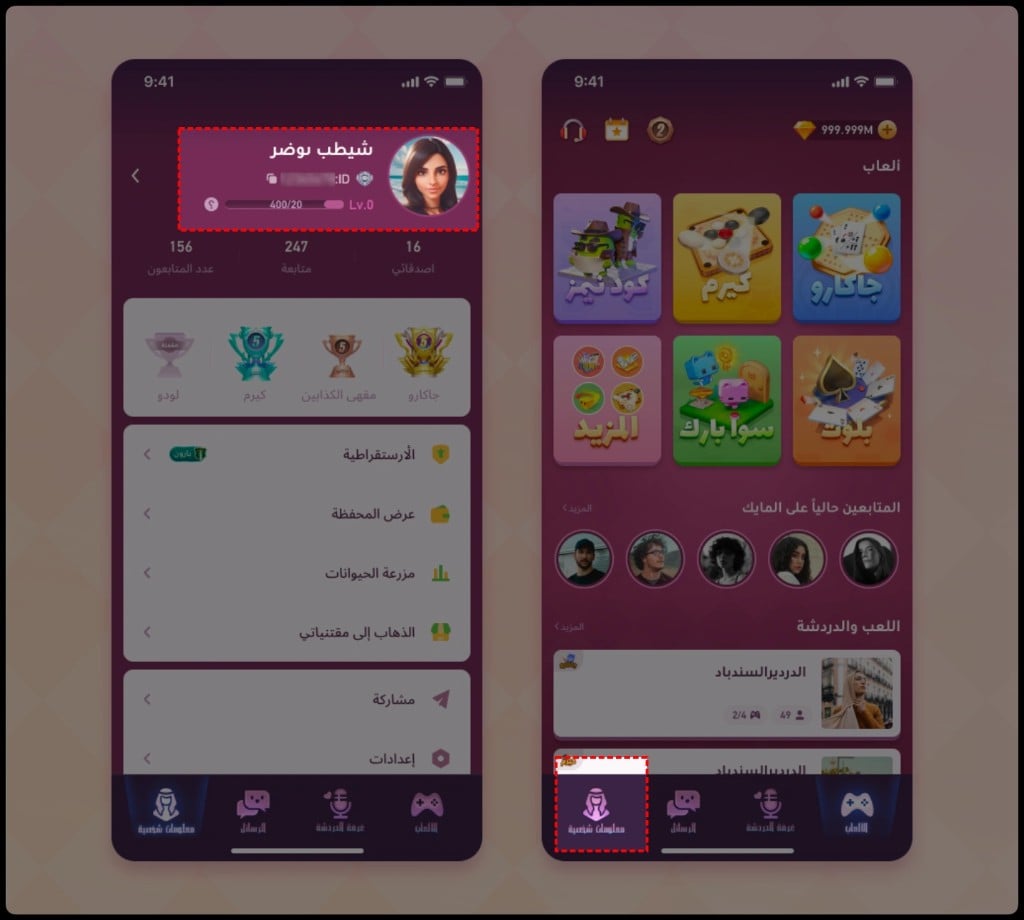
Follow this step-by-step guide to find your ID:
- Launch the Sawa Play app on your phone or tablet.
- Tap your Profile Avatar located in the top-left corner of the main lobby screen.
- Your profile page will open, displaying your nickname, level, and avatar.
- Locate your User ID (a series of numbers) printed directly below your display name.
- Tap the Copy icon next to the number to copy the ID directly to your device clipboard, preventing typing mistakes.
Paste this copied ID directly into the User ID field on ArcTopup to guarantee fast and error-free processing.
Popular Sawa Play Games and Social Voice Room Features
Sawa Play combines regional Middle Eastern board game favorites with live voice interaction. Having an active coin balance allows you to participate across multiple competitive and casual modes:
Jackaroo
Jackaroo is one of the most popular 4-player team board games in the Gulf region. Played with cards and marbles, the objective is to move your team's marbles into the safety zone before your opponents do. Higher-tier rooms require coin buy-ins, matching you against competitive players.
Baloot
Baloot is the iconic trick-taking card game widely played across Saudi Arabia and the wider GCC. Sawa Play provides online Baloot tables with realistic rules, ranking systems, and tournament lobbies. Coins are required to join ranked tables and tournament brackets.
Ludo and Classic Table Games
For quick casual sessions, Sawa Play features 2-player and 4-player Ludo, Hand, and Carrom. You can challenge friends or match with random opponents online, wagering coins on the outcome of each match.
Interactive Voice Rooms
Beyond games, Sawa Play operates as a social audio community. Users can create or join themed voice rooms to chat, listen to music, and host mini-events. Room participants use coins to send virtual gifts—such as sports cars, crowns, and animated rockets—to broadcasters, increasing their room popularity and personal contributor rank.
Safe & Fast Sawa Play Recharge: No Password Required
Account safety is a top priority when purchasing game credits online. ArcTopup uses a direct UID top-up system, eliminating the security risks associated with sharing sensitive account data.
- Zero Password Sharing: You never have to provide your password, Apple ID, Google account, or SMS verification codes. Your login credentials remain strictly in your control.
- No Account Linking Required: You do not need to link your social media profiles to external third-party tools.
- Direct Account Crediting: Once payment is confirmed, the system deposits the coins directly to your numeric UID through the platform's delivery system.
- Encrypted Checkout: ArcTopup utilizes standard encryption protocols to protect your billing details and personal data throughout every transaction.
This ID-only system ensures your Sawa Play account remains safe from unauthorized access while delivering credits directly to your profile.
Troubleshooting Common Sawa Play Top-Up Delivery Issues
If your coins do not appear immediately after completing your order, use these practical troubleshooting steps:
- Restart the Game App: In-game currency displays sometimes do not refresh while the app is running in the background. Close Sawa Play completely, swipe it away from your recent apps, and reopen it.
- Check Your Order Status: Review your confirmation screen or order history on ArcTopup to verify that your payment was successfully processed.
- Verify Your User ID: Confirm that the User ID entered during checkout matches the numeric ID displayed in your in-game profile. If you mistyped your ID, contact ArcTopup customer support with your transaction receipt.
- Check In-Game Mail/System Notices: In certain app versions, currency packages or bonus gifts are delivered to your in-game mailbox rather than directly to the main counter. Open the message center in Sawa Play to claim pending items.
- Server Maintenance: During major Sawa Play server updates, currency delivery may experience brief delays. If maintenance is active, balances update once game servers finish syncing.
Frequently Asked Questions About Sawa Play Top Up
How do I find my Sawa Play User ID for top-up?
Open Sawa Play, tap your profile avatar in the upper-left corner of the main lobby, and locate the numeric User ID displayed beneath your nickname. Tap the copy icon next to the number to copy your exact ID.
Do I need to share my Sawa Play account password to recharge?
No. ArcTopup only requires your numeric User ID to complete the top-up. Never share your account password, email credentials, or phone OTPs with anyone.
How long does it take for Sawa Play coins to reflect in my account?
Top-up orders on ArcTopup are processed automatically upon payment confirmation. Most players see their updated coin balance inside the game within a few moments of completing checkout.
What are Sawa Play coins used for in the app?
Coins are used as entry fees for competitive games like Jackaroo, Baloot, Hand, and Ludo. They are also used to send interactive gifts to hosts and friends in live voice chat rooms.
What should I do if I entered the wrong User ID during checkout?
If you realize you entered an incorrect User ID, reach out to ArcTopup customer support immediately with your order number and the correct UID. If the transaction has not yet been processed by the delivery system, support can help correct the destination.
Is Sawa Play recharge available for players across the Middle East in 2026?
Yes, Sawa Play coin and diamond top-ups on ArcTopup are fully supported for players in Saudi Arabia, the UAE, Kuwait, Qatar, Bahrain, Oman, and international regions in 2026. Enter your valid User ID on the checkout page to receive your balance anywhere.
Current packages and prices
Current base prices exclude Tax. Tax, payment fees and coupon adjustments are shown at checkout.
| Package | Price |
|---|---|
| Sawa Play - 220 Coins | USD 1.90 |
| Sawa Play - 625 Coins | USD 5.22 |
| Sawa Play - 5710 Coins | USD 46.06 |
| Sawa Play - 12830 Coins | USD 103.42 |
| Sawa Play - 37721 Coins | USD 303.28 |






























































