
Soul Chat Top Up Online: Instant Direct Recharge
Soul Chat connects users worldwide through interactive voice chat rooms, casual party games, and dynamic audio communities. To send premium gifts, activate dynamic room effects, and support your favorite room hosts, maintaining an active balance of in-app currency is essential. A direct Soul Chat top up on ArcTopup adds coins and credits straight to your profile balance using only your public Player ID.
Recharging through ArcTopup eliminates the need to share private account credentials, social logins, or one-time verification codes. You select your top-up package, enter your account ID, and complete your purchase using secure payment gateways. Your credits are credited directly to your Soul Chat wallet so you can rejoin audio parties, initiate party games, and send custom visual gifts without interruption.
How to Top Up Soul Chat Balance Online
Completing a recharge takes four simple steps on ArcTopup. Follow this walkthrough to refill your balance:
- Choose Your Package: Browse the available coin and diamond packages listed above on this page and pick the amount that matches your in-app gifting or participation needs.
- Enter Your Player ID: Type your numeric Soul Chat Player ID into the designated input field. Double-check your numbers to ensure correct routing.
- Select Payment Method: Proceed to checkout and select your preferred payment option from the available regional and international channels.
- Receive Your Balance: Once payment authorization completes, the credits process directly into your Soul Chat in-app wallet. Open the app to view your updated balance.
| Top-Up Step | Action Required | Verification Method |
|---|---|---|
| 1. Package Selection | Choose desired coin denomination | Catalog review on ArcTopup |
| 2. Account Input | Enter numeric Soul Chat Player ID | Profile page check in-app |
| 3. Checkout | Pick local or global payment channel | Secure payment gateway confirmation |
| 4. Account Crediting | Check Soul Chat wallet balance | In-app profile balance update |
How to Find Your Soul Chat Player ID
Your Player ID is a unique numeric identifier tied to your personal Soul Chat profile. Because ArcTopup uses direct UID crediting, you only need this number to complete any transaction.
Follow these steps inside the mobile app:
- Open the Soul Chat application on your mobile device.
- Tap the Profile or Me tab located in the bottom-right corner of the main screen.
- Locate your profile avatar and display name at the top of the screen.
- Find the ID number displayed directly below your username.
- Tap the copy icon next to the number, or write it down carefully to paste into the Player ID field on ArcTopup.
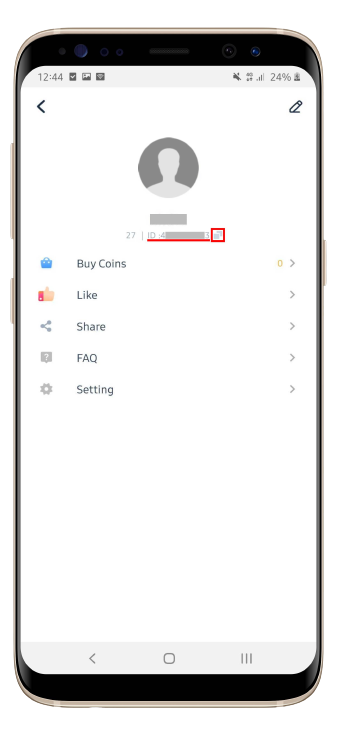
Tip: Always use the copy button rather than typing long numbers manually to avoid accidental typos and ensure your credits arrive to the right account.
Benefits of Soul Chat Diamonds and Virtual Gifts
Refilling your Soul Chat balance allows you to participate fully in group voice rooms and host broadcasts. Here is what your topped-up currency unlocks:
- Live Room Gifting: Send animated virtual gifts to room owners, speakers, and performers to show appreciation and boost room popularity scores.
- VIP Badges and Entrance Effects: Certain gift tiers and spending milestones unlock specialized entrance banners, custom profile frames, and chat bubble styling.
- Interactive Voice Games: Use in-app credits to join community mini-games, lucky draws, and interactive group challenges inside active rooms.
- Room Ranking Boosts: Gifting contributes directly to host leaderboard scores, helping your favorite communities climb daily and weekly voice-party charts.
Safe and Password-Free Topup Security with ArcTopup
Account safety is a core priority when buying digital currency online. ArcTopup uses a direct ID-based fulfillment process that protects your account privacy at every stage.
- Zero Password Requirements: You will never be asked for your account password, email login, or two-factor authentication codes. Your login information stays strictly on your personal device.
- Encrypted Transactions: All payment channels on ArcTopup operate under high-grade SSL encryption to safeguard your billing details.
- No Third-Party Access: Direct UID crediting means no stranger needs to log into your account to perform manual top-ups, eliminating the risk of unauthorized account changes or suspensions.
Supported Global and Local Payment Methods in 2026
ArcTopup supports a wide selection of payment channels to make purchasing Soul Chat balance convenient from anywhere in the world. Depending on your region, you can choose from:
- Credit and Debit Cards: Visa, Mastercard, and other major card networks with secure 3D Secure authentication.
- Digital and E-Wallets: Regional mobile wallets and instant digital payment apps tailored to local markets.
- Online Banking & Instant Transfers: Direct bank transfer channels for quick clearing without card details.
Live pricing, regional currency conversions, and active payment channel availability update in real time directly on the ArcTopup checkout screen.
Troubleshooting Soul Chat Delivery and Account Crediting
If your Soul Chat balance does not appear immediately after completing your order, follow these troubleshooting measures:
- Restart the Soul Chat App: Close the application completely from your background apps and reopen it. This forces the client to refresh wallet balances from the server.
- Check Your In-App Message Center: Open your notifications in Soul Chat to check for server maintenance alerts or top-up confirmation receipts.
- Verify Your Submitted Player ID: Check the order confirmation email from ArcTopup to confirm that the Player ID entered matches your current in-app account.
- Contact ArcTopup Support: If your balance has not refreshed after a brief wait, reach out to the 24/7 ArcTopup customer support team with your Order ID and transaction receipt for direct verification.
Frequently Asked Questions
What is Soul Chat and what are top-up coins used for?
Soul Chat is a social voice-chat application where users connect in audio rooms, play casual party games, and interact with live hosts. Top-up coins and diamonds are the in-app currency used to send animated virtual gifts, purchase avatar decorations, trigger custom entrance animations, and participate in interactive room activities.
How do I find my Soul Chat Player ID to recharge?
Open the Soul Chat app, select the Me or Profile icon in the bottom menu, and locate the numeric ID displayed beneath your avatar and display name. Tap the copy icon next to the ID to copy the number directly to your clipboard.
Do I need to share my Soul Chat password to complete a top up?
No. ArcTopup only requires your public Soul Chat Player ID. You should never share your account password, login verification codes, or linked social media credentials with anyone.
How long does it take for Soul Chat top-up credits to arrive?
Most orders process automatically upon payment confirmation. Once the payment gateway clears your transaction, the balance is added directly to your Soul Chat account. Refreshing or restarting the app will display your updated balance.
What payment methods are supported for Soul Chat recharges?
ArcTopup provides access to multiple payment methods, including major credit and debit cards, secure e-wallets, and regional banking options. The full list of supported payment channels and exact pricing for your currency appears on the live checkout screen.
What should I do if my Soul Chat balance does not update after payment?
First, restart the Soul Chat mobile app to refresh your profile data. If the coins do not display, verify the Player ID on your order receipt. If the ID is correct and the balance has not arrived, contact the ArcTopup 24/7 support team with your order number for fast assistance.
Current packages and prices
Current base prices exclude Tax. Tax, payment fees and coupon adjustments are shown at checkout.
| Package | Price |
|---|---|
| Soul Chat - Soul Chat*30000 | USD 4.02 |
| Soul Chat - Soul Chat*50000 | USD 6.70 |
| Soul Chat - Soul Chat*70000 | USD 9.38 |
| Soul Chat - Soul Chat*100000 | USD 13.40 |
| Soul Chat - Soul Chat*200000 | USD 26.80 |
| Soul Chat - Soul Chat*500000 | USD 66.99 |
| Soul Chat - Soul Chat*700000 | USD 93.79 |
| Soul Chat - Soul Chat*1000000 | USD 133.98 |
| Soul Chat - Soul Chat*2000000 | USD 267.97 |
| Soul Chat - Soul Chat*10000 | USD 1.34 |






























































