
SuperSus Top Up: Fast Golden Stars and Super Pass Delivery
Super Sus: Who Is The Impostor brings intense multiplayer deduction and survival mechanics to mobile gaming. Players work together as Spacecrews to complete maintenance tasks on the spaceship while uncovering Impostors and Neutral roles lurking in the shadows. To customize your character, stand out in pre-game lobbies, and acquire the newest role cards in 2026, you need access to premium in-game resources.
Golden Stars represent the primary premium currency in Super Sus, allowing you to participate in limited-time prize draws, purchase legendary character skins, obtain role shards, and activate seasonal battle passes. ArcTopup provides a streamlined direct recharge system that credits Golden Stars and Super Passes straight to your account using only your public Space ID. No account passwords or login credentials are ever required, ensuring your account remains safe and protected throughout the checkout process.
How to Top Up SuperSus Golden Stars and Passes Using Space ID
To complete a top-up for your SuperSus account, follow these straightforward steps:
- Select Your Item: Browse the catalog above and choose your desired Golden Stars denomination or Super Pass package.
- Enter Your Space ID: Type your unique SuperSus Space ID into the designated input field. Double-check your numbers to ensure correct delivery.
- Select a Payment Method: Choose your preferred payment option from the live checkout menu.
- Complete the Transaction: Follow the secure on-screen prompts to finalize your payment.
- Receive Your Items: Once payment confirmation is complete, your Golden Stars or Pass access will be credited directly to your SuperSus account in-game.
How to Locate Your SuperSus Space ID in the Profile Menu
Your Space ID is a unique numerical identifier tied directly to your SuperSus player profile. You do not need to share your login email, social media credentials, or passwords to receive your top-up.
To find your Space ID quickly:
- Launch the Super Sus: Who Is The Impostor game app on your mobile device.
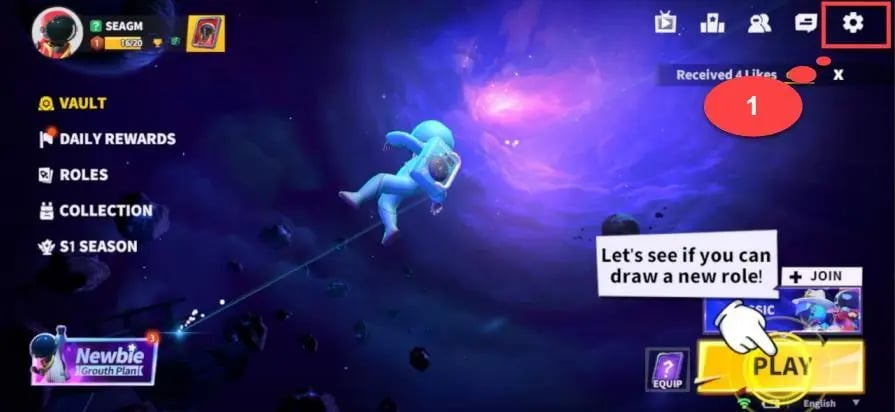
- Tap your Avatar icon located in the top-left corner of the main lobby screen to open your Personal Profile.
- Locate the line labeled Space ID, positioned directly below your player name.
- Tap the Copy icon next to the Space ID numbers to save your ID directly to your device clipboard.
- Paste this number into the Space ID field on ArcTopup before proceeding to checkout.
SuperSus In-Game Currencies: Golden Stars and Super Pass Explained
Understanding the currency system in Super Sus helps you plan your purchases and optimize your seasonal progression. The game features multiple currencies and reward systems designed for cosmetics, character progression, and role access.
| Currency / Pass Item | Primary In-Game Purpose | Acquisition Method |
|---|---|---|
| Golden Stars | Unlocking premium role cards, spinning limited gacha wheels, buying legendary skins | Direct Space ID top-up via ArcTopup |
| Super Pass | Unlocking premium seasonal reward tracks, exclusive costumes, emote sets | Direct recharge or activation with Golden Stars |
| Super Pass Plus | Unlocking the seasonal pass with instant tier skips and bonus exclusive cosmetics | Direct top-up package selection |
| Cookies / Donuts | Standard shop items, base role unlocks, daily mystery chests | Earned via regular gameplay, quests, and events |
Golden Stars Utility
Golden Stars give you direct purchasing power for the rarest items in Super Sus. You can use them to purchase role cards directly, spin the Space Roulette, open premium mystery boxes, and purchase weapon skins, hats, and backpacks. They are also necessary for gifting items to friends or obtaining exclusive seasonal bundles.
Super Pass Benefits
The Super Pass is the seasonal battle pass structure in Super Sus. Upgrading to the premium Super Pass grants access to exclusive themed skins, unique elimination animations, customized chat bubbles, and extra resource caches as you gain battle pass experience by completing daily and weekly mission objectives.
Password-Free Account Safety and Direct Delivery on ArcTopup
Account security is essential when purchasing digital gaming goods. Many unauthorized third-party sellers request full login credentials, exposing your personal data and gaming progress to unauthorized access.
ArcTopup operates exclusively on a direct Space ID delivery model:
- Zero Password Sharing: You never have to share your game password, Google account, Apple ID, or social logins.
- Direct In-Game Crediting: Orders are sent directly to your character profile through official API channels.
- Encrypted Checkout: All personal billing information is handled through secure SSL-encrypted protocols.
- Account Protection: Because no third party logs into your device or profile, your account stays completely within your control.
Troubleshooting Delivery Delays and Checking SuperSus In-Game Balance
Top-ups through ArcTopup are processed immediately upon payment verification. If you do not see your updated balance right away, follow these verification steps:
- Restart the Game App: Close the Super Sus application completely from your device's background task manager and reopen it. This forces the client to sync with the server database.
- Check Your In-Game Mailbox: Certain promotional bundles, passes, or event rewards are delivered directly to your in-game mailbox icon in the main lobby. Open the mailbox and tap "Claim All".
- Verify Your Space ID: Review your ArcTopup order confirmation receipt to verify that the Space ID submitted matches your in-game profile number.
- Check Network Connectivity: Ensure your internet connection is stable so the game client can pull updated profile balance information.
- Contact Support: If your balance has not updated after completing these steps, contact ArcTopup customer support with your Order ID for prompt assistance.
Supported Payment Methods and Currency Checkout Options
ArcTopup supports a wide variety of domestic and international payment channels to provide an accessible checkout experience for players across different regions.
You can complete your transaction using credit cards, debit cards, digital wallets, and region-specific online payment options. Current package pricing, regional currency conversions, and applicable fees are displayed transparently on the live product checkout screen before you finalize your order.
Frequently Asked Questions About SuperSus Top Up
How do I find my SuperSus Space ID?
Open Super Sus and tap on your character avatar in the upper-left corner of the main lobby. Your Space ID is the numerical sequence displayed right beneath your character name. Tap the copy icon next to the number to copy it to your clipboard.
Do I need to provide my SuperSus account password to top up?
No. ArcTopup only requires your public SuperSus Space ID to deliver your Golden Stars or Super Pass. You should never share your account passwords or login verification codes with anyone.
How quickly will Golden Stars and Passes appear in my SuperSus account?
Deliveries are processed immediately once your payment is confirmed. In most cases, items reflect in your in-game balance within moments. A quick restart of the game client helps refresh your current balance.
What should I do if I enter an incorrect Space ID at checkout?
Because top-up orders are processed automatically based on the ID provided, it is critical to confirm your Space ID before payment. If you realize you entered an incorrect ID before the order completes, contact ArcTopup customer support immediately with your transaction details.
Can I unlock the Super Pass directly via Space ID top-up?
Yes. You can select the Super Pass package directly on ArcTopup, or recharge sufficient Golden Stars to unlock the Super Pass tier manually from inside the Super Sus game store.
Are Golden Star top-ups compatible across all SuperSus regional servers?
Yes. The Space ID system identifies your player profile regardless of the regional server you play on, ensuring your Golden Stars and Passes credit directly to your specific account.
Current packages and prices
Current base prices exclude Tax. Tax, payment fees and coupon adjustments are shown at checkout.
| Package | Price |
|---|---|
| 100 Golden Stars | USD 0.63 |
| Weekly Card | USD 0.75 |
| 310 Golden Stars | USD 1.91 |
| 520 Golden Stars | USD 3.19 |
| SUPER PASS | USD 3.19 |
| 1060 Golden Stars | USD 6.46 |
| SUPER PASS Bundle | USD 6.47 |
| Monthly Card | USD 6.96 |
| Super VIP Card | USD 7.79 |
| 2180 Golden Stars | USD 13.27 |
| 5600 Golden Stars | USD 34.03 |






























































