
Top Top Top Up: Get Coins for Social Mini-Games
Top Top (also known as TopTop) is a popular mobile social gaming platform that brings people together through voice chat and interactive classic board games. Unlike clothing or apparel brands with similar names, the Top Top gaming app is dedicated entirely to casual online multiplayer games such as Ludo, Dominoes, UNO, Candy, and interactive social lounges.
Coins serve as the central in-app currency in Top Top. Having a steady coin balance allows you to enter higher-stakes game rooms, host private voice parties, send animated gifts to friends, and personalize your account with distinctive frames and chat bubbles. Purchasing a Top Top top up through ArcTopup provides a direct, secure way to reload your balance using only your numeric Player ID, keeping your login details completely private.
How to Find Your Top Top Player ID
To ensure your Top Top recharge arrives in your game balance without delay, you need to provide your exact Player ID from the mobile app. Finding this ID takes only a few seconds.
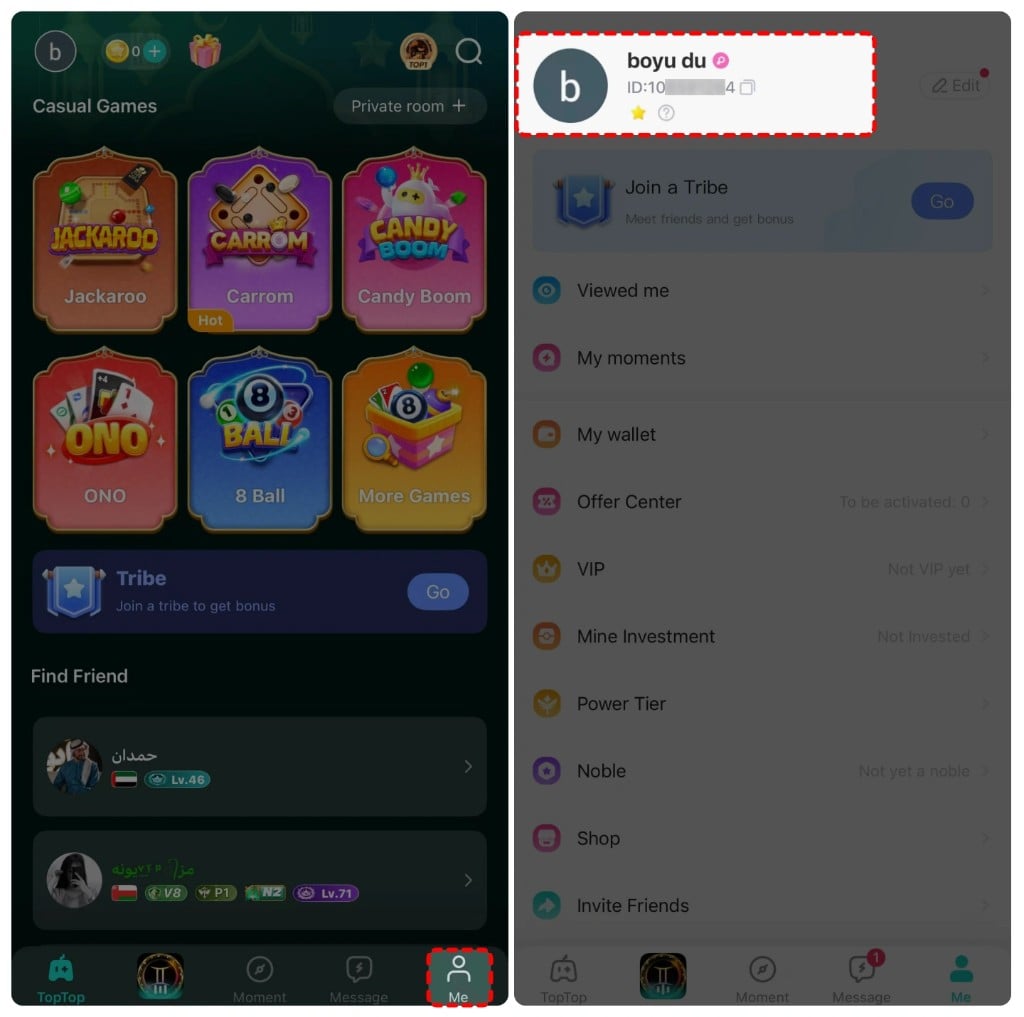
Follow these steps inside the app:
- Open the Top Top application on your mobile device.
- Tap the Profile icon located in the bottom-right corner of the home screen.
- Look directly below your profile avatar and display name on the account page.
- You will see a unique numerical code labeled ID.
- Tap the copy icon next to your ID number to copy it directly to your clipboard.
Make sure to paste this exact number into the Player ID input field on ArcTopup before proceeding to checkout.
How to Top Up Top Top Coins on ArcTopup
ArcTopup makes purchasing game coins straightforward. You do not need to link social media profiles or hand over your account password.
- Enter Your Player ID: Paste your numeric Top Top Player ID into the designated input box at the top of the product page.
- Select Your Coin Package: Choose the coin denomination that fits your gaming and gifting needs from the live catalog.
- Review Order Details: Confirm that your Player ID is entered accurately and check the final order summary.
- Complete Payment: Choose your preferred regional payment option and complete the transaction through the secure checkout.
- Check In-Game Balance: Open Top Top on your phone to verify that the coins have been credited to your account.
All real-time coin quantities and currency conversions are updated directly on the live checkout interface.
Where to Use Your Top Top Coins
Coins drive the social and competitive ecosystem within Top Top. Recharging your balance gives you complete access to competitive table stakes and social rewards.
| Feature / Mini-Game | Coin Application | Player Benefit |
|---|---|---|
| Ludo & Dominoes | Match entry stakes | Compete in higher-tier rooms and earn higher match payouts. |
| Voice Chat Rooms | Virtual gifting & interactions | Send animated gifts to room hosts and build social popularity. |
| Casual Card Games (UNO) | Table entry stakes | Join high-level casual rooms with skilled international players. |
| Profile Cosmetics | Avatars, frames & chat bubbles | Customize your public profile to stand out in public lobbies. |
| Social Room Upgrades | Room themes & sound effects | Host interactive party rooms with custom audio-visual features. |
Ludo and Domino Matches
Ludo and Dominoes are among the most played board games on the platform. Every competitive match requires an entry fee in coins. Higher-stake tables offer larger prize pools and faster leader rank progression. Maintaining a healthy coin balance ensures you never get locked out of high-stakes matches.
Interactive Voice Party Rooms
Top Top voice rooms allow users to chat, listen to music, and interact in real time. Coins allow you to send animated virtual gifts to friends, speakers, and room hosts. Sending gifts increases your in-room charm level, boosts your standing on community leaderboards, and unlocks exclusive room entrance animations.
Profile Customization and Chat Accessories
Personalize your social presence by spending coins in the in-app shop on dynamic avatar frames, entrance banners, and speech bubble designs. These cosmetic items highlight your active status whenever you join a public game table or voice lounge.
Account Security: ID-Only Recharge Without Passwords
Account safety is essential when purchasing in-game items online. ArcTopup uses a direct Player ID delivery system that never asks for your Top Top password, email login, or two-factor authentication codes.
- Zero Password Sharing: You only provide your public Player ID. Your account login credentials remain strictly in your own hands.
- No Third-Party Binding: You do not need to link your Facebook, Google, or Apple accounts to third-party portals to complete an order.
- Encrypted Transactions: Checkout data is processed through industry-standard encryption protocols to protect your personal information.
Because the system credits accounts directly through server-side ID routing, your game account remains safe from unauthorized access.
Troubleshooting Top Top Coin Delivery
If you experience any issues after placing your order, use the following troubleshooting guide to resolve the situation quickly:
Coins Have Not Appeared Yet
- Restart the App: Close Top Top completely from your device app switcher, then reopen it to force a fresh data sync with the game server.
- Check Network Connection: Ensure your mobile data or Wi-Fi connection is stable so the app can fetch your updated wallet balance.
- Verify Order Status: Check your ArcTopup order status page to confirm that the transaction was completed successfully.
Entered an Incorrect Player ID
- Contact Support Immediately: If you submitted an incorrect Player ID, reach out to ArcTopup customer support as quickly as possible with your order number and the correct ID.
- Order Completion Window: If the order has already been processed to an active, valid third-party ID on the game server, transactions cannot be reversed. Always double-check your ID before paying.
Why Recharge Top Top on ArcTopup
ArcTopup provides international mobile gamers with a reliable, straightforward system for managing their in-game currencies. You get clear package options, up-to-date pricing on the live checkout interface, and a direct recharge workflow that requires no unnecessary account permissions. Whether you need coins to join a late-night Ludo tournament or send gifts in a voice chat lounge, ArcTopup handles your top up smoothly and securely.
Frequently Asked Questions
What is TopTop used for?
TopTop is a social mobile gaming app where users play classic board games like Ludo, Dominoes, and UNO while chatting in real-time voice rooms. Coins in the app are used to pay match entry fees, send virtual gifts to other users, and buy profile decorations.
How do I find my TopTop Player ID?
Open Top Top, tap your Profile icon in the bottom-right corner, and locate the numeric ID displayed underneath your profile picture. Tap the copy icon next to the number to copy your exact ID.
Do I need to provide my TopTop password to top up coins?
No. ArcTopup only requires your numeric Player ID. You should never share your account password or social login details with anyone.
What can I use TopTop coins for in the app?
You can use Top Top coins to enter competitive matches in Ludo and Dominoes, send interactive gifts to voice room hosts, unlock custom chat bubbles, and purchase exclusive avatar frames.
How quickly will TopTop coins appear in my account?
Once your payment is verified on ArcTopup, coins are sent directly to your Top Top account over the game network. In most cases, the balance updates shortly after you restart the app.
What should I do if I entered the wrong Player ID?
Contact ArcTopup customer support immediately with your order reference code and correct Player ID. If the coins have not yet been dispatched by the system, support can help correct your details.






























































