
Tumile Top Up: Step-by-Step Guide Using Player ID
Tumile is a popular live video chat platform that connects people across the globe through real-time 1v1 video conversations. To initiate calls, apply matching preferences, send virtual gifts, or unlock VIP perks, you need Tumile coins. ArcTopup provides a direct top-up service that credits coins straight to your account balance using only your numeric Player ID.
Following these steps lets you complete your Tumile recharge quickly:
- Select Your Coin Package: Choose the coin bundle that fits your chatting needs from the product list above.
- Enter Your Player ID: Input your unique Tumile Player ID in the designated account field. Make sure the numbers match your in-app profile.
- Proceed to Checkout: Select your preferred payment method from the available local and international options displayed on the secure payment screen.
- Confirm Payment: Review your order summary and finalize the transaction. ArcTopup processes the request automatically.
- Check Your In-App Balance: Open the Tumile app on your mobile device, refresh your profile page, and start using your newly credited coins.
How to Find Your Tumile Player ID in the App
Your Player ID is a unique numeric identifier assigned to your Tumile profile upon registration. Because ArcTopup uses a direct UID delivery system, providing the correct ID ensures your coins arrive in your account without delays.
Here is how to locate your Player ID inside the Tumile mobile application:
- Launch the Tumile app on your Android or iOS device.
- Tap the Profile / Me icon located in the bottom-right corner of the main screen.
- Your Player ID is displayed directly below your profile picture and nickname.
- Tap the copy icon next to the ID or carefully note down the full number to paste into the ArcTopup order field.
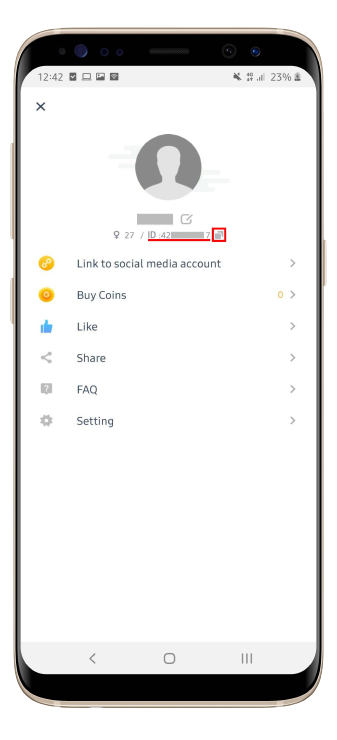
Always double-check the digits before submitting your order to prevent crediting another user by mistake.
What Can You Buy with Tumile Coins? (VIP, Gifts, and Filters)
Tumile coins serve as the primary currency within the app ecosystem. Maintaining an active coin balance allows you to use interactive features and customize your discovery preferences.
1. Direct 1v1 Video Calls and Match Extensions
While basic matching is available, starting direct video calls or continuing engaging conversations requires coins. Coins are deducted per minute during active calls, ensuring uninterrupted communication with your favorite connections.
2. Gender and Regional Matching Filters
Tumile allows you to narrow down video matching by selecting specific geographic regions or gender preferences. Applying these advanced discovery filters consumes a set amount of coins per search, helping you connect with users in specific countries or languages.
3. Interactive Virtual Gifts
Sending virtual gifts during live video chats is the best way to show appreciation, break the ice, and stand out. Tumile offers a wide variety of animated gifts, ranging from simple emojis to full-screen special effects.
4. VIP Status and Profile Customization
Coins can also be used to activate VIP subscriptions and unlock premium profile decorations. VIP members enjoy priority matching, distinctive profile badges, exclusive video effects, and ad-free browsing.
Tumile Coin Packages and Value Comparison 2026
Selecting the right coin package depends on how frequently you use live matching, filters, and gifting features. Review the package breakdown below to determine which tier matches your usage style:
| Package Tier | Recommended For | Primary Use Case | Delivery Method |
|---|---|---|---|
| Starter Bundles | Casual users & new arrivals | Short test calls and trying basic match filters | Direct Player ID credit |
| Standard Bundles | Regular daily chatters | Frequent 1v1 video calls and occasional gifting | Direct Player ID credit |
| Popular Bundles | Active socializers | Extended video calls and regional match filtering | Direct Player ID credit |
| Pro Bundles | Heavy gifters & VIP users | Unrestricted calling, premium gifts, and VIP perks | Direct Player ID credit |
All current prices and available bundles are displayed on the live ArcTopup checkout module. Rates reflect real-time currency pricing, so check the live catalog above for current bundle values.
Secure Tumile Recharge: Why You Never Share Your Password
Account safety is critical when purchasing virtual currencies online. ArcTopup uses a direct Player ID fulfillment model designed to protect your personal information:
- Zero Login Credentials Required: You never have to share your Tumile password, Google account, Apple ID, or phone verification codes. Only your public numeric Player ID is needed.
- Protection from Account Takeover: Keeping your login details private eliminates the risk of unauthorized account access, password changes, or data breaches.
- SSL-Encrypted Transactions: Every order placed on ArcTopup is protected by modern SSL encryption protocols to safeguard your payment information and transaction records.
- Safe Global Processing: Coins are credited directly to your in-game balance through standard system channels, ensuring your account remains in good standing.
Troubleshooting Tumile Coin Delivery and Payment Inquiries
If your coins do not appear immediately after completing payment on ArcTopup, follow these quick troubleshooting steps:
- Restart the Tumile App: Completely close the Tumile application from your phone background apps and reopen it. This forces the client to fetch updated account balance data from the server.
- Verify the Submitted Player ID: Check your ArcTopup order confirmation receipt to confirm that the Player ID entered matches your current in-app ID.
- Confirm Payment Completion: Ensure that your payment went through and that your bank or payment provider marked the transaction as successful.
- Check Regional Network Connection: If your internet connection is unstable, profile data may take a moment to refresh. Switch between Wi-Fi and mobile data to test.
- Contact ArcTopup Support: If your order status shows completed but your balance remains unchanged after a few minutes, reach out to ArcTopup customer support with your Order Number and Player ID for rapid assistance.
Frequently Asked Questions About Tumile Top Up
How do I top up coins on Tumile?
Select your desired coin package on ArcTopup, enter your numeric Tumile Player ID, choose your payment method, and complete the checkout. Coins are credited directly to your account upon payment confirmation.
Where can I find my Tumile Player ID?
Open the Tumile app, tap the Profile/Me tab at the bottom right of the screen, and locate the numeric ID displayed beneath your avatar and nickname. Tap the copy icon next to it to copy the number.
What can you buy with Tumile coins?
Tumile coins are used to initiate and extend 1v1 live video calls, apply gender and region matching filters, send animated virtual gifts to chat partners, and unlock VIP privileges.
Do I need to share my Tumile account password to recharge?
No. ArcTopup only requires your public Player ID to deliver coins. You should never share your account password, email credentials, or verification codes with anyone.
How fast are Tumile coins credited after top-up?
Orders on ArcTopup are processed automatically once payment is verified. In most cases, coins reflect in your in-app balance shortly after the transaction is finalized.
What should I do if my Tumile coins do not appear in my balance?
First, force-close and reopen the Tumile app to refresh your profile. If the balance still does not update, verify the Player ID on your order receipt and contact ArcTopup customer support with your order details.
Current packages and prices
Current base prices exclude Tax. Tax, payment fees and coupon adjustments are shown at checkout.
| Package | Price |
|---|---|
| tumile 650 coins | USD 3.26 |
| tumile 1250 coins | USD 6.26 |
| tumile 1800 coins | USD 8.59 |
| tumile 3500 coins | USD 15.55 |
| tumile 7000 coins | USD 30.63 |
| tumile 15000 coins | USD 66.36 |
| tumile 300 coins | USD 67.62 |
| tumile 35000 coins | USD 155.93 |






























































