
YoYo Coins Top Up: Instant Voice Room Recharge
YoYo is a popular voice chat and interactive social entertainment app where users join audio chat rooms, participate in live party games, listen to music, and interact with global communities. YoYo Coins serve as the primary in-app virtual currency required to access premium social interactions. When you hold coins in your account balance, you can send dynamic animated gifts to room hosts, activate special entry effects, buy profile badges, and participate in interactive room activities.
Recharging your balance on ArcTopup allows you to bypass manual queues and top up your account directly using only your numeric User ID (UID). Unlike manual recharge sellers who only operate during specific shift hours, ArcTopup processes orders automatically 24 hours a day, 7 days a week, ensuring your coins arrive directly in your wallet balance when you need them.
What Are YoYo Coins and How to Use Them in Voice Rooms
YoYo Coins drive all premium community interactions across voice rooms and private chats. Once added to your balance, coins never expire and can be used across several core platform features:
- Animated Virtual Gifting: Support audio room broadcasters, show appreciation to speakers on mic, or celebrate special room events by sending items ranging from simple flowers to full-screen luxury animations.
- Entrance Vehicles and Visual Effects: Announce your arrival inside high-traffic voice rooms with customized entry animations, avatar banners, and special spotlight effects.
- Profile Customization: Decorate your user profile with exclusive avatar frames, chat bubble themes, and honorable title badges.
- Interactive Voice Games: Use your coins to enter room mini-games, lucky wheels, and community challenges hosted inside voice channels.
- Clan and Room Growth: Help level up your favorite voice community, boost room popularity rankings, and unlock higher room capacity limits.
| Feature | In-App Coin Usage | Core Benefit |
|---|---|---|
| Virtual Gifts | Send roses, luxury cars, rockets, and custom animations | Boost host popularity and display community appreciation |
| Room Entry Effects | Equip custom sports cars, magic portals, and banners | Stand out immediately whenever entering voice rooms |
| Profile Customization | Purchase avatar frames, chat bubbles, and unique badges | Distinguish your profile across audio rooms and direct messages |
| Interactive Activities | Join room mini-games and lucky wheel draws | Increase room engagement and win in-app bonus items |
| Room Leveling | Contribute coins toward voice room experience points | Increase room visitor limits and gain top room ranking tags |
How to Find Your YoYo Account UID
ArcTopup delivers your coin recharge directly to your profile using your unique YoYo account UID. You do not need to share your password or log in through third-party platforms. Follow these quick steps to locate your numeric ID in the app:
- Launch the YoYo application on your mobile device.
- Tap the Profile icon located in the bottom-right corner of the main screen.
- Locate your numeric ID displayed directly beneath your nickname and profile avatar.
- Tap the copy icon next to your ID number to copy it to your clipboard.
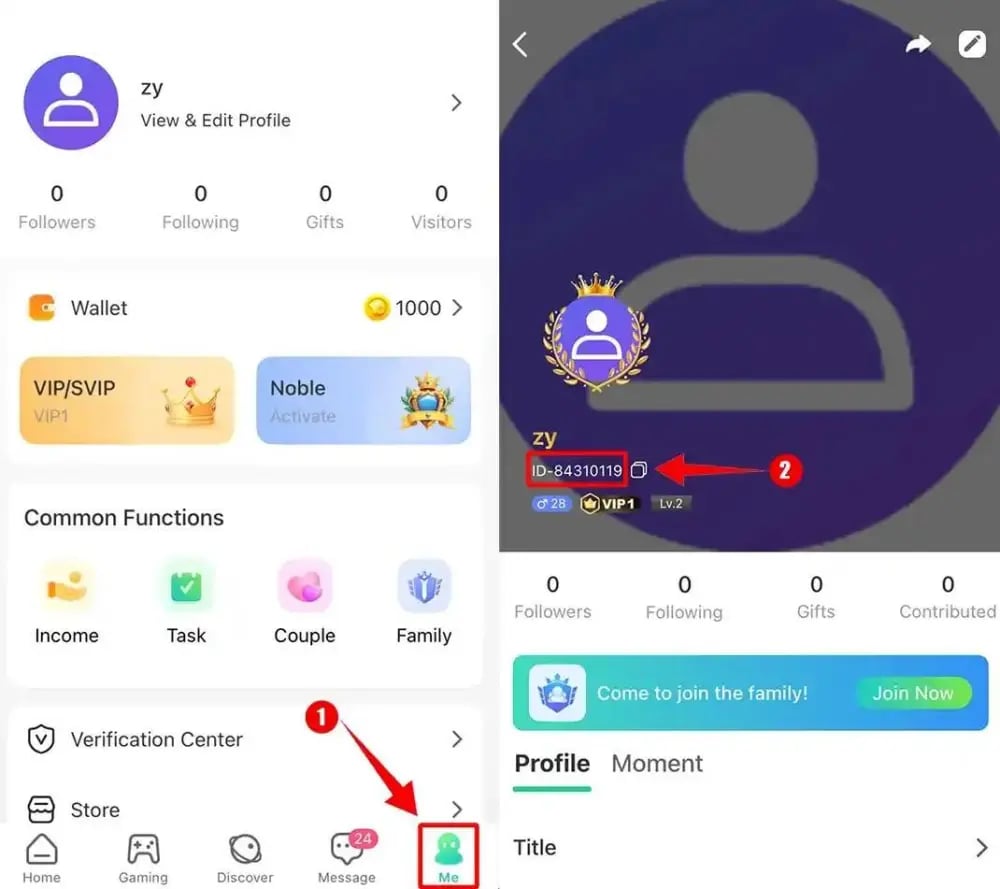
Always double-check your copied digits before submitting your order to prevent sending coins to an unintended account.
Step-by-Step Guide: How to Top Up YoYo Coins Online
To complete a YoYo Coins recharge on ArcTopup, follow this simple process:
- Select Your Package: Browse the available coin bundles and select the amount you want to purchase.
- Enter Your UID: Paste your numeric YoYo UID into the designated field. Make sure there are no spaces or extra characters.
- Check Live Pricing: Review your order summary. ArcTopup displays live, transparent prices in your local currency directly on the checkout screen without hidden platform fees.
- Choose Payment and Checkout: Pick your preferred payment method from the checkout list and complete the transaction.
- Receive Your Balance: Once your payment is confirmed, our automated system dispatches your YoYo Coins directly to your account. Open your YoYo app and check your in-app wallet balance.
Account Safety: Why Direct UID Top-Up Needs No Password
Account safety is a critical factor when buying digital credits. Some third-party sellers request full login credentials, account passwords, or SMS verification codes to log into your account manually. Sharing your login details creates major security risks, including unauthorized account access, modified profile data, or lost personal messages.
ArcTopup uses direct-to-ID API routing. Because the transaction only requires your public numeric UID, your account remains completely secure in your hands:
- Zero Password Requirements: You never share your password, phone number, email verification codes, or linked social media accounts.
- No Account Sharing: No third party ever logs into your app session, keeping your personal chat logs and friend lists private.
- 24/7 Automated Dispatch: Direct UID integration allows orders to process automatically at any hour of the day, eliminating the delays associated with manual seller shifts.
Supported Payment Methods for YoYo Recharge
ArcTopup offers a variety of payment options to give international and local buyers a convenient checkout experience. Depending on your region, you can select from major credit and debit cards, e-wallets, bank transfers, and regional payment systems. The live checkout screen automatically updates to show all payment channels available for your country alongside exact conversion rates.
Troubleshooting Delivery Delays and Incorrect UID Entries
Coin recharges are typically processed instantly once your payment provider confirms the transaction. If you experience an unexpected delay, check the following troubleshooting steps:
- Restart Your YoYo App: In some cases, the mobile app balance display caches older data. Force-close the YoYo app and reopen it to trigger a fresh data sync with the server.
- Check Your Internet Connection: Verify that your mobile data or Wi-Fi connection is stable so your in-app wallet can communicate with the server.
- Verify Your Payment Confirmation: Ensure your payment was successfully deducted and that your banking provider did not place the transaction on hold.
- Mistyped UID Handling: If you discover that you entered an incorrect UID, contact ArcTopup customer support immediately with your order number. If the order has not yet been processed by the automated dispatch queue, support can update the delivery ID for you. Once an order is completed and delivered to an active account UID, digital credits cannot be reversed.
Frequently Asked Questions
How do I find my YoYo UID for top up?
Open the YoYo app, tap the Profile icon in the bottom-right corner, and find the numeric ID located right below your username and avatar. Tap the copy icon next to the number to copy your exact UID.
Do I need to provide my YoYo password to recharge coins?
No. ArcTopup only requires your numeric YoYo UID to credit your coins. You never need to share passwords, one-time verification codes, or linked social accounts.
How long does it take for YoYo Coins to be credited?
Orders are dispatched automatically through our direct system as soon as payment is confirmed. Most recharges arrive in your in-app balance within seconds.
What should I do if I entered the wrong YoYo UID?
If you realize you submitted an incorrect UID, contact ArcTopup customer service right away with your transaction ID. If the order has not been completed, our support team will update your details. Completed transactions cannot be recalled.
Can I buy YoYo Coins for a friend?
Yes. Because the top-up process only requires a numeric UID, you can enter your friend's YoYo UID at checkout to send coins directly to their account as a gift.
Are YoYo Coins the same as cryptocurrency tokens?
No. YoYo Coins on ArcTopup are strictly the in-app virtual entertainment credits used exclusively inside the YoYo voice chat application for sending virtual gifts, room features, and profile cosmetics. They have no relationship to cryptocurrency tokens or blockchain assets.
Current packages and prices
Current base prices exclude Tax. Tax, payment fees and coupon adjustments are shown at checkout.
| Package | Price |
|---|---|
| 5,000 Yoyo Coins | USD 3.53 |
| 14,000 Yoyo Coins | USD 9.89 |
| 40,000 Yoyo Coins | USD 28.26 |
| 160,000 Yoyo Coins | USD 113.03 |
| 320,000 Yoyo Coins | USD 226.07 |































































