Onmyoji Jades Top Up: Direct Account Delivery
Powering up your Shikigami lineup and securing rare summons requires a steady balance of premium currency. An Onmyoji Jades top up provides the vital resources needed to purchase Mystery Amulets, restore Action Points (AP), acquire skins, and participate in limited-time summon rate-up events. On ArcTopup, you can order your Jade and S-Jade packs directly to your Global server account using only your User Code, eliminating the need to share private account logins or passwords.
ArcTopup processes direct top-up transactions securely, ensuring your in-game balance updates quickly so you can focus on building your teams, farming soul dungeons, and progressing through dual-mode battles.
What Are Jades and S-Jades Used for in Onmyoji?
Understanding how currencies function in NetEase's turn-based tactical RPG is essential for maximizing your account progression. Onmyoji features two primary premium resources:
- S-Jades (Soul Jades): Direct paid currency obtained through real-money top-ups. S-Jades are used to buy daily summoning packs, special talisman passes, event bundles, skin tokens, and can be converted directly into standard Jades.
- Jades: The core resource used to buy Mystery Amulets for Shikigami summoning, reset duel attempts, buy AP stamina packs from the General Store, expand storage, and acquire courtyard decorations.
Onmyoji RPG vs. Onmyoji Arena: Understanding the Difference
It is vital to distinguish between Onmyoji (Turn-Based RPG) and Onmyoji Arena (MOBA) before placing your order:
| Feature / Currency | Onmyoji (RPG) | Onmyoji Arena (MOBA) |
|---|---|---|
| Game Genre | Turn-based Strategy / Gacha RPG | Multiplayer Online Battle Arena (MOBA) |
| Currencies Available | Jade / S-Jade / Mystery Amulets | Jade / Daruma Tokens / Skin Tickets |
| Primary Function | Summoning SSR/SP Shikigami, AP Packs | Unlocking MOBA Champions, Battle Skins |
| Required Top-Up ID | User Code + Global Server | User ID / Character ID |
| Product Compatibility | This page supplies Onmyoji RPG | Requires dedicated Arena top-up page |
Please ensure your account belongs to the turn-based Onmyoji RPG client on the Global server before completing your checkout on ArcTopup.
How to Find Your Onmyoji User Code and Server
ArcTopup utilizes direct system injection via your unique User Code. You never need to supply your email login, Apple ID, Google Play credentials, or password. Follow these steps to find your exact details:
- Launch the Onmyoji app on your mobile device or PC client.
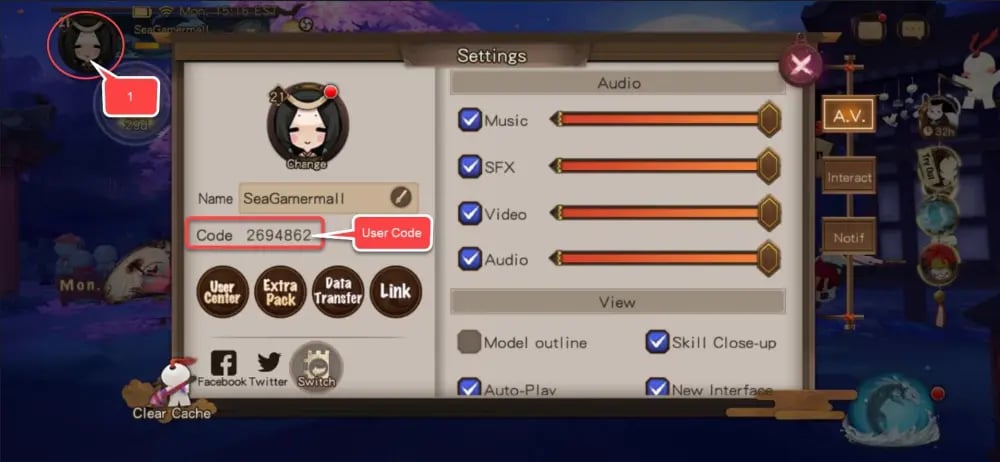
- Tap your Character Avatar located in the top-left corner of the main Courtyard screen.
- The User Info profile window will open.
- Locate your User Code displayed near your nickname. This is a unique numerical sequence.
- Tap the copy icon next to your User Code to save it to your clipboard.
- Confirm your active server is set to Global.
Double-check that all digits are copied accurately to prevent any delivery delays to alternate accounts.
How to Top Up Onmyoji Jades on ArcTopup
Recharging your account balance takes only a few quick steps on the ArcTopup platform:
- Select Denomination: Choose your preferred Onmyoji Jade or S-Jade package listed in the live catalog above.
- Enter Player Information: * Enter your User Code into the designated field. * Verify your Server selection (set to Global).
- Proceed to Checkout: Review your selected package and order quantity.
- Select Payment Method: Choose from the available secure checkout channels displayed on the payment screen.
- Complete Payment: Finalize the transaction. Once payment is confirmed, the system processes your request and credits the Jades directly to your Onmyoji account.
Supported Payment Methods and Delivery Process
ArcTopup supports a wide selection of globally recognized and localized payment gateways. Exact methods, regional currencies, and current rates are displayed dynamically on the live checkout interface.
How the Delivery Process Works
- Direct Balance Injection: Once your payment clears, our automated processing system connects directly with server verification to deposit your purchased S-Jades or Jades into your game profile.
- No Account Handover: The entire transaction executes using only public profile identifiers (User Code + Server). You remain in control of your account at all times.
- Fast Crediting: Delivery typically completes shortly after payment confirmation. In high-traffic periods, minor processing queues may occur.
Why Choose ArcTopup for Safe Onmyoji Recharge
- Strict Account Security: We never ask for login credentials, authentication codes, or passwords. Your NetEase, Google, Steam, or Apple account remains 100% private and protected.
- Accurate Server Targeting: Dedicated support for the Onmyoji Global server ensures purchases land on the correct character profile without cross-region routing errors.
- Transparent Pricing: All pack values, regional conversions, and live totals are explicitly shown at checkout with no hidden processing fees.
- Responsive Support: ArcTopup provides dedicated customer service assistance should you ever need help tracking order statuses or confirming delivery receipts.
Troubleshooting Common Onmyoji Top-Up Issues
If your Jades do not display immediately after completing your order, run through the following troubleshooting checklist:
- Restart the Game App: Completely close the Onmyoji application (kill background processes) and restart it. This forces the client to sync fresh balance data from the Global server.
- Check the In-Game Mailbox: Certain special bundles or bonus items arrive as in-game system mail within the Courtyard rather than going straight to your numerical counter. Tap the paper crane mailbox to collect attachments.
- Verify User Code Accuracy: Compare the User Code entered during your ArcTopup order with the numerical ID in your in-game profile. A single miskeyed digit can route orders to an incorrect profile.
- Confirm Bank Clearance: Check your payment provider statement to verify that the transaction completed successfully and was not held for secondary banking verification.
- Contact ArcTopup Support: If your order status is marked complete but your balance has not refreshed after restarting your client, contact ArcTopup customer support with your Order Number, User Code, and transaction receipt for prompt resolution.
Frequently Asked Questions
How do I find my Onmyoji User Code for top up?
Open Onmyoji and tap your player avatar in the upper-left corner of the main Courtyard screen. Your User Code is the numerical string shown directly in the profile popup. Tap the copy button to copy it accurately for top-up.
Do I need to share my Onmyoji account password to recharge Jades?
No. ArcTopup only requires your public User Code and server name. You should never share your account passwords, NetEase credentials, or verification codes with third parties.
What is the difference between Jade and S-Jade in Onmyoji?
S-Jades (Soul Jades) are the premium currency obtained through real-money purchases, used for exclusive event packs, passes, and direct conversion. Jades are the core in-game currency used to buy Mystery Amulets, AP refills, and daily shop items.
Which servers are supported for Onmyoji top up on ArcTopup?
ArcTopup supports the official Global server for the turn-based Onmyoji RPG. Ensure your account is registered on the Global server before placing an order.
How long does it take for Jades to reflect in my Onmyoji account?
Orders are processed immediately upon payment authorization. In most cases, currency reflects in your account shortly after checkout. Relaunching the game helps force a balance refresh.
What should I do if my Onmyoji Jades have not arrived after purchase?
First, restart the game client and check your in-game mailbox. If the balance remains unchanged, confirm that your payment went through and verify your User Code on the ArcTopup order details. Then, contact ArcTopup customer service with your Order ID for direct assistance.
Current packages and prices
Current base prices exclude Tax. Tax, payment fees and coupon adjustments are shown at checkout.
| Package | Price |
|---|---|
| 60 Jade | USD 0.80 |
| 300 Jade | USD 4.03 |
| 680 Jade | USD 8.06 |
| 1280 Jade | USD 16.14 |
| 3280 Jade | USD 40.35 |
| 6480 Jade | USD 80.69 |