
Fast Honey Jar Top Up for Live Voice Rooms
Honey Jar is a popular interactive social audio and live voice chat platform where users join themed voice rooms, connect with creators, and participate in community events. It is a live streaming and social audio application, distinct from any physical product. Within the Honey Jar app, coins serve as the essential virtual currency required to interact with broadcasters, send animated virtual gifts, join interactive activities, and unlock exclusive room privileges.
ArcTopup provides a direct, UID-based Honey Jar top up service designed for speed, safety, and convenience. By purchasing your coins directly with your Honey Jar User ID (UID), you can replenish your in-app balance at any hour of the day without sharing passwords or linking sensitive private accounts.
How to Top Up Honey Jar Coins on ArcTopup
Recharging your Honey Jar account on ArcTopup takes only a few simple steps:
- Select Your Coin Package: Choose the desired quantity of Honey Jar coins from the live product options above. All real-time rates and package sizes are listed directly on the checkout module.
- Enter Your Honey Jar UID: Input your numeric Honey Jar User ID into the designated field. Double-check the numbers to ensure accuracy.
- Proceed to Checkout: Select your preferred payment option from the available global methods.
- Confirm and Receive Coins: Complete the payment. The automated system processes your order instantly and credits the coins straight to your Honey Jar balance.
How to Find Your Honey Jar UID in the App
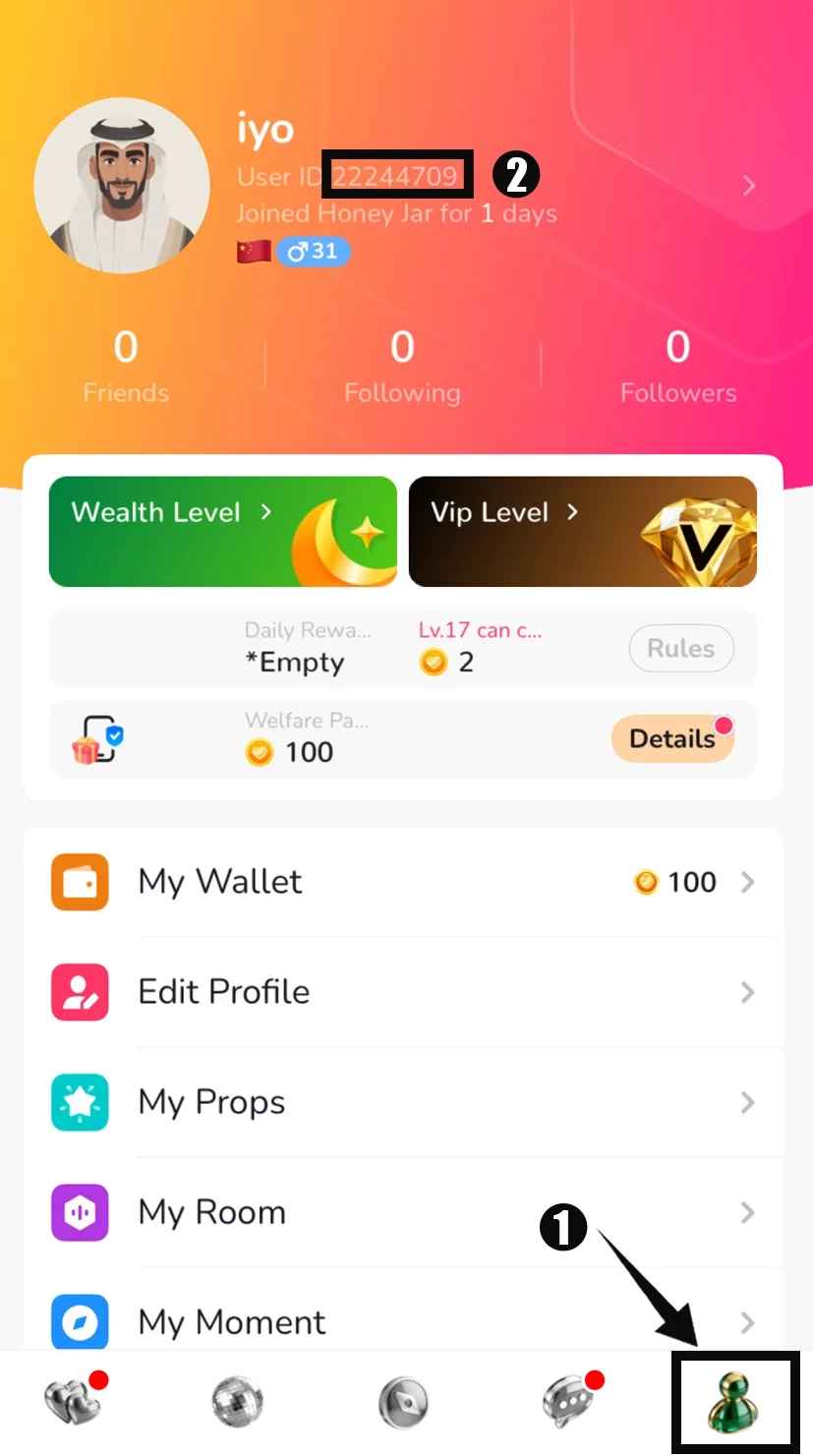
Your Honey Jar UID is the unique account identifier needed to deliver coins directly to your profile. Finding it takes less than ten seconds inside the mobile app:
- Open the Honey Jar application on your mobile device.
- Tap the Me (Profile) icon located in the bottom-right corner of the main screen.
- Look directly beneath your profile avatar and username.
- You will see a numeric string labeled ID or UID.
- Tap the copy icon next to your UID or write it down carefully to paste into the checkout box on ArcTopup.
What Can You Use Honey Jar Coins For? (Gifts & Room Features)
Coins are the primary driver of engagement across all Honey Jar voice chat rooms. Having an active coin balance allows you to participate in community activities and show appreciation to your favorite room hosts.
| Feature / Utility | Description | Why It Matters |
|---|---|---|
| Animated Virtual Gifts | Send dynamic gifts (roses, sports cars, luxury effects) during live audio streams. | Increases host popularity and displays your username across the room. |
| Host & PK Battle Support | Support room hosts when they compete in head-to-head PK challenges. | Helps your favorite broadcaster win ranked competitions and climb leaderboards. |
| Exclusive Entrance Effects | Unlock custom arrival banners, entrance animations, and vehicle effects. | Makes your entrance noticeable whenever you join a popular voice room. |
| VIP Badges & Frames | Access special profile frames, chat bubbles, and prestige status markers. | Demonstrates your active standing and loyalty in the Honey Jar community. |
| Interactive Room Mini-Games | Participate in in-room mini-games and prize draws organized by room owners. | Adds entertainment value and social interaction during group conversations. |
Safe UID-Only Recharges: Protecting Your Account Security
Account safety is a top priority when topping up live streaming and voice chat currencies. ArcTopup uses a direct ID-based fulfillment process that protects your personal data:
- Zero Password Requirements: You will never be asked for your Honey Jar password, email credentials, phone verification codes, or social login tokens. All that is required is your public UID.
- No Account Sharing: Your profile stays securely in your hands. You do not need to log out, transfer ownership, or share access with third-party agents.
- 24/7 Automated Fulfillment: Unlike services that rely on manual operators who work limited shifts, ArcTopup operates an automated processing system that handles orders around the clock.
- Protected Transactions: All payments are processed through secure, encrypted checkout gateways to safeguard your billing details.
Honey Jar Coin Packages and Pricing Overview
ArcTopup offers multiple coin tiers to fit different needs, whether you want a small pack to send a quick thank-you gift or a large bundle to back a broadcaster during a competitive PK event.
- Small Packs: Ideal for casual room participants who want to tip hosts or test out basic animated gifts.
- Medium Packs: Perfect for regular voice room members active in daily chat groups and community events.
- Large Bundles: Designed for dedicated supporters who participate heavily in host battles, seasonal leaderboard events, and luxury room gifting.
Note: Exact bundle sizes, current availability, and active promotions are displayed on the live selection grid at the top of this page. Check the live selector above for current rates before placing your order.
Troubleshooting Missing or Delayed Honey Jar Coin Deliveries
While the vast majority of Honey Jar top ups complete within moments, occasional network delays can occur. If your balance does not update right away, follow these troubleshooting steps:
- Refresh the Honey Jar App: Fully close the Honey Jar application from your device background apps and reopen it. Check your wallet balance under the Me tab.
- Verify Your Order Status: Review your order confirmation page on ArcTopup to ensure the payment status shows as completed.
- Check the Submitted UID: Verify that the UID provided during checkout matches your in-app profile ID exactly.
- Contact ArcTopup Support: If your order shows completed but coins have not appeared after several minutes, reach out to the ArcTopup 24/7 customer support team with your Order ID for rapid assistance.
Frequently Asked Questions About Honey Jar Recharges
How do I find my Honey Jar UID for recharge?
Open the Honey Jar app, tap the Me tab in the bottom-right corner, and locate the numeric ID displayed under your profile avatar and nickname. You can copy this number directly to use on ArcTopup.
Do I need to provide my Honey Jar password to top up coins?
No. Recharging on ArcTopup only requires your Honey Jar UID. You should never share your account password, SMS verification codes, or login credentials with anyone.
How long does it take for Honey Jar coins to reflect in my account?
Orders placed on ArcTopup are processed automatically 24/7. In most cases, coins are delivered to your Honey Jar in-app wallet within a few minutes after payment confirmation.
Can I recharge Honey Jar coins for a friend using their UID?
Yes. Because the top-up process only requires a valid UID, you can send coins to friends, content creators, or room hosts by simply entering their numeric Honey Jar UID at checkout.
What should I do if I entered the wrong Honey Jar UID?
Top ups are delivered automatically to the UID specified at checkout. Once an order is processed, coins sent to an existing, valid UID cannot be reversed. Always double-check your UID digits carefully before completing payment. If you notice an error before the order completes, contact customer support immediately.
What are Honey Jar coins used for in the app?
Honey Jar coins are used to buy and send virtual gifts to room hosts, activate entrance animations, purchase profile badges and frames, and support broadcasters during competitive live PK events.
Current packages and prices
Current base prices exclude Tax. Tax, payment fees and coupon adjustments are shown at checkout.
| Package | Price |
|---|---|
| Honey Jar - Honey Jar*1000 | USD 6.96 |
| Honey Jar - Honey Jar*2000 | USD 13.91 |
| Honey Jar - Honey Jar*5000 | USD 34.78 |
| Honey Jar - Honey Jar*10000 | USD 69.56 |
| Honey Jar - Honey Jar*15000 | USD 104.34 |
| Honey Jar - Honey Jar*20000 | USD 139.13 |
| Honey Jar - Honey Jar*25000 | USD 173.91 |
| Honey Jar - Honey Jar*50000 | USD 347.81 |
| Honey Jar - Honey Jar*500 | USD 3.48 |






























































