
Hoob Live Top Up with Player ID
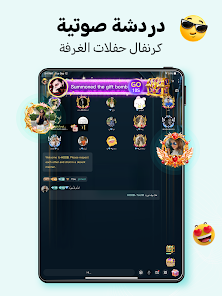
Hoob Live brings people together through voice chat rooms, live audio broadcasting, and interactive social streaming. Users connect across the Middle East, North Africa, and global communities to share conversations, host party rooms, and showcase their talents. To participate fully in the Hoob Live ecosystem, having an active balance of in-app coins is essential.
Recharging your Hoob Live coins directly via Player ID gives you instant access to gifts, special effects, and room privileges without needing to log in through third-party social accounts or expose your personal credentials. ArcTopup provides a direct channel to buy Hoob Live coins, offering clear package listings, immediate order processing, and regional payment support.
Where to Find Your Hoob Live Player ID in the App
Your Hoob Live Player ID is a unique numerical code assigned to your profile when you register your account. You only need this number to complete a top-up on ArcTopup.
Follow these simple steps to find your Player ID:
- Launch the Hoob Live app on your mobile device.
- Tap the Profile or Me icon located in the bottom navigation bar.
- Your profile page will display your avatar, nickname, and account details.
- Look directly beneath your nickname to find your ID / UID digits.
- Tap the Copy icon next to the number to copy your Player ID to your clipboard.
Make sure to copy the numeric ID directly from your profile rather than typing it manually. This ensures your coin delivery is credited to the correct account.
How to Top Up Hoob Live Coins on ArcTopup
Buying Hoob Live coins on ArcTopup takes only a few quick steps:
- Select your coin package: Browse the coin options on the page and select the denomination that fits your budget.
- Enter your Player ID: Paste your copied Hoob Live Player ID into the designated field.
- Review your order: Double-check that the Player ID is accurate and matches your account.
- Choose your payment method: Select your preferred payment option available on the live checkout screen.
- Complete payment: Finalize your payment. Your Hoob Live coin balance will update automatically once the order clears.
What Are Hoob Live Coins and How to Use Them
Coins serve as the primary virtual currency in Hoob Live. They power interactions between listeners, hosts, and room creators, turning simple audio broadcasts into lively, competitive events.
| Hoob Live Coin Use | In-App Feature | Value & Benefit |
|---|---|---|
| Virtual Gifting | Voice & Party Rooms | Send animated gifts to support creators and show appreciation |
| VIP Status & Badges | Profile Customization | Display exclusive badges and special entrance banners |
| Seat & Mic Unlocks | Multi-Guest Audio Rooms | Access premium speaker slots and exclusive voice channels |
| Room Ranking Battles | PK & Host Competitions | Help your favorite room host win daily and weekly leaderboards |
| Avatar Frames & Effects | Chat & Profile Cosmetics | Customize your public identity with animated frames and text bubble styles |
Virtual Gifting
Virtual gifts range from simple roses and reaction emojis to grand animated luxury effects. Sending gifts during live audio sessions helps broadcasters earn popularity points, climb the host leaderboards, and convert gifts into real rewards.
Exclusive Room Effects and VIP Perks
Spending coins on premium badges, customized entrance animations, and profile frames makes your presence noticeable the moment you enter any public or private party room. Room owners and fellow guests immediately recognize active supporters.
Safe and Password-Free Hoob Live ID Recharge
Account safety is a top priority when purchasing in-game currencies online. ArcTopup uses a direct ID recharge system designed to protect your personal data:
- No Passwords Required: You never need to share your Hoob Live password, phone number, email address, or social media login.
- Zero Account Linking: Transactions take place entirely through your public Player ID, keeping your login credentials completely private.
- Secure Checkout: All payments are processed through encrypted gateways, safeguarding your financial information at all times.
- Gift for Friends: Because only the Player ID is required, you can easily top up coins for friends, family members, or your favorite voice room hosts by entering their ID at checkout.
Accepted Payment Methods and Order Processing
ArcTopup supports a wide variety of payment options tailored for users in the MENA region and worldwide. Pricing, currency conversions, and available payment channels are displayed clearly on the live checkout page.
Once your transaction completes, the system processes your request immediately. The coins are credited directly to the corresponding Hoob Live user ID, allowing you to return to your favorite voice rooms without long waiting times.
Troubleshooting Common Hoob Live Top-Up Issues
If you run into any issues during or after your recharge, review the following guidelines:
- Coins not appearing immediately: Refresh your Hoob Live app by closing it completely and opening it again. Check your profile wallet to confirm your updated coin total.
- Mistyped Player ID: If you enter an incorrect Player ID that belongs to another active user, the coins will be delivered to that account and cannot be reversed. Always verify your ID before confirming payment.
- Payment completed but order pending: In rare cases of network delays, payment processing may take a short moment. Keep your transaction receipt and order number ready.
- Customer Support: If your order does not update within a reasonable timeframe, reach out to ArcTopup customer support with your order number, Player ID, and payment receipt for quick assistance.
Frequently Asked Questions
How do I find my Hoob Live Player ID for top-up?
Open the Hoob Live app, tap the Profile (Me) tab at the bottom right of the screen, and locate the numeric ID displayed under your username. Tap the copy icon next to it to paste it directly into the ArcTopup order field.
Do I need to share my Hoob Live account password to recharge?
No. ArcTopup only requires your public numeric Player ID. You will never be asked for your account password, email, or social media login details.
How fast will the coins appear in my Hoob Live account after purchase?
Recharges are processed automatically upon successful payment. In most cases, coins appear in your Hoob Live wallet balance shortly after completing checkout.
What should I do if I entered the wrong Player ID during checkout?
Double-check your Player ID carefully before confirming your purchase. If the order has already been processed and delivered to an existing account, digital currency transfers cannot be refunded or recalled. If you notice an error before the order completes, contact ArcTopup customer support immediately with your order details.
Can I recharge Hoob Live coins for another user using their Player ID?
Yes. You can purchase coins for any Hoob Live user by entering their specific Player ID in the input box during checkout.
What payment methods can I use to buy Hoob Live coins on ArcTopup?
ArcTopup offers multiple regional and international payment options, including major bank cards, online wallets, and local payment gateways. View the live checkout page to see the specific payment channels available in your country.
Current packages and prices
Current base prices exclude Tax. Tax, payment fees and coupon adjustments are shown at checkout.
| Package | Price |
|---|---|
| Hoob live - Hoob live*70000 | USD 0.97 |
| Hoob live - Hoob live*100000 | USD 1.38 |
| Hoob live - Hoob live*200000 | USD 2.76 |
| Hoob live - Hoob live*500000 | USD 6.90 |
| Hoob live - Hoob live*700000 | USD 9.66 |
| Hoob live - Hoob live*1000000 | USD 13.81 |
| Hoob live - Hoob live*2000000 | USD 27.61 |
| Hoob live - Hoob live*5000000 | USD 69.03 |
| Hoob live - Hoob live*10000000 | USD 138.06 |






























































