
Infinite Borders Top Up for 2026 Conquest Seasons
Commanding your forces and expanding your territory across vast historical battlegrounds requires rapid tactical decisions and steady resource management. An Infinite Borders top up gives you direct access to Jade, the premium currency essential for recruiting top-tier commanders, accelerating infrastructure upgrades, and strengthening your alliance during competitive 2026 seasonal campaigns.
ArcTopup provides a direct recharge system that credits Jade straight to your account using only your Player ID. With no login sharing required and transparent live checkout pricing, you can secure the Jade you need to maintain your strategic momentum on the battlefield.
What is Infinite Borders Jade and How to Use It
Jade is the core premium currency in Infinite Borders. It enables commanders to execute critical actions quickly, build competitive armies, and maintain tactical advantages throughout every season.
Primary Uses for Jade:
- Commander Recruitment (Summoning): Jade allows you to summon five-star generals and legendary commanders from seasonal card pools, forming elite armies for attack, defense, and territory control.
- Skill Points and Experience Conversion: Convert surplus heroes into essential skill points to level up advanced combat tactics and optimize commander synergies.
- Construction and March Acceleration: Instantly speed up fortress construction, city building upgrades, and critical military movements during high-intensity alliance wars.
- Tax and Resource Boosts: Spend Jade on forced levies to secure sudden influxes of copper and key resources during critical war efforts.
- Seasonal Transfer and Preparation: Prepare for 2026 Conquest Season transfers, territory redrafts, and special seasonal events.
How to Find Your Infinite Borders Player ID
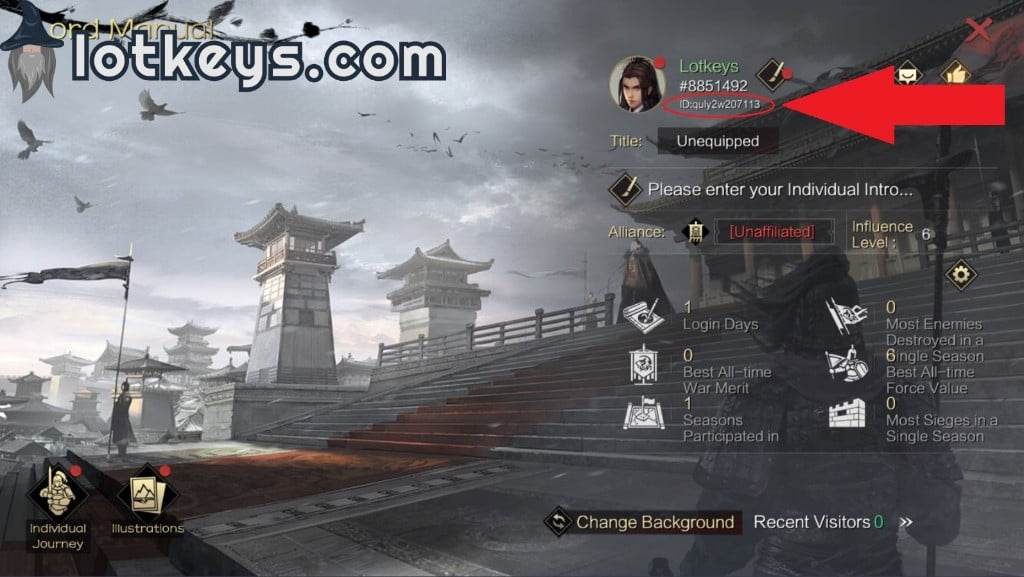
To ensure your Jade arrives at the correct game profile, you must provide your exact numeric Player ID. Follow these steps inside the game client:
- Launch Infinite Borders on your mobile device or PC emulator and log into your game server.
- Tap your Avatar / Profile Icon in the top-left corner of the main territory screen.
- Open the profile overview screen to view your character information.
- Locate your numeric Player ID displayed below or beside your character name.
- Note or copy the numeric sequence to use during checkout.
How to Buy Infinite Borders Jade on ArcTopup
Recharging your account on ArcTopup takes only a few simple steps:
- Select Your Jade Pack: Choose the Jade amount or bundle that fits your current tactical needs.
- Enter Your Player ID: Type your numeric Infinite Borders Player ID into the designated field.
- Review Your Details: Double-check your numeric ID to prevent delivery delays.
- Proceed to Checkout: Select your preferred local or international payment option on the live checkout interface.
- Receive Your Jade: Once payment is confirmed, your Jade balance updates directly inside your Infinite Borders account.
Why Direct Player ID Top-Up Keeps Your Account Secure
Account protection is vital in competitive strategy games where seasons of progress are on the line. ArcTopup uses a direct ID-based delivery system designed around player security:
- Zero Password Sharing: You never have to share your game password, social login credentials, or verification codes.
- No Account Handover: Your profile remains strictly under your control at all times.
- Protection Against Unauthorized Access: Direct ID crediting eliminates the risks associated with third-party logins or credential leaks.
- Direct Game Crediting: Orders are processed through standard player crediting pipelines, keeping your account safe and compliant.
Infinite Borders Jade Utilities and Server Compatibility
Whether you are fighting through Season 1, advancing through Season 2 and 3, or competing in the 2026 Conquest Season, Jade remains the key driver of military efficiency.
| Feature / Utility | In-Game Application | Benefit |
|---|---|---|
| Hero Recruitment | Seasonal & Standard Summons | Acquire high-tier generals to build frontline teams |
| Tactic Upgrades | Skill point conversion | Maximize damage, support, and defensive skills |
| March Speed-Up | Instant tactical recall & rush | Respond immediately to enemy alliance flank attacks |
| Fort & Base Build | Fast-finish defensive structures | Secure border chokepoints before enemy forces arrive |
| Levy Acceleration | Extra daily tax collections | Generate urgent copper for skill development |
Note: Exact bundle pricing, regional payment methods, and live currency rates are displayed directly on the ArcTopup live checkout screen.
Troubleshooting Player ID Errors and Purchase Verification
If you experience any delays or issues during your top-up process, use the following checklist to verify your order:
- Check Digit Accuracy: Ensure no numbers were omitted or mistyped when pasting your Player ID.
- Restart Game Client: Close and relaunch Infinite Borders to refresh server data and sync your updated Jade balance.
- Check In-Game Mail: Certain bonus items or seasonal packs may be delivered directly to your in-game mailbox rather than the raw Jade counter.
- Contact ArcTopup Support: If your balance has not updated after completing payment, submit your order number and Player ID to the ArcTopup customer service team for immediate assistance.
Frequently Asked Questions
How do I find my Infinite Borders Player ID?
Open Infinite Borders, tap your character avatar in the top-left corner of the main screen, and view your profile overview. Your numeric Player ID is listed directly on this screen.
What in-game items can I purchase with Infinite Borders Jade?
You can use Jade to summon Five-Star commanders, purchase skill point conversions, speed up building and fortress construction, rush army march times, and buy strategic seasonal items.
Do I need to provide my account password to top up Infinite Borders?
No. ArcTopup only requires your numeric Player ID. You never need to share passwords, email logins, or secondary authentication codes.
How fast will the Jade appear in my Infinite Borders account after payment?
Once your transaction completes on the live checkout page, your Jade is delivered directly to your account. In most cases, the balance updates within moments of payment confirmation.
Can I top up Infinite Borders Jade for another player using their Player ID?
Yes. As long as you enter the correct numeric Player ID of your friend or alliance member, the purchased Jade will be delivered directly to their character account.
What should I do if I enter an incorrect Player ID during checkout?
If you realize you entered an incorrect Player ID, reach out to ArcTopup customer support immediately with your transaction receipt. If the order has not yet been processed by the system, our support team can help correct the information.
Current packages and prices
Current base prices exclude Tax. Tax, payment fees and coupon adjustments are shown at checkout.
| Package | Price |
|---|---|
| Infinite Borders - Infinite Borders - 300 Jades Tribute Pack | USD 4.09 |
| Infinite Borders - Infinite Borders - 720 Jades | USD 8.19 |
| Infinite Borders - Infinite Borders - 1440 Jades | USD 16.39 |
| Infinite Borders - Infinite Borders - 3790 Jades | USD 41.00 |
| Infinite Borders - Infinite Borders - 7150 Jades | USD 82.00 |
| Infinite Borders - Infinite Borders - 14350 Jades | USD 164.01 |
| Infinite Borders - Infinite Borders - 28310 Jades | USD 328.03 |
| Infinite Borders - Infinite Borders - 288 Jades | USD 3.27 |