Where Winds Meet Top Up: Fast, Direct Echo Beads Recharge
Where Winds Meet transports players to the historic Ten Kingdoms era of China, combining open-world wuxia exploration, martial arts combat, and deep character customization. To customize your wandering swordsman, acquire exclusive attire, unlock premium battle pass tracks, or obtain special items, you need the primary premium currency: Echo Beads.
Purchasing a Where Winds Meet top up through ArcTopup provides a direct method to credit Echo Beads to your account without sharing login credentials. By utilizing your unique User ID (UID), orders process directly through official server interfaces. ArcTopup displays live pricing directly at checkout, ensuring complete transparency before you finalize any transaction.
How to Top Up Where Winds Meet Using In-Game UID
To complete your Where Winds Meet top up on ArcTopup, follow this quick four-step process:
- Select Your Echo Beads Package: Review the list of available denominations on ArcTopup and choose the pack size that meets your in-game goals.
- Enter Your Where Winds Meet UID: Input your numeric in-game User ID into the designated field. Double-check the numbers to avoid sending items to the wrong account.
- Choose Your Payment Method: Pick your preferred payment solution from the checkout options. ArcTopup calculates your total price in real time based on your selected region and currency.
- Confirm Payment and Receive Echo Beads: Finalize the payment. Once verified by the system, your Echo Beads are delivered directly to your in-game mailbox or added straight to your character balance.
Where Winds Meet Currencies: Echo Beads Explained
Where Winds Meet features several in-game currencies that govern your adventure across ancient China. Understanding how these currencies work helps you manage your spending efficiently:
- Echo Beads: The core premium currency purchased with real money. Echo Beads buy cosmetic outfits, weapon skins, mount accessories, gacha pulls for companions or styles, and premium season passes.
- Silver / Bound Coins: Standard in-game currencies earned by completing quests, clearing dungeons, defeating world bosses, and trading with NPCs. Used for basic gear upgrades, skill training, and crafting supplies.
- Prestige / Sect Tokens: Earned through faction reputation, sect missions, and PvP arenas. Used to acquire sect-specific manuals, titles, and unique martial arts forms.
| Currency Name | Type | Acquisition Method | Primary Uses |
|---|---|---|---|
| Echo Beads | Premium Currency | ArcTopup UID top-up / In-game purchase | Premium cosmetics, battle passes, weapon skins, mount decorations |
| Bound Coins / Silver | Gameplay Currency | World quests, exploration, mob drops | Gear repair, blacksmith crafting, basic consumables, skill leveling |
| Sect Tokens | Reputation Currency | Faction quests, sect challenges | Faction martial arts scrolls, specialized titles, guild items |
Echo Beads cannot be traded between players directly, making secure third-party recharge services on ArcTopup the most practical choice for boosting your account balance.
Where Winds Meet Account UID Location Guide
Your User ID (UID) is a unique string of numbers assigned to your character upon account creation. ArcTopup requires only this UID to send Echo Beads to your account.
Follow these steps to locate your UID:
- Launch Where Winds Meet on your PC or console and log into your main game server.
- Open the main game menu by pressing the Esc key on PC or opening the pause menu on your controller.
- Click on your Character Profile / Avatar icon located in the top-left corner of the screen.
- Look under your character name and server title. Your numeric UID is displayed clearly.
- Click the Copy icon next to the UID string, or write it down carefully.
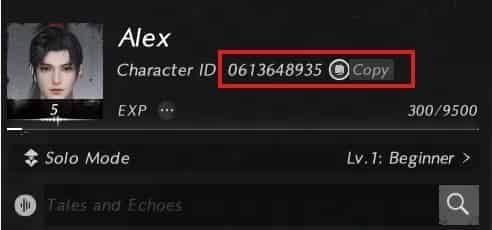
Always confirm that you are copying the UID from the correct character if you maintain multiple characters across different servers.
Is Third-Party Where Winds Meet Top-Up Safe?
Safety is the top priority when purchasing in-game items online. ArcTopup implements strict security measures to protect your account integrity and financial information:
- Zero Credential Sharing: ArcTopup never asks for your game password, verification codes, email access, or social login credentials. You only provide your public UID.
- Direct System Delivery: Transactions are routed through standard delivery channels, meaning your account status remains in full compliance with publisher guidelines.
- Encrypted Checkout: All checkout pages utilize advanced SSL/TLS encryption protocols, safeguarding your payment details against unauthorized access.
- No Account Takeover Risk: Because staff never log into your profile, your account cannot be locked, altered, or compromised during the top-up process.
Using a UID-based recharge system on ArcTopup provides complete peace of mind while securing the currencies you need for your martial arts journey.
Available Payment Methods for Where Winds Meet Top-Up
ArcTopup supports a wide variety of domestic and international payment channels to ensure every player can complete transactions smoothly:
- Credit and Debit Cards: Visa, Mastercard, and other major card networks are accepted with real-time verification.
- Digital Wallets and Local Gateways: Regional e-wallets, bank transfer solutions, and online banking options are available depending on your country.
- Real-Time Currency Conversion: Check live pricing directly on the checkout page in your local currency without hidden conversion fees.
Select your region on the ArcTopup platform to view all available payment options for your area.
Troubleshooting Where Winds Meet Recharge Issues
If you experience any delay or issue during your transaction, follow these troubleshooting steps to resolve the problem:
- Verify Your UID Submission: Check your order confirmation receipt on ArcTopup. If you entered an incorrect UID, contact customer support immediately with your transaction ID before the order status updates to completed.
- Restart the Game Client: In some cases, game servers need a fresh session to update your currency balance. Log out of Where Winds Meet, close the client completely, and restart the game.
- Check In-Game Mailbox: Certain promotional bundles or bonus Echo Beads are delivered as in-game system mail. Open your mailbox and claim any attached attachments.
- Confirm Bank Processing: Ensure that your payment method was charged successfully. If your bank placed a temporary hold on the transaction, verify the charge to finalize order processing.
- Contact ArcTopup Customer Support: If your Echo Beads do not show up after 15 minutes, reach out to the 24/7 ArcTopup support team with your order number and transaction proof for instant assistance.
Frequently Asked Questions About Where Winds Meet Top-Up
How to top up on Where Winds Meet?
Select your Echo Beads denomination on ArcTopup, type in your numeric in-game UID, choose your preferred payment option, and complete the payment. The currency is sent directly to your character.
Is Where Winds Meet 3rd party top up safe?
Yes, purchasing via ArcTopup is completely safe because the platform only requires your public character UID. You never share your password, login tokens, or personal account credentials.
How do I find my Where Winds Meet UID?
Open the main game menu in Where Winds Meet, select your character profile avatar in the upper-left corner, and locate the numeric UID shown below your character name. Use the copy button to capture the exact numbers.
Do I need to share my password to recharge Where Winds Meet?
No. ArcTopup uses a direct UID delivery system. You do not need to share passwords, email authentications, or security questions.
What should I do if my Echo Beads do not arrive after payment?
First, restart your game client and check your in-game mailbox. If the Echo Beads are still missing after a short wait, check your order receipt on ArcTopup and submit a ticket to ArcTopup support with your order ID.
What payment options can I use for Where Winds Meet top up?
ArcTopup offers multiple secure payment methods including major credit/debit cards, regional e-wallets, and online banking. Available options and live prices are shown on the checkout page.
Current packages and prices
Current base prices exclude Tax. Tax, payment fees and coupon adjustments are shown at checkout.
| Package | Price |
|---|---|
| 60 Echo Beads | USD 0.82 |
| 180 Echo Beads | USD 2.36 |
| Monthly Pass | USD 3.94 |
| 300+30 Echo Beads | USD 3.94 |
| 600+68 Echo Beads | USD 7.88 |
| Elite Battle Pass | USD 7.88 |
| 900+115 Echo Beads | USD 7.88 |
| Premium Battle Pass | USD 15.76 |
| 1800+268 Echo Beads | USD 23.78 |
| 3000+458 Echo Beads | USD 39.39 |
| 6000+1200 Echo Beads | USD 79.48 |
| 12000 Echo Beads | USD 158.81 |